
- Home
- Employee call monitoring
- Employee call tracking app
Employee call tracking app
Employee Call Tracking App for Every Staff Phone Is Calsyst
An employee call tracking app pulls the work calls of many staff handsets into one account, so owners see who rang customers without screenshots. Calsyst picks up each Android phone's log, joins internet calls from WhatsApp, Meet and Zoom to it, and totals everything per person.
- SIM calls and internet calls in one list
- Work-hours-only and leads-only backup rules
- Missed calls counted per person
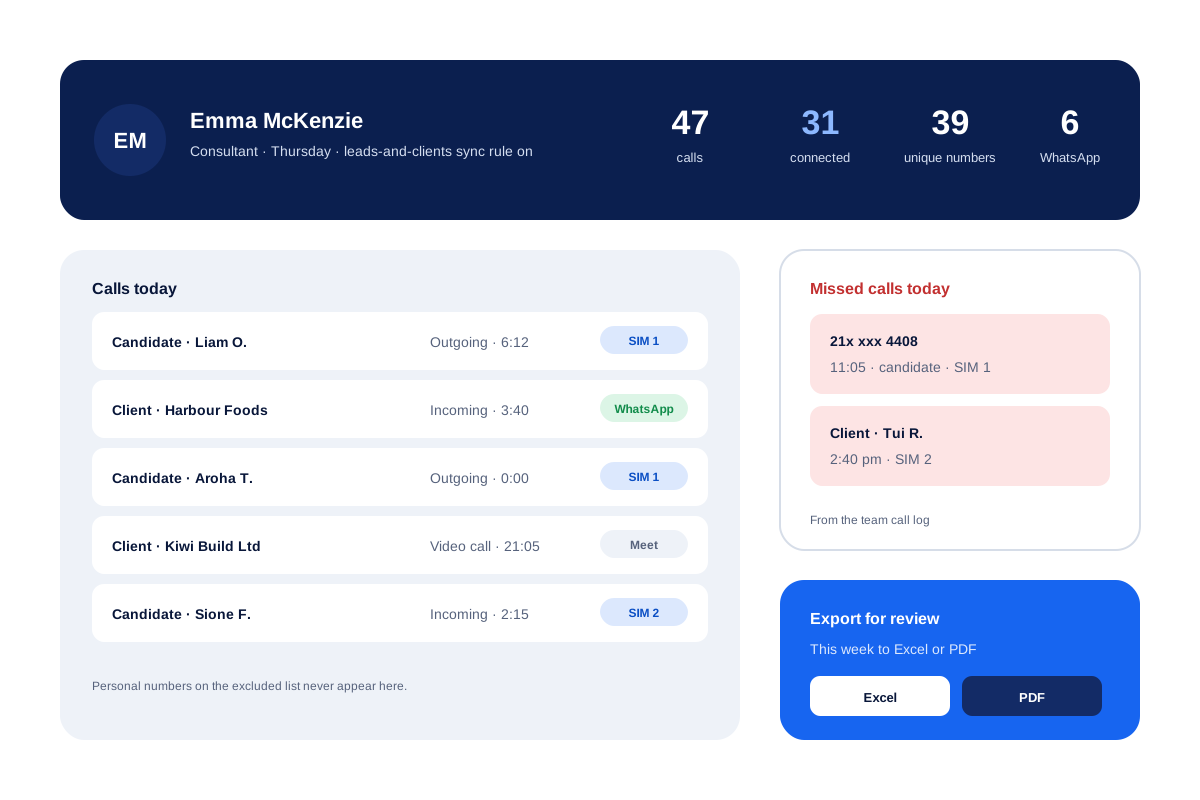
What is an employee call tracking app?
An employee call tracking app moves the call history of work handsets into one account, then reports volume and answered calls for each staff member.
Calsyst also marks which SIM each call used, and on each phone it lists the missed callers who never got a call back.
- One owner account for the whole team.
- Personal calls can stay out of the backup.
- Android only; iPhone hides its call log.
Employee call tracking app benefits
What an owner stops guessing about.
Totals per person
See how often each person dialled and how many calls got through, over any range from one day upwards.
Internet calls counted
A customer rung over WhatsApp, or a client met on Meet or Zoom, still shows up in that person's list.
Right SIM on each call
On dual-SIM phones the record shows whether the business SIM or the personal one was used.
Unique callers per person
Different numbers set against total calls show whether someone reached many customers or rang the same few again.
Sync limits for mixed phones
Optional limits sync office-time calls or customer calls, and leave the rest on the handset.
Employee call tracking app: the figures kept for each person
Background sync lifts every number here straight from the handset. The right-hand column tells a manager which screen holds it: the owner account, or the employee’s own phone.
| Figure | What it counts | Where to find it |
|---|---|---|
| Total calls | Incoming, outgoing and missed calls in the period | Team activity in the owner account |
| Connected calls | Calls that were answered | Analytics rings, tap to filter |
| Unique numbers | Different people, not repeat calls | Unique callers against total calls |
| Missed, not called back | Customers who rang and still wait for a reply from either card | Home list on that employee's phone |
| Lost leads | Dialled numbers that never got past your 60, 30 or 0 second limit | Lost leads filter on the phone |
| Internet calls | WhatsApp, Meet and Zoom calls | Call history, beside SIM calls |
| SIM used | Which card carried each call | Each call in the history |
Staff call tracking that respects personal calls
A sales assistant may phone her mother and a client from the same handset within the hour. Calsyst offers three optional limits, used alone or together:
- Office time only: sync a call when it falls inside the branch hours and is not on a day off, in the branch time zone.
- Customers only: sync a call if the number belongs to an enquiry, a lead handed to this person or someone who already pays you.
- Named exceptions: list private numbers that must never sync or trigger any automatic step.
Pick the limits before you roll the app out, and tell staff which ones you chose. The hub page on employee call monitoring covers company-owned phones, where stricter rules apply.
Call tracking for employees: day view and team view
The day view answers “what did Priya do today?” Open one employee and the calls are there, each with its SIM, length and type. The team call log page shows the same data for all staff on one screen.
The team view answers “who is ahead this month?” Pick a period, and the owner account rolls up the calling activity of everyone. For sales targets built on these counts, see the call tracking app for sales teams.
Employee call tracking app limits
- Call logs come from Android phones only.
- Calsyst does not record call audio; it can only upload what the phone recorded.
- Staff know it is there, because it is set up openly on business handsets; covert monitoring of a private device is not what it is for.
- It cannot see calls made from a desk phone or a VoIP line.
Employee call tracking app example: an Auckland recruitment firm
A recruitment agency in Auckland gives 8 consultants Android phones with a company SIM. Several of them also carry a personal SIM in the same phone.
The owner picks the customers-only sync rule, so a consultant’s evening call home stays on the handset. On Fridays the owner lines up answered calls and missed calls for all 8 consultants.
One consultant shows 12 missed candidate calls in a week, most of them after 6 pm. The owner moves that consultant’s evening shift to cover the hour when most candidates ring.
Employee call tracking app FAQ
Which app can track employee calls on company Android phones?
Calsyst can. It reads the call log of each staff phone, adds WhatsApp calls, and shows the owner totals and missed calls per person.
Does Calsyst track the calls made on staff phones?
Yes. Calsyst is an employee call tracking app that copies each Android phone's business calls to the owner account, with SIM, length and result.
Do calls my team places through WhatsApp get counted?
Yes. Calsyst lists them in the history together with ordinary mobile calls, and Google Meet and Zoom calls are added in the same way.
How do I track another person's phone calls?
Only on a work phone and with that person's knowledge. Calsyst is a business tool installed openly; it is not a hidden spy app for private phones.
Does the app record what is said on the calls?
No. Calsyst does not record audio itself. On company phones the owner can require that every recording the phone makes uploads to the account.
Can staff delete calls to hide them from the owner?
Only if you allow it. Deletes sync to the server under the admin's permissions, so the owner decides whether a deleted call also leaves the account.
Can I see which employee left customer calls unanswered?
Partly. Missed calls show in each employee's call log in the owner account. The list of missed calls not called back sits on the Home screen of that employee's own phone.
Can I keep personal calls of staff out of the record?
Yes. Limit syncing to office time, limit it to known customers, or put a spouse or parent on the excluded list so their number never leaves the phone.
Does employee call tracking work on iPhone?
No. iPhone does not let apps read its call log. Staff on iPhone can still use leads, reminders, WhatsApp and attendance in Calsyst.
Can I see the call totals of the whole team for last month?
Yes. Pick last month or a custom range, and team activity rolls up in the owner account with a Summary and an Analysis view.
Can the call history of an employee be exported?
Yes. Choose the dates, then save that person's calls as a spreadsheet or a PDF for a review meeting.