
- Home
- Lead management app
Lead management app
Lead Management App for Android and Small Teams Is Calsyst
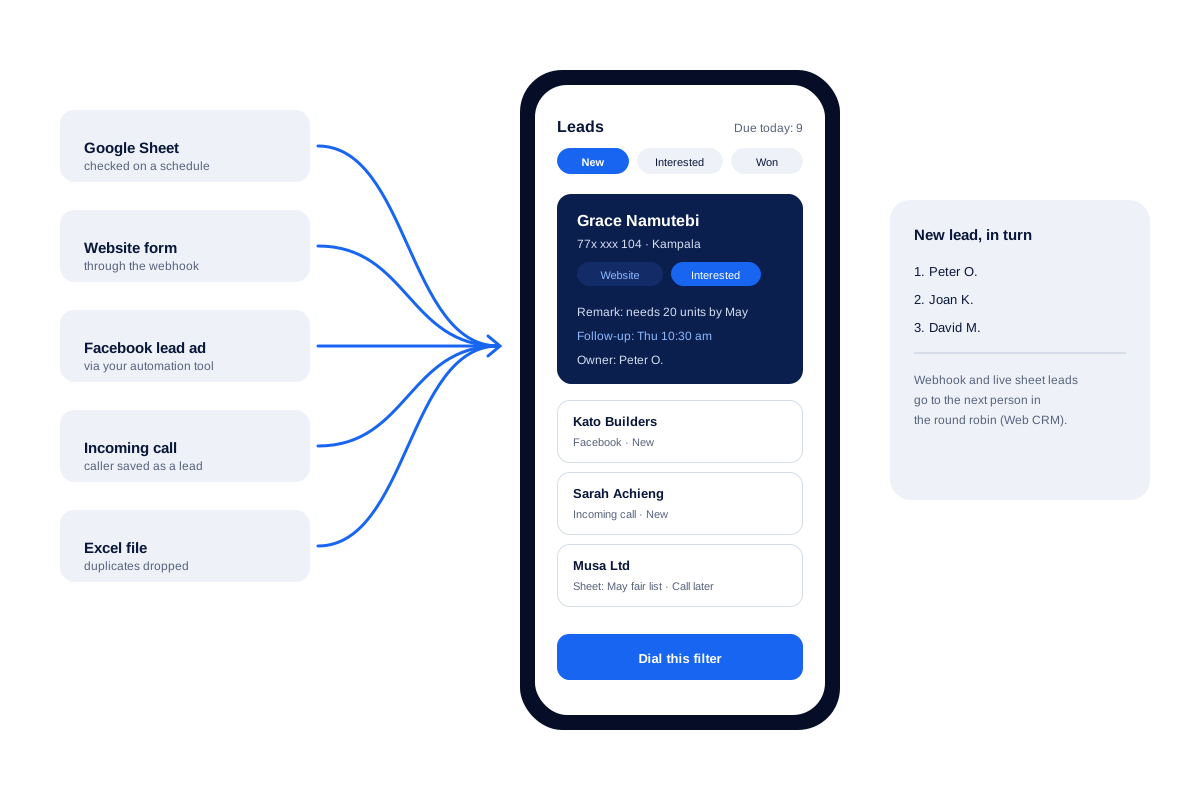
A lead management app gathers leads from every channel, shows each lead's status and prompts the next step, so interest does not cool. Calsyst turns callers, spreadsheets and web forms into leads, then shows a lead's calls, notes and next call date together on one screen.
- Leads from Sheets, Excel, webhooks and callers
- Statuses you name, colour and reorder
- New webhook leads shared out to the team in turns
What is a lead management app?
A lead management app keeps every buyer in one list, shows where each one stands and prompts the next contact until a yes or no.
Calsyst builds the telephone into that list, so a call lands on the right lead and a filtered group of leads can be dialled in one session.
- Every channel feeds the same list.
- Calls and chats stay on the lead.
- Each lead carries a next step.
Lead management app benefits
What changes once leads stop living in five different places.
Every channel, one list
Sheets, REST APIs, a webhook, Excel files and people who simply ring you all arrive as leads.
Statuses that match your sales
Call them Site visit, Quote sent or Paid if that is how you sell; recolour and reorder any time.
The whole story in tabs
A colleague covering a sick day reads the calls, chats, notes and reminders of a lead in one place.
Precise filters
Stack conditions such as Website source, Interested status and a product tag to find the right ten leads.
New leads shared fairly
Leads posted to the Web CRM webhook, or added to a live sheet, are dealt to staff one by one in rotation.
Dial the filter
Whatever the filter shows can become an auto dialer session with one tap.
Lead management app: where your leads come from
A list is only as good as what flows into it. Calsyst takes leads in five ways.
| Source | How leads arrive | Setup |
|---|---|---|
| Google Sheet | Read in the background at set times | Match columns to fields once |
| REST API | Pulled from the API at set times | Match fields and pick a country |
| Custom webhook (Web CRM) | Posted in, then handed to the next person in turn | Paste the address into your form or automation |
| Excel, CSV or JSON file | Arrives as its own list | Share the file into the import screen |
| A person who calls you | Saved with only the number | Nothing to set up |
Facebook lead ads arrive by way of a sheet or the webhook, with an automation service such as Zapier, Make, Pabbly or n8n in between. The full steps are on Facebook lead ads to CRM. For intake that needs nobody at the keyboard, read about lead automation.
Lead tracker app: working the list every day
Filter, then act
Build a filter such as “due today, Website, Interested”. From that one screen you can dial it, send it a WhatsApp, or change its tags in bulk.
Notes that come back at the right moment
A note written on Monday pops up on the call screen when the same customer rings on Thursday. Notes made on a visit also carry the area name and coordinates.
Passing leads on
Hand one lead to a colleague, or split a whole filter among several people in rotation. The history travels with the lead, so the new owner knows what was said. The lead assignment software page covers the rules in depth.
Lead management app for small business: pages by trade
The same app fits many trades. These pages walk through the daily routine of each:
- Real estate CRM for site visits and property leads.
- CRM for insurance agents and CRM for mutual fund distributors for renewals and reviews.
- CRM for travel agencies for trip requests with dates.
- Enquiry management system for any counter that answers walk-ins and calls.
Larger teams working at desks should read lead management software. For a phone-first CRM see the CRM app for Android, and for buyers who already paid, the customer management app.
Lead management app limits
- No automatic lead scoring. Statuses, tags and filters do the sorting.
- No email campaigns. Follow-up happens by phone and WhatsApp.
- No form builder. Keep your website or ad form and route its leads through a sheet or the webhook.
- No ready-made link to other CRMs. Call data leaves Calsyst by call webhooks or the read-only outbound API, sent straight to the other system or passed through Zapier, Make, Pabbly or n8n.
Lead management app example: a solar installer
A solar installer in Kampala gets about 30 new leads a day from a website form, a Facebook lead ad and people who ring the office.
The form posts straight to the Calsyst webhook, and the Facebook ad reaches the same webhook through an automation tool. Callers become leads with one tap. Webhook leads are dealt out to the 3 sales staff in rotation on the Web CRM.
At 9 am the manager filters “Interested, due today” and gives each salesperson their calls for the morning. Each lead gets its next call time before the office closes.
Lead management app FAQ
Which lead management app works best for a team that sells by phone?
Calsyst is built for that case. A sale talked through on the phone is saved on the lead, with the outcome and the date of the next call.
What is Calsyst?
Calsyst is a lead management app with its own phone dialer, so the list of leads, the calls and the reminders sit in a single Android or iPhone app.
How should a small business choose lead software?
Pick the one your staff will open every morning. When most deals close over calls and WhatsApp, software that links leads to those calls saves the most typing.
Which app is best for capturing leads?
One that captures without typing, such as Calsyst. It reads Google Sheets and REST APIs on a schedule, accepts webhook leads on the Web CRM, and saves a caller with one tap.
Can I bring in the leads I already keep in Excel?
Yes. Share the spreadsheet, a CSV or a JSON file into the app. Every file shows up as a separate list, and repeated numbers are removed on the way in.
How do I record where a lead came from?
With a source tag. Nine sources come built in, from Facebook and Google to IndiaMART and JustDial, and you can add your own for a trade fair or a local paper.
Can two people work the same list without calling the same lead?
Yes. Every salesperson calls from a separate pending queue made of the leads assigned to them. Moving a lead to a colleague keeps a record of every earlier owner.
Can an AI call new leads first?
Yes, once the Web CRM is set up for it. An AI voice agent rings each fresh lead, then hands it to the next team member with a note of how the call went.
Is the lead management app available for iPhone?
Yes. Leads, reminders and WhatsApp all run on iPhone. Only the call log is absent there, as Apple keeps it away from apps.
Can I take my leads out as a file?
Yes. The CSV export follows the filter on screen, so one region, one product or one status can leave as its own file.
What happens to a lead that is lost?
Give it a Lost status of your own, and it drops out of the working filters. The separate lost leads view is different: it lists numbers you dialled that never connected past your limit.