
- Home
- Employee call tracking app
- Team call log
Team call log
Team Call Log by Calsyst: Every Seller's Calls in One List
A team call log is one shared list of every call a team made and took, so a manager reads the day without collecting phones. Calsyst builds that list from each company Android handset, with the customer and the lead status on every row.
- About phone calls of sales staff, not Microsoft Teams
- Every seller's calls in one owner account
- Missed calls show under the seller whose phone rang
What is a team call log?
A team call log is one record of a group's phone calls: who rang whom, when, and what came of it, read from one screen.
In Calsyst the owner's account gathers the calls of every company handset into that record, already matched to leads and their saved statuses.
- One list instead of one phone per seller.
- Each row carries the customer and the status.
- Built for company phones with staff informed.
Team call log app: what each row shows
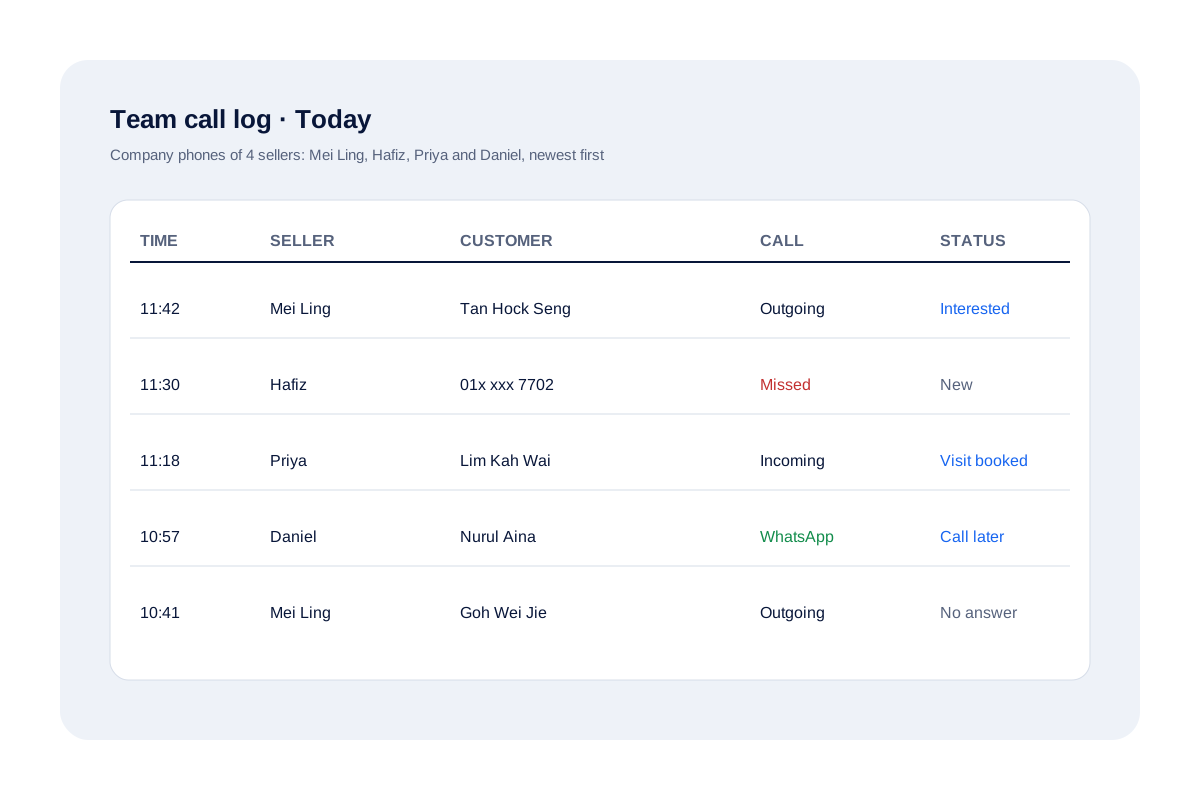
In Calsyst the team call log is the owner’s single list of calls from every company handset. Each row names the seller whose phone carried the call, the customer, the call type and the lead status the seller saved, so the whole day reads in one place.
| Field | What it tells the manager |
|---|---|
| Seller | Whose company handset made or took the call |
| Customer | The lead or client, or the number if unknown |
| Call type | Outgoing, incoming, missed or an internet call |
| Status | The lead status the seller saved after the call |
For the full owner view, read the employee call tracking app page. The wider rules for company phones are on the employee call monitoring page.
Sales team call log in practice: a Penang property agency
A property agency in Penang has 4 sellers on company phones. Each lunchtime the principal opens the team call log, scans the morning and finds one missed buyer, 01x xxx 7702 at 11:30 on Hafiz’s phone, with no later call from the agency. Hafiz is out on a viewing, so the principal passes the lead to Priya, who rings before 2 pm.
Team call log FAQ
Does this page cover Microsoft Teams calls?
No. Microsoft Teams keeps its own history inside Teams. This page is about phone calls that sellers make on their mobiles.
Where can I read a team call log for all my sellers at once?
In the owner's Calsyst account. Give the sellers company Android phones running Calsyst; every handset reports in, so you read one combined list instead of four phones.
What is Calsyst?
Calsyst is a team call log app that shows the owner every seller's phone calls, each tied to a lead and its outcome.
Can I see which seller missed a customer's call?
Yes. Missed calls appear under the seller whose handset rang. On that phone, the Home screen also lists missed numbers not yet called back.
Does the team call log include WhatsApp calls?
Yes. WhatsApp, Google Meet and Zoom calls made on the handset appear in its history next to SIM calls.
Does the team call log work on iPhone?
No. iPhone keeps its call list from apps, so the team call log draws on Android company phones.