
- Home
- Staff attendance app
- Employee tracking app
Employee tracking app
Employee Tracking App with a Time Clock and Work Hours Is Calsyst
An employee tracking app notes when each person starts, pauses and stops work, and where field staff are meanwhile, so timesheets stop coming from memory. Calsyst turns each phone into a selfie time clock and, for people on the road, logs the route of the shift only.
- A live selfie at every punch in and punch out
- Breaks counted with their own buttons
- No screen, app or keystroke monitoring
What is an employee tracking app?
An employee tracking app captures punch-in, punch-out and break times on a phone, and may add work location, to build a true record of hours.
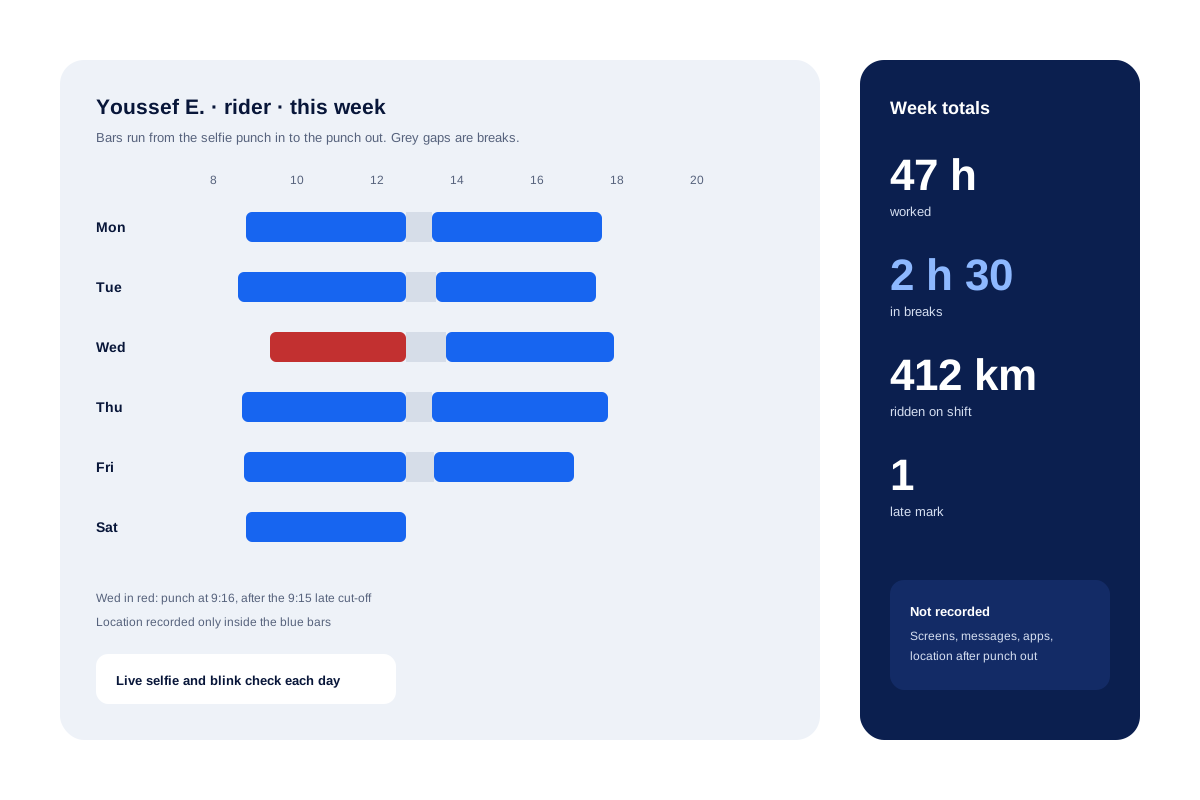
With Calsyst the record covers hours, breaks, distance and, on Android, work calls, while screens, messages and private apps stay untouched.
- Time clock first, location second.
- Tracking ends at punch out.
- Staff can see their own hours.
Employee tracking app benefits
Why owners switch from a register book.
Hours taken from the punch, not a signature
Arrival and leaving times come from the selfie punch itself, so rounded entries in a register book stop.
Breaks on record
Each pause is logged when it starts and ends, so long lunches are visible without arguments.
Distance for travel pay
Kilometres for each working day and month help settle fuel or travel payments.
Staff see their own data
Everyone can open their own week and month on the handset, so a disagreement starts from figures both sides already know.
Employee tracking software: what it records, and what Calsyst leaves alone
The word “tracking” scares many staff, because some products record screens and keystrokes. Calsyst does not. The table sets out what is common in this kind of software and what Calsyst records.
| Data | Found in some tracking tools | Recorded by Calsyst |
|---|---|---|
| Punch-in and punch-out time | Yes | Yes, with a live selfie |
| Breaks | Yes | Yes, Break and Resume buttons |
| Location during the shift | Yes | Yes, for staff who switch it on |
| Location after work | Some tools | No, never after punch out |
| Distance travelled | Some tools | Yes, per day and per month |
| Work calls | Rare | Yes, on Android |
| Screens, apps and keystrokes | Some desktop tools | No |
| Private messages | Spy apps | No |
Share this table with your staff when you introduce the app. People accept a time clock far more easily when they know what is not watched.
Track employee hours with a selfie time clock
The punch is the centre of the record. A staff member opens Calsyst, takes a selfie and passes the blink and random-action check. The app also checks that the phone sits inside the office radius of the branch, unless the branch accepts outside punches.
From that moment the day is counted. Breaks start and stop with their own buttons, and the punch out closes the day. The daily hours, breaks and late marks then appear in the attendance report. The branch rules that decide late marks and half days are on the staff attendance app page.
Employee tracking app: field staff on shift
Riders, technicians and sales reps who work outside give their agreement on a consent screen and enable location one time. From then on the handset saves positions during the shift only, and stops the second they punch out.
Each evening the web map shows that shift as a line with stops and a kilometre total. Positions faked by spoofing tools get a warning and do not count towards distance. For the full field picture, see the employee location tracking app page. For a geofence-only set-up, see the GPS attendance app.
Employee tracking app limits
- It does not run payroll or produce payslips.
- It does not plan shifts or rotas.
- It does not monitor computers, screens or app use.
- The call log part works on Android only.
Tell staff in writing what the app records before you roll it out. Local law may require it, and it builds trust.
Employee tracking app example: a courier office in Casablanca
A courier office in Casablanca has 2 desk staff and 11 riders. Riders used to write their start and end times on a sheet at the door, and the sheet often showed round hours like 9:00 and 6:00.
Now each rider punches in with a selfie at the depot, with live location switched on once after the consent screen. At 1 pm they tap Break, and at 1:40 Resume. The owner sees each rider’s real hours and kilometres for the week.
When the month closes, the owner downloads the figures and pays each rider fuel money for the distance he really rode, no longer one flat sum per head.
Employee tracking app FAQ
Which employee time clock app also records location during the shift?
Calsyst does both. Staff punch in with a selfie, and for field staff the app records where they went until they punch out.
Is Calsyst an attendance app or a tracking app?
Both, in a sense. Calsyst is an employee tracking app whose core is a selfie time clock, with breaks, distance, the shift route and Android work calls added on top.
What do employers use to track employees today?
Mostly a phone app with a time clock. Small firms use one, often with GPS for field staff. Larger firms add access cards, shift planners and HR systems.
Is it legal to GPS track an employee?
Usually, within work hours and with informed consent, but the rules differ by country. Read the guide on tracking employee location legally. This is general information, not legal advice.
How does the app show the hours an employee worked?
In the attendance report. It lists the punch times, the hours and the breaks of every day, on the phone and in the web report for the branch.
Does the app watch screens, messages or other apps?
No. Calsyst does not capture screens, read messages or list the apps a person opens. It records punches, breaks, on-duty location and work calls.
Can an employee check their own hours?
Yes. Each person opens a report on their own handset with hours and pauses for today, a rolling week, this month and the month before.
Does punching in fail when the phone has no data signal?
No. Calsyst stamps the time locally and pushes the record up later, when mobile data or Wi-Fi comes back.
How often does the app note the location of field staff?
Every 15 seconds while on duty. The points go to the account every 5 minutes and stop during a break.
Can a manager look at the raw GPS points?
Yes. Behind each day's route on the web there is a view of the raw points, for checking a doubtful stretch.
Do office staff need location turned on?
Only for the punch, which checks that they stand inside the office radius. Live location is for field staff who switch it on.