
- Home
- Lead management app
- Lead management software
Lead management software
Lead Management Software for Small Business Teams Is Calsyst
Lead management software gathers leads from each channel, gives each an owner and follows it to a win or loss, so none is forgotten. Calsyst runs this for phone sellers: sheets, web forms and incoming calls feed one list, and each salesperson works it from a mobile.
- Leads land from sheets, APIs and web forms
- Webhook and live-sheet leads shared in turns on the Web CRM
- Every call, remark and reminder on one lead screen
What is a lead management software?
Lead management software captures new leads, sends each to a salesperson, logs every contact and shows which leads are open, won or lost.
Calsyst joins that record to the phone itself, so the lead opens when its number rings, and a prompt for its new status pops up as soon as the line goes quiet.
- Capture, sharing and follow-up in one place.
- Built around calls and WhatsApp, not email campaigns.
- A Lost status keeps buyers who said no in one filter.
Lead management software benefits
What a small team stops doing by hand.
No copying from sheets
Calsyst reads a linked sheet or API at regular times and adds what is new as leads.
Fair sharing of new leads
On the Web CRM, rotation deals webhook and live-sheet leads one by one, so no salesperson cherry-picks the easy buyers.
Source on every lead
Tags such as Facebook, Website, Referral or Walk-in show which channel brings buyers.
Pipeline in your own words
Name the statuses what your shop calls them, pick colours, and sort them in the order deals really move.
A reminder for every open lead
A booked call back sounds on time and keeps nagging on the list until it is finished.
Lead management software functions, mapped to Calsyst
Most guides list five jobs that lead management software should do. This table shows each job and what Calsyst does for it today, including the one it does not do.
| Function | What it means | In Calsyst |
|---|---|---|
| Lead capture | New leads arrive without copying | Google Sheets, REST API, custom webhook, file import, any caller saved as a lead |
| Lead routing | Each lead gets an owner by a rule | Rotation between people (Web CRM, for webhook or live-sheet arrivals), assigned queues, bulk transfer |
| Lead scoring | A number ranks how ready a lead is | Not built in; statuses, tags and custom fields show how ready a lead is |
| Nurturing | Regular contact until the lead is ready | Follow-up reminders, WhatsApp on status change, day-by-day WhatsApp series |
| Pipeline tracking | See where each lead stands | Your own status pipeline with full status history |
Lead management system vs CRM: is there a difference?
A CRM keeps everything about a customer for years: orders, tickets, invoices and contacts. A lead management system covers the shorter stretch from the first contact to the sale.
A small business that sells by phone often needs the second more than the first. Calsyst covers the lead period and the calls, and once a buyer pays, a separate clients tab tracks renewal dates. If you already run a large CRM, Calsyst can send call data to it through webhooks or the outbound API. The page on HubSpot call logging shows one example of that set-up.
Lead tracking software for a phone team: the path of one lead
- A buyer fills in a form on your website. The webhook adds the lead with the source tag Website.
- On the Web CRM, round robin gives the lead to the next caller, who sees it in their queue.
- The caller dials. During the ring, the lead name and its current status are on screen, and the full record is one tap away.
- After the call, the caller sets the status to Interested and books a follow-up for Thursday.
- On Thursday the reminder rings. The caller calls back and moves the lead to Won.
- The caller converts the buyer to a paid client and records the package and what is still owed.
A buyer who says no gets your own Lost status, so a filter on it gives a win-back list next month. For the Android app behind these steps, read about the lead management app. For the reminder rules, see the lead follow up CRM page.
Sales lead management software: when Calsyst is not the right fit
- You need lead scores that update by themselves from website visits or email opens.
- You run email newsletters or SMS campaigns as the main way to nurture leads.
- Your team sells only by email and video meetings, never by phone.
- Quotations, billing and warehouse stock must live in the one program.
In these cases a marketing automation tool or a full CRM suits you better. Calsyst can still sit next to it as the calling app.
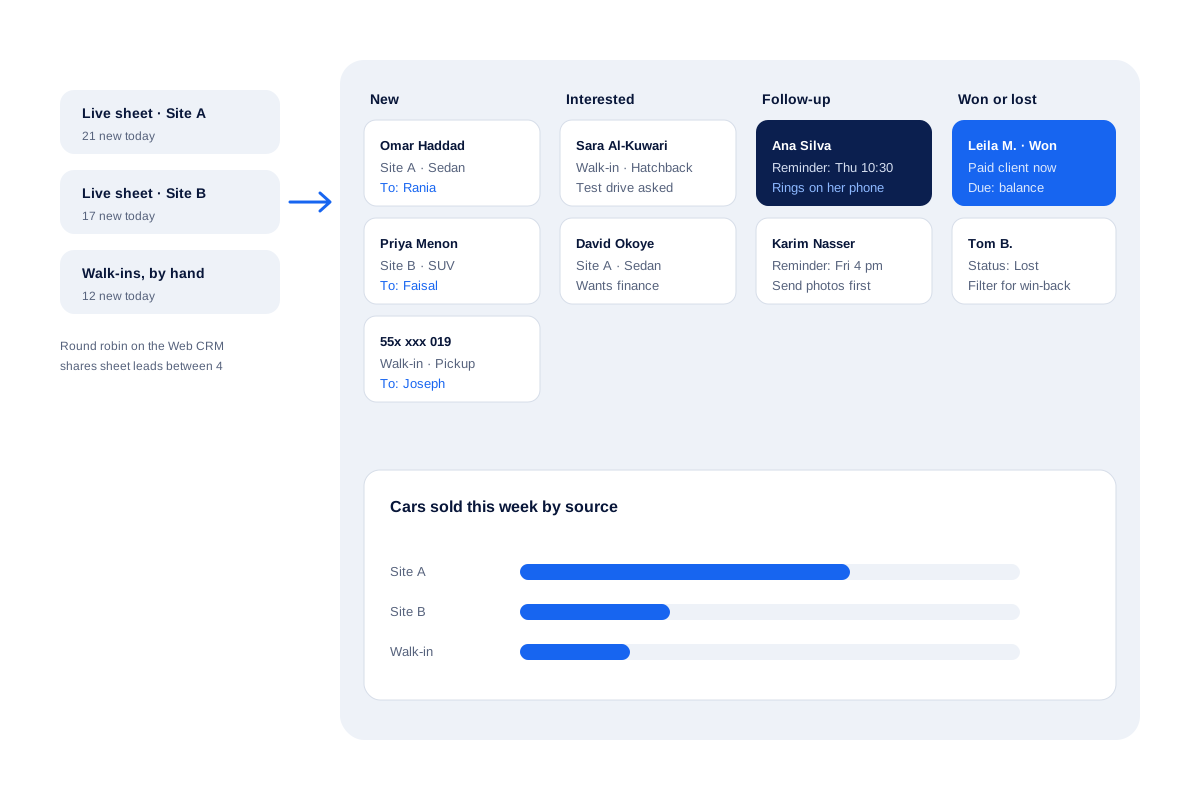
Lead management software example: a car dealer in Doha
A used-car dealer in Doha gets about 50 leads a day from two listing sites and from walk-ins. Before, the leads sat in two inboxes and a notebook.
The dealer sends the listing-site leads to a Google Sheet and links that sheet in live mode on the Web CRM, where round robin shares new leads between 4 salespeople. Walk-ins are added by hand with just a mobile number and the tag Walk-in.
Each Monday the owner filters by source and sees that most cars sold came from one listing site. The sales team then spends the first hour of each day on that source.
Lead management software FAQ
What does lead management software do in a normal working day?
Four jobs. It brings in new leads, hands each one to a person, reminds that person to follow up and shows the manager which leads are still open.
Is there lead management software built for shops that close deals on the phone?
Yes, Calsyst is built for that. The lead opens on the salesperson's mobile as soon as the number rings, and a short form for the result appears the moment both sides hang up.
Is lead management part of a CRM?
Mostly yes. A CRM covers the whole customer, and lead management is the part from first contact to sale. Many small teams only need that part plus calling.
What is Calsyst used for?
Calsyst is lead management software and a call manager for Android teams. It captures leads, hands them out, dials them and reminds callers about follow-ups.
Can leads from Facebook ads reach Calsyst by themselves?
Yes. Point the ad form at a sheet that Calsyst reads, or at its webhook address, usually with Zapier, Make, Pabbly or n8n in between. Each form entry becomes a lead.
Does Calsyst score leads automatically?
No. It has no built-in lead score. Teams use statuses, tags and custom fields to mark hot, warm and cold leads instead.
Can I see which channel each lead came from?
Yes. Mark each lead with its origin, for example Google, Instagram, IndiaMART, JustDial or a label of your own, then filter the list by that origin.
Can I see everything that happened with one lead?
Yes. Open the lead and the tabs hold its calls, chats, notes and reminders, beside a dated trail of its earlier statuses.
What happens to leads that do not buy?
Give them a Lost status of your own. Filter by that status next month and run a win-back calling session from the result.
Can I export my leads to Excel?
Yes. Set a filter first, then export; you get a CSV of exactly those leads, ready to open in Excel.
Can I add fields that fit my business?
Yes. Create the fields your trade needs, for example budget, model or a map location, and speak the value instead of typing when that is quicker.