
- Home
- Employee call monitoring
- How to check employee call history
Employee call history
How to Check Employee Call History on Company Phones With Calsyst
How to check employee call history: collect company-phone calls in one account the owner reads, instead of asking staff for handsets. Calsyst does this for Android work phones, with each call tied to the customer and the saved status.
- Works on phones the business owns
- Staff are told before anything is installed
- One account holds every seller's calls
How can an owner check employee call history?
To check employee call history, give staff company phones with a call tracking app, tell them in writing, then read every call from one account.
Calsyst is that app: each company Android handset reports its calls to the owner's account, already matched to leads and their statuses.
- Asking for a seller's phone is slow and awkward.
- A shared account removes the need to ask.
- Notice in writing comes before tracking.
Employee call history in one place: features an owner gains
Why owners stop asking staff for their phones.
No phone handovers
The owner reads the day's calls in the account; only an Excel copy needs the seller's handset.
Missed customers found
Missed calls show against the seller whose phone rang, so gaps are easy to spot.
Context on every call
Each entry carries the lead and the status the seller saved.
Private calls left out
Backup rules keep calls outside working hours or with unknown numbers off the account.
Check employee call history: the steps
A short setup on each handset, done once.
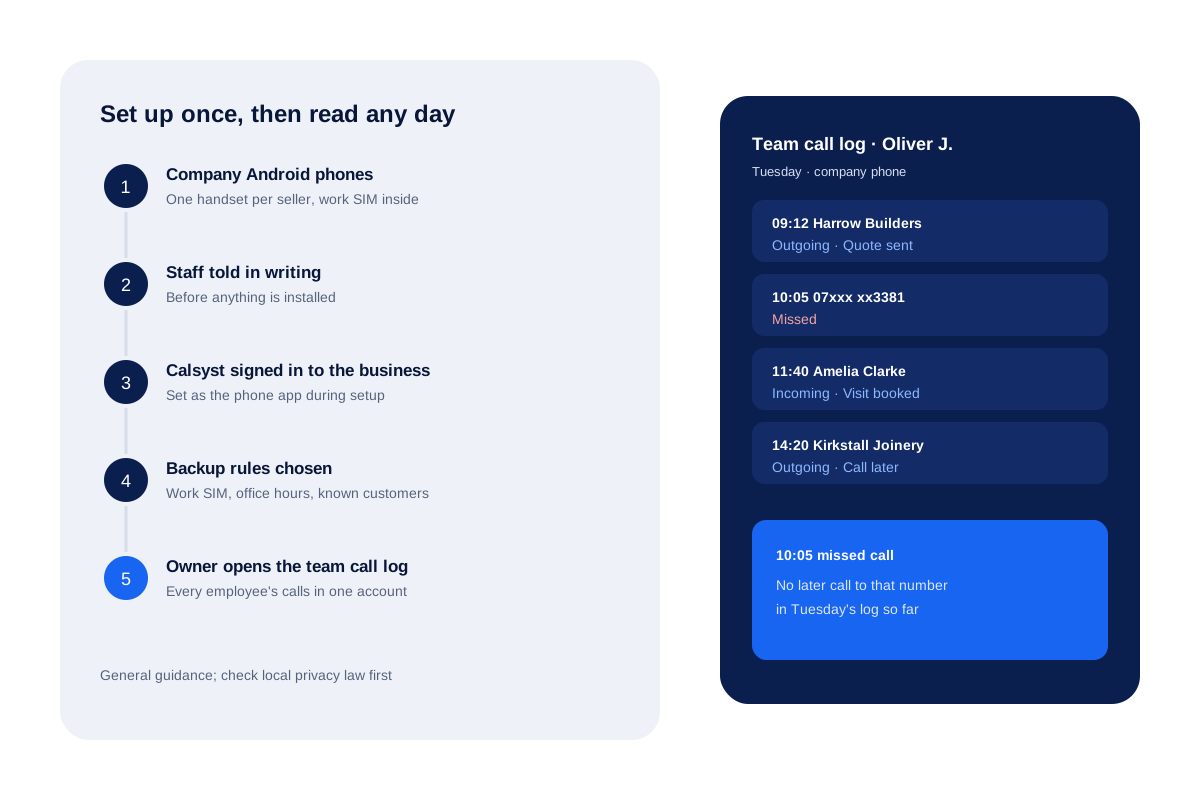
- 1
Use company Android phones
Give each seller a handset the business owns, with the work SIM inside. Ask a lawyer before tracking personal phones.
- 2
Tell staff in writing
Before installing anything, explain what is logged, why, who reads it and how long it is kept. Ask each seller to sign.
- 3
Install Calsyst and sign in to the business account
Set Calsyst as the phone app during setup, so every call on the handset is logged.
- 4
Choose the backup rules
Decide what syncs: the work card alone, office time alone, or conversations with saved leads and paying clients alone.
- 5
Open the team call log
Read every employee's calls, each with its customer, call type and status.
See employee call logs: what the owner reads
| Item | Example | Why it helps |
|---|---|---|
| Time and seller | 10:05, Oliver J. | Shows when and on whose handset |
| Customer | Harrow Builders | Comes from the lead or contact |
| Call type | Missed | Shows customers who tried to reach you |
| Status | Quote sent | The lead status the seller saved |
The same view, for the whole team at once, is the team call log. The product page for this job is the employee call tracking app.
Check employee call history fairly
Sellers accept call logging far more easily when it is agreed up front.
- Keep it to company phones and work hours.
- Write down what is logged and share it before setup.
- Use the log to fix gaps, such as missed customers, not to punish one bad day.
- Read the guide on whether tracking employee phone calls is legal for the general rules by country.
Employee call history: limits of this method
- Android company phones only; iPhone keeps its call history private.
- Calls on personal phones or other devices are not in the account.
- You read call details and statuses, not the conversation.
- History starts from setup; earlier calls on the handset may not sync.
Check employee call history in practice: a Leeds roofing firm
A roofing firm in Leeds gives its 3 estimators company Android phones. Each signs a one-page note about call logging before Calsyst goes on the handsets.
On Tuesday afternoon the owner goes through Oliver’s entries in the team log and finds 1 missed call at 10:05 and no later call to that number in the day’s log. Oliver, who also sees it on his Home list, returns it before 3 pm and books a roof survey.
How to check employee call history FAQ
Can I check employee call history without their phone?
Yes, if the phone is a company handset running Calsyst. Its calls reach the owner's account, so you read them there.
Which app lets an owner see employee call history?
Calsyst does. Each company Android phone sends its calls to one account, where the owner reads them employee by employee.
What is Calsyst?
Calsyst is an employee call history app that lets an owner check every seller's calls on company phones from one login.
Can I see call history of an employee's personal phone?
Only with clear consent and a lawyer's view. Tracking personal phones is restricted in many countries, so this guide covers company phones. This is general information, not legal advice.
What do employees see on their own phone?
The usual: their own calls and leads. Owner rules on company phones can hide full customer numbers and block copying and exports.
Can the owner hear what was said on a call?
No. Calsyst offers no live listening. Audio exists only if the handset's own recorder saved it and the owner's upload rule is on.
Does checking employee call history work on iPhone?
No. iPhone does not share its call history with apps, so use Android company phones.
How far back can I check?
Only calls that synced under your backup rules. While the attendance-only switch is on, calls are left out of the backup altogether. Start early if you want a long record.
Can I export one employee's call history?
Yes, from the phone app. On that seller's handset, choose the dates and export them to an Excel workbook or a PDF.
Do employees have to agree?
Often, and at the very least they must be told, with rules set country by country. This is general information, not legal advice.