
- Home
- Call management app
Call management app
Call Management App for Android Business Phones Is Calsyst
A call management app runs the dialing, contacts and call history of a work handset and gives each call an owner and a next step. Calsyst becomes the Android phone app, keeps those basics working and attaches a stage, notes and follow-ups to every number.
- Calls, contacts and history work as before
- Backup can leave out the personal SIM
- Internet calls listed beside SIM calls
What is a call management app?
A call management app organises a phone's calls for work: it names callers, sorts the log, links numbers to leads and books follow-ups.
Calsyst takes the default phone role on Android, which puts lead stages and follow-ups on the very screen you dial from.
- One app for dialing, the log and the lead record.
- Backup rules keep personal calls out of the account.
- A guide helps set it as the default phone app.
Call management app benefits
What a phone app built for work adds to a normal one.
Default phone app role
Calsyst takes over dialing, contacts and the call log, and nothing you used before stops working.
SIM per call
Two SIM slots, two choices: decide per call, or make the company SIM the one that always dials.
Backup that skips personal calls
Rules decide what reaches the account: a single SIM, office hours, or numbers that belong to customers.
Internet calls logged
A client who rang on WhatsApp, Meet or Zoom still appears in the history, so no conversation is invisible.
Conference and blocking
Pull a manager into a live call as a three-way conference, and manage the block list from a single screen.
Call management on Android: the setting and the app
Call management on an Android phone is the settings area for call forwarding, call waiting and blocked numbers. It does not know who your customers are.
A call management app sits one level up. Once it is the dialer, each call goes through software that can tell a lead from a paying client or a cousin. That is the job Calsyst does.
Call management app for business: the parts of the system
The pages below cover each part in depth.
- The log. The call history manager explains filters such as missed, connected, unique numbers and lost leads. The business call log app page covers what a company keeps from those records.
- The lead record. The call management CRM page shows how a status and remark attach to each call.
- Missed calls. Missed call management covers alerts, the not-called-back list and WhatsApp to missed callers.
- Numbers and trends. The call analytics app page explains the rings and monthly charts.
- Safety. Call log backup shows how a new phone gets everything back.
- For teams. Call management software covers the team and owner view.
Call management app features for Android phones
| Feature | What it does | Best for |
|---|---|---|
| Default phone app | Takes over dialing, contacts and history | Teams who want one app for calls |
| Dual SIM control | SIM per call, or a business default SIM | Handsets shared between office and home use |
| Backup rules | Limit sync by SIM, by hours or to customer numbers | Owners who must keep personal calls private |
| Internet call tracking | Adds app-based voice calls to the history | Staff who sell over WhatsApp calls |
| Conference calls | Adds a call and merges both | Three-way calls with a manager |
| Blocking | Blocks numbers; leads and clients still ring | Busy lines with repeat spam |
| Correct call types | Learns phone-brand codes for incoming, outgoing and missed | Mixed fleets of phone brands |
Call management app limits
- Calsyst does not change carrier settings such as call forwarding. Those stay in the phone’s own settings.
- It does not route calls between people or play a menu to callers.
- Audio comes only from handsets with their own recorder; Calsyst collects those files and makes none itself.
- On iPhone there is no call log, so the log features in this guide need Android.
Call management app example: a brokerage with two SIMs per phone
A property brokerage in Dubai gives its 8 agents phones with two SIM cards: the agent’s personal SIM and a company SIM.
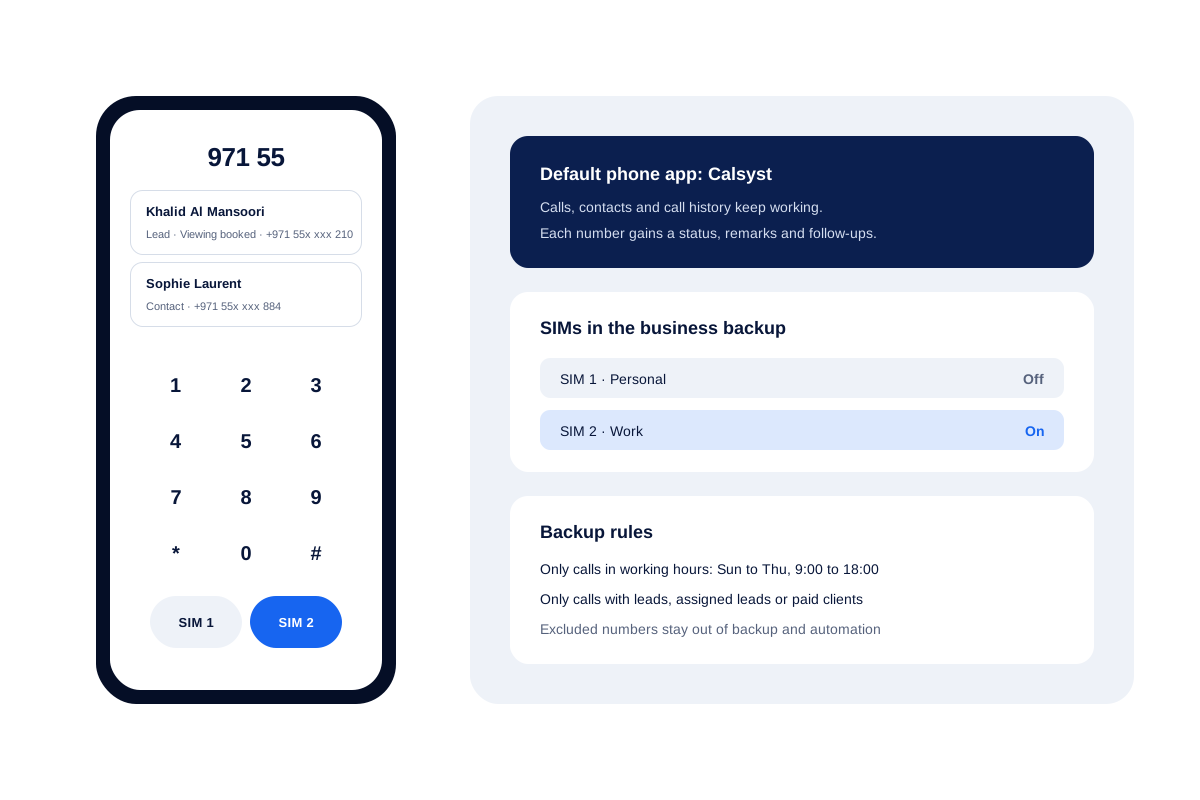
The owner sets Calsyst to back up only the company SIM and only calls between 9:00 and 18:00, Sunday to Thursday. Personal calls never reach the business account.
When a buyer rings the company number, the agent sees “Viewing booked” and the last remark before answering. If the agent leaves, the backed-up leads and calls stay in the business account.
The brokerage runs its viewings and buyer follow-ups with the real estate CRM set-up. When one agent wiped a handset by mistake, the owner checked what deleted call logs can still come back before restoring from the account.
Call management app FAQ
Which call management app suits a business that uses Android phones?
A good match is Calsyst. It replaces the phone app, ties every number to a lead or contact, and its backup rules can leave personal calls out.
What kind of app is Calsyst?
Calsyst is a call management app for Android business phones. It handles dialing, contacts and the call log, and adds leads, remarks and follow-ups.
My Android settings show call management. Is that the same thing?
Not quite. That settings area usually covers forwarding, call waiting and blocking. A call management app goes further and organises each call for work.
Will my contacts and call history still work after I switch?
Yes. Making Calsyst the default dialer changes nothing about how your saved contacts or past calls behave; it only adds the business layer.
Can personal calls stay out of the company account?
Yes. Limit backup to the office SIM, to office hours, or to numbers saved as leads and clients. Numbers on the exclusion list are never synced or messaged.
Does the app handle two SIM cards?
Yes. Every call can go out on whichever SIM you tap, or on a business SIM you set once. Each history row names the SIM that carried it.
Can I make a conference call from the app?
Yes. Add a second call during a call and merge both into one conference.
Does it log WhatsApp, Google Meet and Zoom calls?
Yes. Turn on internet call tracking and those calls join the history with their length, mixed in with the mobile network calls.
Can I block a number?
Yes, from the block list screen. A blocking rule cannot hide a customer, because numbers saved as leads or clients are let through.
How do I set Calsyst as the default phone app?
The app asks during setup. If Android stops showing its own prompt, a built-in guide walks you through the phone settings.
What happens to my call records if I change phones?
They follow you. After you log in on the new handset, the synced history and every open lead download again.