
- Home
- Follow up reminder app
Follow up reminder app
Follow Up Reminder App for Sales Calls and Client Callbacks Is Calsyst
A follow up reminder app is a callback alarm for sales work, so a promised callback no longer depends on memory or a sticky note. Calsyst books the next call with one tap on the after-call sheet, then sounds an alarm at that minute, even on a locked screen.
- Eight preset gaps plus a custom time
- Still rings after the handset restarts
- Open until somebody ticks it off
What is a follow up reminder app?
A follow up reminder app rings at a chosen time to say a buyer is due a call or message, with that buyer's record open.
When a Calsyst reminder goes off, it opens on the buyer's last note with a dial button, so the callback begins in one tap.
- Booked before the call screen closes.
- Loud like a wake-up alarm.
- Overdue items move into Today.
Follow up reminder app benefits
Why sales teams move callbacks into the app they call from.
Booked with the call result
Choosing the next call date is part of saving the outcome, so nobody needs a calendar afterwards.
Alarm-style alert
The handset sounds at the chosen minute with the screen off, and again after a reboot.
Work from inside the alert
Dial, scroll the history, speak a new note or push the time back without opening anything else.
A WhatsApp text on cue
Link a stored message or an approved template. With an API provider connected it leaves as the alarm sounds; without one, WhatsApp opens with it typed.
Nothing slips away
An unticked reminder never closes itself, and yesterday's misses wait in Today marked overdue.
One session for the day
Press start on the Today list and the auto dialer works through every callback in order.
Follow up reminder app for sales: how a callback gets booked
The reminder is booked inside the call flow. On an Android handset it goes like this:
- Hang up. The after-call sheet opens.
- Pick a status and speak or type a short note.
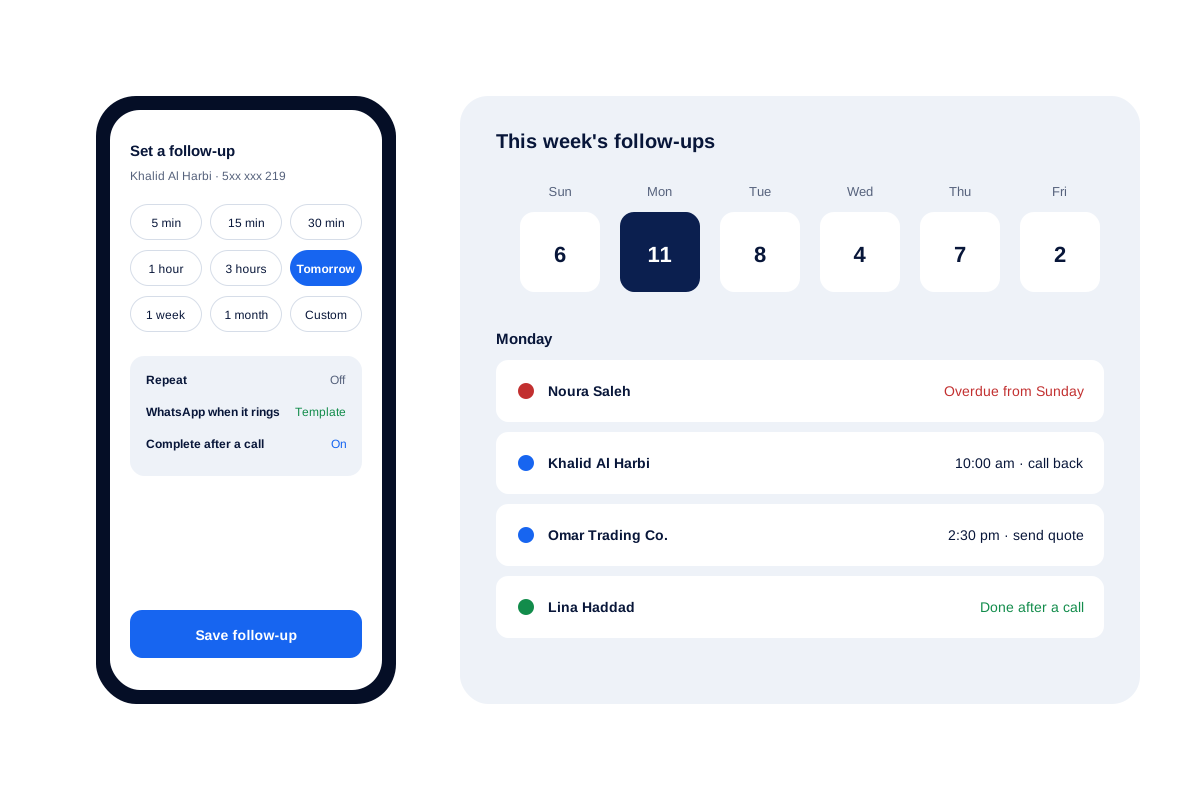
- Tap a gap, for example Tomorrow.
- Save. If you are mid-session, the dialer moves on to the following number.
At the booked minute the handset sounds and shows the buyer’s name, the note and a dial button. Any linked WhatsApp text is delivered then if your API provider is set up, or appears in WhatsApp waiting for your tap.
Follow up reminder app settings
| Setting | Choices | When to use it |
|---|---|---|
| Quick gap | Eight presets or a custom time | Straight after the call, while you remember |
| Repeat | Five patterns, each with a last date | Renewals, monthly check-ins, service visits |
| Linked WhatsApp | A stored text or an approved template | Sending a link or note as you ring back |
| Complete after a call | On or off | Hectic days when ticking things off is forgotten |
| Views | Pending, completed, today, tomorrow, upcoming | Planning tomorrow before you leave |
| Timed note | No number attached | Jobs such as preparing a quote |
Customer follow up app: pages for each kind of follow-up
Each kind of follow-up has its own page:
- Money still owed: the payment reminder app keeps paid and outstanding amounts side by side.
- Plans running out: renewal reminder software covers policies, subscriptions and service contracts.
- Leads that need several touches: the lead follow-up CRM shows statuses and reminders working as one.
For the dialing side, the auto dialer app shows how a session of due callbacks runs.
Follow up reminder app limits
- Alerts live inside the app. There is no email reminder and no link to a desktop calendar.
- Buyers are not sent SMS. Messages to them go by WhatsApp.
- The alarm needs the phone’s alarm permission. Setup asks for it the first time you open the app.
Follow up reminder app example: a used-car showroom
A used-car showroom in Riyadh has 2 sales staff who handle about 60 phone enquiries a week.
At the end of each call they tap a gap, mostly Tomorrow or 3 hours. On Monday morning Today holds 11 callbacks, one of them carried over from Sunday.
A seller starts a dialing session from that list, works through all 11 before 10 am, and either ticks each one off or books a fresh time.
Follow up reminder app FAQ
Which follow up reminder app suits a sales team that works by phone?
Calsyst fits that team. The callback is booked as the call is saved, and when it is due the alert shows the buyer's last note beside a dial button.
What is Calsyst?
Calsyst is a follow up reminder app joined to a phone dialer: every conversation ends with a booked next step, and the app rings when that step is due.
Is there a reminder app that sounds like an alarm clock?
Yes. Calsyst alerts behave like an alarm clock. They go off at the set minute with the screen locked, and they survive a restart of the handset.
Can a callback reminder tick itself off once I reach the customer?
Yes. With the Complete after a call option switched on, a connected call to that buyer closes the reminder for you.
Can I schedule a follow-up that comes back every month?
Yes. Choose a repeat pattern such as weekly, monthly, yearly or a set number of days, then give it a last date. Insurance renewals and service check-ins suit this.
What happens to a reminder I did not act on?
It stays on your list. An unticked reminder is marked overdue and moves into Today, where it waits until you deal with it.
Can one buyer have two separate reminders?
Yes. A quote call on Tuesday and a payment check on Friday can sit side by side for the same buyer, each closed on its own.
Can I make a reminder that is not linked to any phone number?
Yes. Leave the number empty and it works as a timed note, for jobs such as printing a contract before a meeting.
Can a follow-up alert also message the buyer on WhatsApp?
Yes. Link a stored text or an approved template to the reminder. A connected API provider sends it the second the alert fires; on a phone with no provider, the text sits in WhatsApp for you to send.
How can I get through all of today's callbacks quickly?
Run them as one session: open Today and start the dialer on the due list. Calsyst rings each buyer in order while you talk and save the result.
Do follow-up reminders work on an iPhone?
Yes. Reminders run on iPhone as well. Only the list of calls is unavailable there, because Apple keeps it away from apps.