
- Home
- Staff attendance app
- Employee location tracking app
Employee location tracking app
Employee Location Tracking App for Work Hours Only Is Calsyst
An employee location tracking app logs where field staff go during paid hours, so a manager confirms visits and kilometres without photos of gates. Calsyst collects points only after the employee punches in and agrees on a consent screen, and stops when they punch out or the branch closes.
- Nothing is gathered outside the shift
- Stops of 5 minutes or more found by themselves
- Kilometres skip any fake GPS points
What is an employee location tracking app?
An employee location tracking app records a staff member's position on a work phone in paid hours, so a firm plans routes and confirms visits.
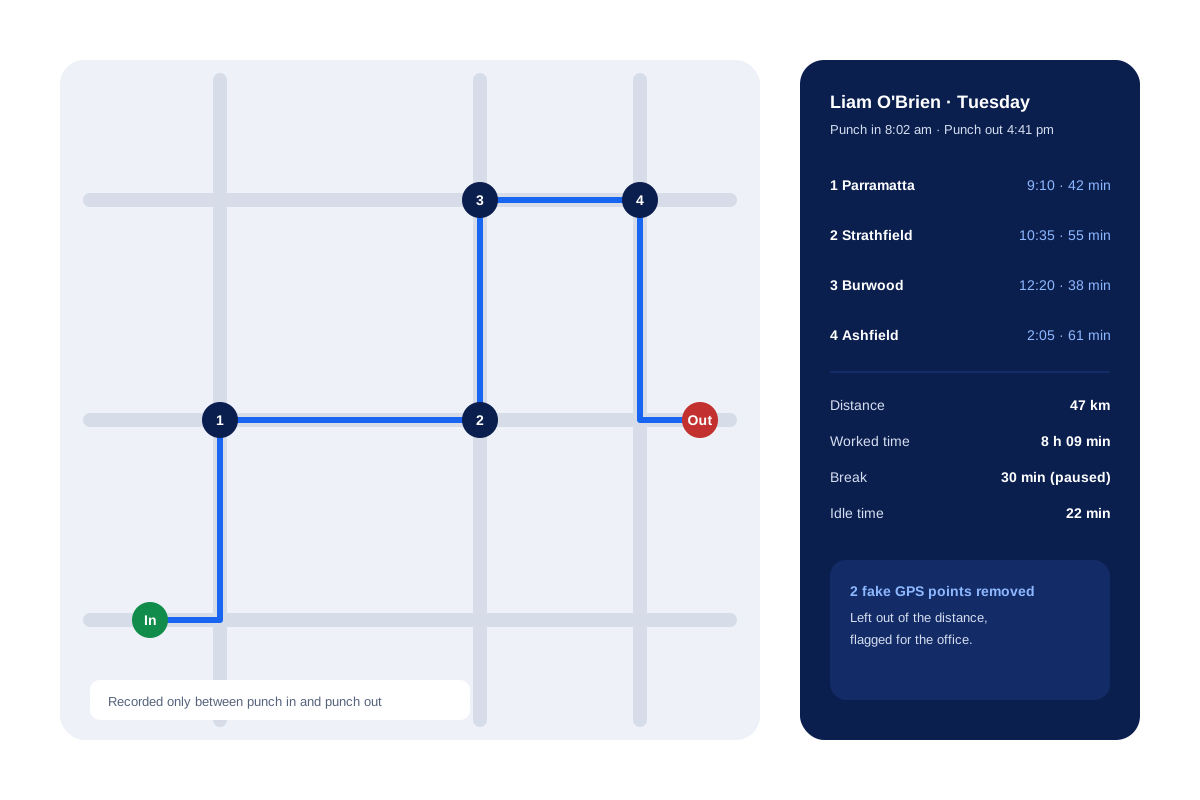
Calsyst turns those points into a route on the web: start, finish, numbered stops with minutes spent, kilometres and idle time for each day.
- Staff opt in once, on their own phone.
- Breaks pause the tracking.
- Office staff can be left out completely.
Employee location tracking app benefits
Why owners of field teams pick a work-hours tracker over a phone finder.
Shift-bound by design
Recording starts at the morning punch and halts at the evening one, or at branch closing, so nights stay private.
Visits without paperwork
Stops of 5 minutes or longer appear with an area name, so a client visit needs no selfie at the door.
Honest kilometres
A spoofing app or a jump no vehicle could make is dropped before the mileage total is worked out.
Breaks stay private
Pressing Break pauses the location record until the employee taps Resume.
The staff member sees it too
The day's kilometres show on the employee's own phone, so nobody is surprised by the report.
Employee GPS tracking app: what is recorded and when
| Data | When it is collected | Who sees it |
|---|---|---|
| Position point | Every 15 seconds while on shift | The owner, on the web route |
| Upload of points | Every 5 minutes while on duty | Stored in the business account |
| Stops | Any halt of 5 minutes or more | Owner, with area name and minutes |
| Kilometres | Added up for the day, fake points removed | Employee on the phone, owner on the web |
| Breaks | Tracking paused from Break to Resume | Shown as a break, no positions |
| Battery level | Through the working day | Owner, beside the route |
Field employee tracking app: reading a day’s route
Open the web route view, pick a person and a date. The map draws the day from the first point after the punch in to the last one before the punch out.
Each numbered stop shows arrival time, departure time and minutes spent there. Below the map you get the totals for the shift, from kilometres and idle minutes to the phone’s battery. If a client says nobody came, open the raw GPS points for that hour.
For sales visits in particular, the sales visit tracker app page shows how stops turn into a visit report, and field sales tracking covers whole teams on the road.
Employee live location tracking and the law
The law varies, yet a few points come up almost everywhere:
- Put it on paper. Name the tracked handsets, the hours covered and the business reason.
- Limit tracking to working time. Many regulators frown on tracking after hours, so Calsyst stops at punch out.
- India: the DPDP Act of 2023 expects notice and a stated purpose for personal data.
- EU and UK: location counts as personal data, so employers need a legal ground and often a written impact check.
- Australia and the USA: some states set their own workplace surveillance rules, so check the state where staff work.
The guide how to track employee location legally covers this in more depth. For punch in rules, go back to the staff attendance app hub. This is general information, not legal advice.
Employee location tracking app limits
- Calsyst does not track a phone before the punch in or after the punch out.
- It does not run hidden. The employee switches location on and sees the day’s kilometres.
- It is not a lost-phone finder for personal devices.
Employee location tracking app example: a service technician
An air-conditioning service firm in Sydney has 4 technicians who visit homes across the western suburbs.
Each technician punches in at the depot at 8 am and agrees once to location sharing. On Tuesday the route for one technician shows 4 stops, 47 km and a 30 minute break with no positions recorded.
A customer in Burwood calls to say nobody came. The office opens the stop list, sees a 38 minute stop at that street at 12:20 pm, and settles the call in a minute.
Employee location tracking app FAQ
Can I track my employees' location?
Usually yes, on work phones, inside paid hours and after a clear written notice. Rules differ by country and state, so check the local position. This is general information, not legal advice.
Which employee location tracking app stops recording when the shift ends?
Calsyst is built for that limit: it gathers positions from the punch in to the punch out, and only after the employee accepts a consent screen.
What is Calsyst?
Calsyst is an employee location tracking app inside a wider business app, where the same phone punches staff in, maps their field route and logs their customer calls.
Will my boss see where I go in the evening?
Not through Calsyst. Recording stops at whichever comes first: your punch out or the branch closing time.
How often does the app record a position?
Four times a minute during the shift. The handset batches those points and uploads them every 5 minutes.
Does the employee have to agree to tracking?
Yes. The employee turns location on once, after a screen that explains what is recorded and why. Before every location prompt the app also shows a short notice.
Can a field worker fake their location?
Not unnoticed. Spoofed points are marked for the office to see, and they never count towards the kilometres.
Where does the manager see the route?
On the web route view: choose the employee and the day to see the map, start and end, numbered stops, worked time, distance, idle time, breaks and battery.
Can I download kilometres for expense claims?
Yes. The web attendance and field report for any branch and dates includes the kilometres for each day and exports to Excel.
Does location tracking work on iPhone?
Yes. A technician with an iPhone gets the same punch in, route and kilometre features as one with Android.
Can I see the raw GPS points behind a route?
Yes. Any day's route can be opened down to its raw points, which helps when a client disputes a visit.