
- Home
- Sales team tracking app
- Sales management app
Sales management app
Sales Management App for Small Business Sales Teams Is Calsyst
A sales management app is a manager's phone dashboard that shares out leads and shows each seller's day, so meetings stop running on guesswork. Calsyst builds that dashboard from the calls sellers make on Android phones with their own SIMs; the iPhone app has no call log.
- Leads handed out, one queue per seller
- Every seller's calls in the owner's account
- Revenue and dues from the same records
What is a sales management app?
A sales management app lets a sales head assign leads, follow every seller's calls and deals, and catch stuck opportunities before the month closes.
Calsyst adds this manager view to a calling app, so the numbers come from real calls and saved outcomes rather than from typed-up reports.
- Assignment and tracking in one place.
- Figures built from actual calls.
- Works on the handsets sellers already carry.
Sales management app benefits
What a sales lead gains in the first fortnight.
Leads shared on purpose
Assign names by hand, move ticked leads in bulk, or rotate new web leads through the team.
Team call log
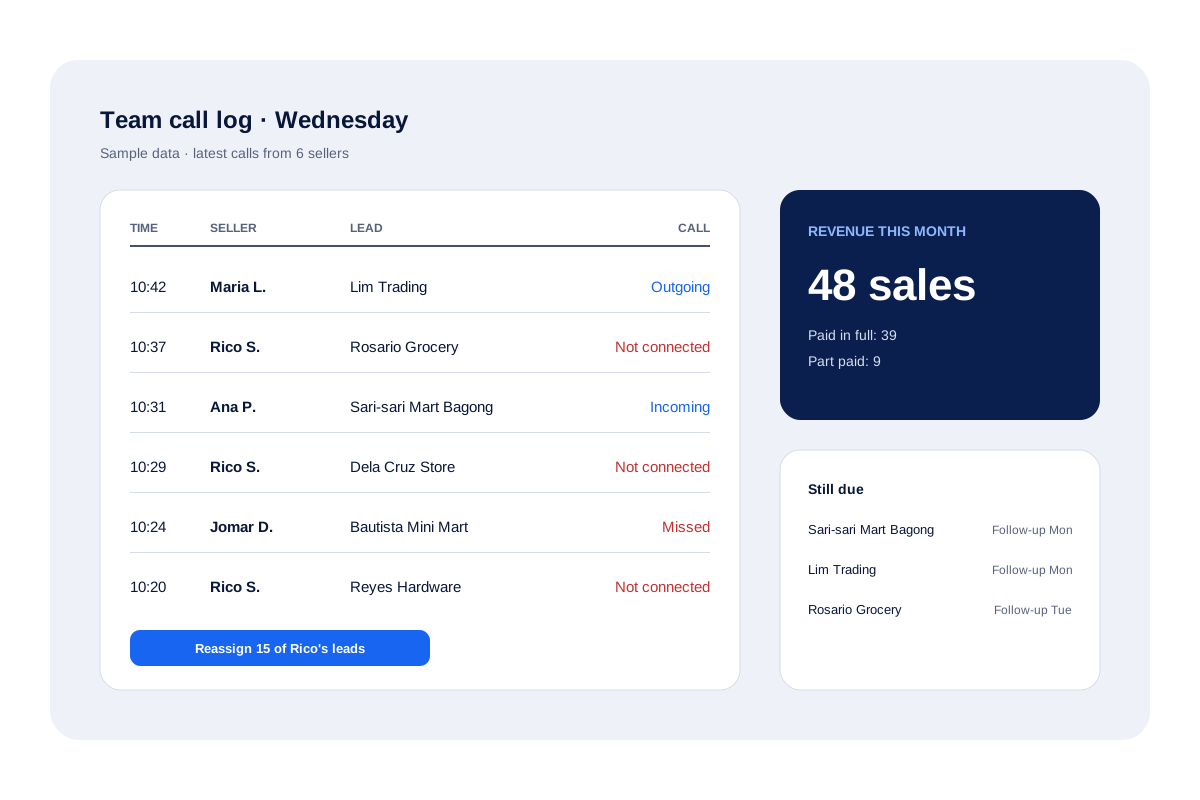
Every employee's calls sit in the owner's team call log, with the team's calling activity rolled up there too.
Statuses you define
Name, colour and order your own pipeline statuses, and every move between them is kept.
Money in the same record
A won deal becomes a client record showing the amount received and the balance outstanding.
Hand-overs without loss
When a seller is off, pass their leads on; the history goes along with each record.
Field days on a map
For sellers on the road, the web shows the route, stops and kilometres during working hours.
Sales management app for small business: the manager’s day
A sales lead in a small company juggles three questions every morning: who gets which leads, who did the work yesterday, and which deals are about to slip. Calsyst answers each from the same records.
Share the work
New leads can be assigned by hand, moved in bulk to several sellers in turns, or rotated automatically when they arrive through the webhook or a live sheet. Each person then works from their own pending queue. The lead assignment software page covers the rules.
Read yesterday honestly
The team call log shows every employee’s calls as the phones recorded them, so nobody types a report; the sales team tracking app page covers that view in full.
Catch slipping deals
Filter leads by status together with “due today” to find promised callbacks that are still open. On each seller’s phone, missed follow-ups roll into Today as overdue until someone handles them.
Sales manager app features, mapped to the job
| Manager task | Calsyst feature | Why it helps |
|---|---|---|
| Split leads | Manual assignment, bulk transfer in turns, round-robin sources | Nobody grabs the best leads first |
| Check activity | Team call logs and team activity in the owner's account | Real calls replace typed reports |
| Review the pipeline | Your own statuses with a full change history | Stuck deals show up by status |
| Track money | Paid clients, paid and due per sale, revenue cards | Dues stay next to the customer |
| Cover absences | Lead transfer with history kept | The colleague sees every earlier note |
| Watch field days | Route map, stops and kilometres on the web | Visits are visible without phone calls |
Sales management software vs a calling-first app
Desktop sales software often expects sellers to log calls by hand after the fact. That record is only as good as the seller’s memory. A calling-first app logs the call the moment it happens, then offers an outcome sheet while the conversation is still fresh.
The trade-off is depth in other areas. If you need territory planning, quotes, contracts or forecasting, a larger CRM will serve better, and Calsyst can still send its call data to it by webhook or API. For the daily rhythm of calls and callbacks, the CRM with dialer approach keeps everything on one screen.
Sales management app limits
- No sales forecasting, deal probability or lead scoring.
- No quotes, invoices or payment collection; payments are tracked as paid and due only.
- No quota, target or commission calculation.
- Calls go over SIM cards; there are no virtual numbers.
Sales management app in use: a distributor’s week
A household goods distributor in Quezon City runs 6 sellers who phone retailers and visit the busiest ones.
On Monday the manager moves 300 reorder leads to the 6 sellers in turns, 50 each. By Wednesday, scrolling the team call log, the manager sees that one seller’s calls are mostly unanswered; the manager reassigns 15 of that seller’s leads.
On Friday the revenue card shows the week’s paid orders, and the “due” amounts show three retailers who still owe for their delivery. Those three get follow-ups booked for Monday and Tuesday.
Sales management app FAQ
What is a good sales management app for a growing team of sellers?
Choose one that gives each seller a lead queue and a dialer and shows the manager calls, statuses and payments. Calsyst does all three on the phones your team already uses.
What is Calsyst?
Calsyst is a sales management app and call manager that assigns leads, logs every call against them and shows the manager each seller's day.
Can a manager see which seller called which lead?
Yes. Every call sits on the lead record with the person who made it, and the owner's account rolls up the calls of the whole team.
How do I split new leads fairly between sellers?
Move them in turns. Tick a batch and bulk-transfer it so sellers receive leads one after another. For leads arriving by webhook, the Web CRM can rotate them as they land.
Can the app show revenue as well as calls?
Yes. Every sale sits on the client record with its received and outstanding sums, and separate revenue cards add up takings for the current day, week, month and year.
Does it work for sellers who visit customers in person?
Yes. Road sellers punch in with a live selfie, and the web draws their shift as a route with every halt of 5 minutes or longer.
What happens to a seller's leads when they leave the company?
Bulk-move their leads to a colleague; each record remembers who held it. Their WhatsApp conversations remain with the company account too.
Can I stop sellers from exporting the customer list?
Yes, on company handsets. The owner can block exports and copying and mask customer numbers, while calling keeps working.
Is there a web screen for the sales manager?
Yes. Managers sign in at app.calsyst.live for reports, route maps and team settings, while sellers keep calling from their handsets.
Can a sales manager export the team's calls for a meeting?
Yes. Save the call history for the chosen period as Excel or PDF; a filtered lead list downloads as CSV.
Does the app forecast sales or score deals?
No. Calsyst shows statuses, calls, follow-ups and revenue already booked, but it does not predict future sales or score deals.