
- Home
- Telecalling CRM
- Telecaller app
Telecaller app for business
Telecaller App for Business Teams on Android Is Calsyst
A telecaller app is a calling agent's work phone app, showing who is on the line, what was said last time and what comes next. Calsyst is built for that job on Android: it ties every call to a lead instead of only naming unknown numbers.
- The lead card appears before you answer
- Past calls, chats and notes open during the call
- Status, remark and next date in 2 taps
What is a telecaller app?
A telecaller app is the agent's working phone: it rings leads, keeps their past conversations one tap away mid-call and records each result.
Calsyst gives each telecaller that screen on their Android phone, fed by the leads their manager assigned to them.
- Callers are named from your own leads first.
- Remarks follow the lead from call to call.
- Missed calls nobody returned wait on Home.
Telecaller app benefits
The phone a telecaller holds for eight hours a day.
Lead card while it rings
Before you swipe to answer, the locked handset already shows who it is and where the deal stands.
Names from your own records
A ringing number is matched against your own records first; the web lookup is only a fallback.
Spam warnings
Numbers reported by other users show a warning, while saved leads always ring through.
Voice instead of typing
Speak a name or a requirement into the form, and add remarks by voice from a reminder.
Keypad that finds leads
Typing digits searches contacts and leads together, so a half-remembered number is enough.
Telecaller app for business: not a caller ID utility
Search for this term and the first results are spam blockers that name unknown numbers. That is a different tool. A business telecaller app is the place where a calling agent’s work lives: the leads, the call results and the next dates.
Calsyst does name callers, but from your own lead list first, so a returning customer shows up with their stage and the last thing they said. For the team side of the same work, such as queues and the pipeline, see the telecalling CRM page.
Telecaller app screens through one call
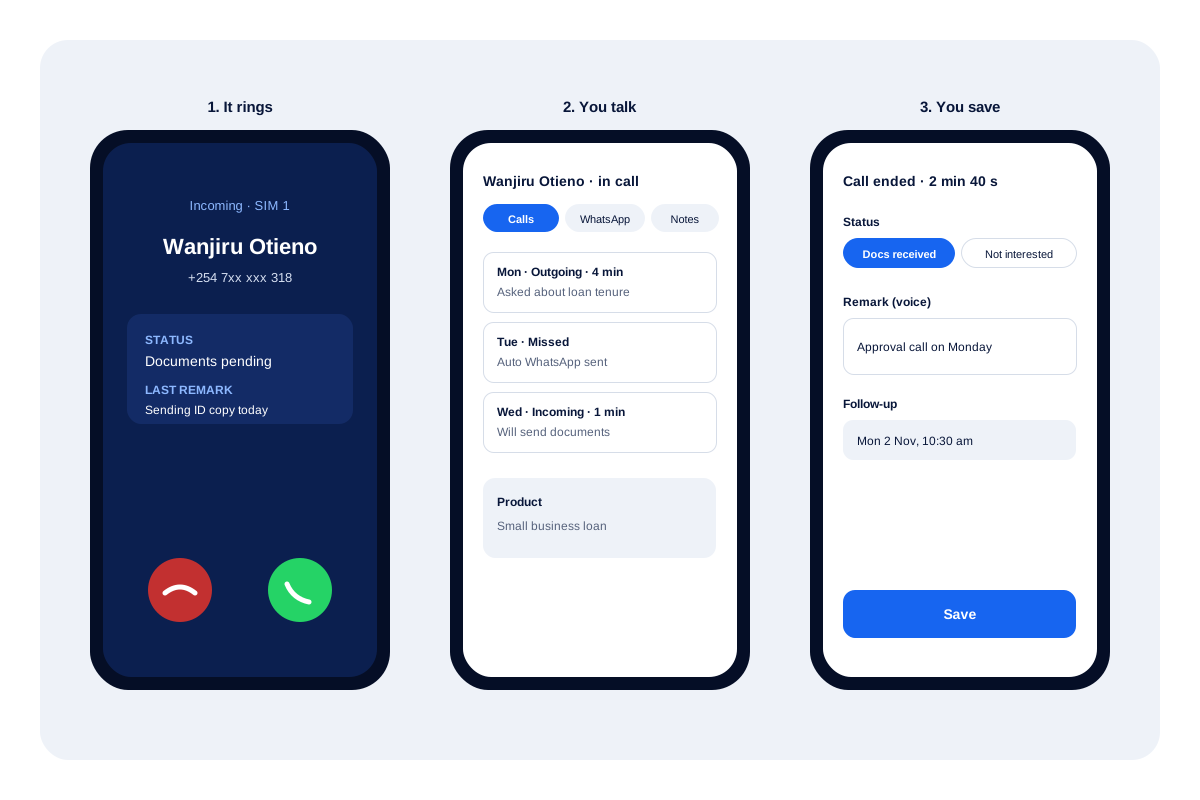
Before you answer
A known lead appears by name with their stage and your last note across the whole screen. An unknown number gets the optional web lookup and any spam reports, so you can judge it in a second.
While you talk
Open the lead record without leaving the call. Tabs hold the calls, WhatsApp chats, remarks and reminders for that person, so you can check what was promised last week.
After you hang up
A small sheet slides up with three blanks to fill: where the lead now stands, one line of notes and when to ring again. When you use the auto dialer app, the session then carries on to the next lead.
Telecaller app for Android: features on the caller’s screen
| Feature | What the telecaller sees | When it helps |
|---|---|---|
| Call screen | Name, stage and last remark, also on the lock screen | A lead calls back after a week |
| After-call sheet | Outcome, note and follow-up date | Every call, before the next one |
| Call log filters | Missed, connected, unique, lost leads, not called back | Planning the next hour of calls |
| Missed-call alert | Return the call or message the lead | A lead rings during another call |
| Keypad search | Contacts and leads that match the digits typed | Only part of the number is known |
| Analytics rings | Today's calls by type, tap a ring to see them | A quick check at lunch time |
Telecaller app limits
- No built-in recorder: audio appears only when the handset makes its own recording and Calsyst picks the file up.
- Calls go out from the telecaller’s SIM. There is no shared office number or call transfer to a desk phone.
- Without access to the iPhone’s past-call list, the log filters and missed-call lists need an Android phone.
Teams still choosing tools should read the telecalling software checklist before they buy phones.
Telecaller app example: a loan follow-up desk
A microfinance lender in Nairobi has 5 telecallers who chase loan documents from small business owners.
When an applicant rings, the card shows “Documents pending” and the remark “Sending ID copy today”, so the telecaller opens with the right question. After the call she picks “Docs received”, records a voice remark and books the approval call for Monday at 10:30.
An applicant who missed a call yesterday sits on the Home list as not called back, so the first call of the morning goes to him.
Telecaller app FAQ
Which telecaller app works well for a sales team?
For a sales team on Android, Calsyst works well. Each telecaller gets an assigned queue, a lead card on every call and reminders for each follow-up.
What is Calsyst used for?
Calsyst is a telecaller app for business teams. Callers use it to ring leads from their SIM, see the full history on each call and book the next step.
Does a telecaller app do the same job as a spam-blocking caller ID app?
No. A caller ID app mostly names unknown numbers and blocks spam. A business telecaller app also stores leads, statuses, remarks and follow-ups.
Will the app tell me which lead is ringing before I answer?
Yes, when the number is a saved lead or client. Their name, current stage and the note from your last talk cover the screen during the ring.
Does the telecaller app warn me about spam calls?
Yes. A number flagged by enough other users carries a warning, and you choose what enough means. Your saved leads are never silenced.
Can a telecaller call a lead on WhatsApp from the app?
Yes. Open the WhatsApp button on the lead and choose voice or video. This works for saved contacts who have WhatsApp.
What happens if I miss a call while I am on another call?
You get an alert with a one-tap return call on the SIM you pick. Ignore it, and that number waits on the Home screen until somebody rings it back.
Does each telecaller get their own list of leads?
Yes. Leads assigned to a telecaller land in a personal pending queue for that person. If the handset belongs to the company, digits can be hidden and copying blocked as well.
Can telecallers check their own numbers for the day?
Yes. Analytics rings show their calls by type, and achievements track daily streaks with cards they can share.
What happens to my leads if my phone is lost?
Nothing is lost if it was synced. Log in on the replacement handset and your queue, notes and booked follow-ups come back.
Does the telecaller app work on iPhone?
Partly. On an iPhone a telecaller gets everything bar the handset's own list of past calls. Agents who dial all day are better served on Android.