
- Home
- Telecalling CRM
- Call center software for small business
Call center software for small business
Call Center Software for Small Business Without Hardware Is Calsyst
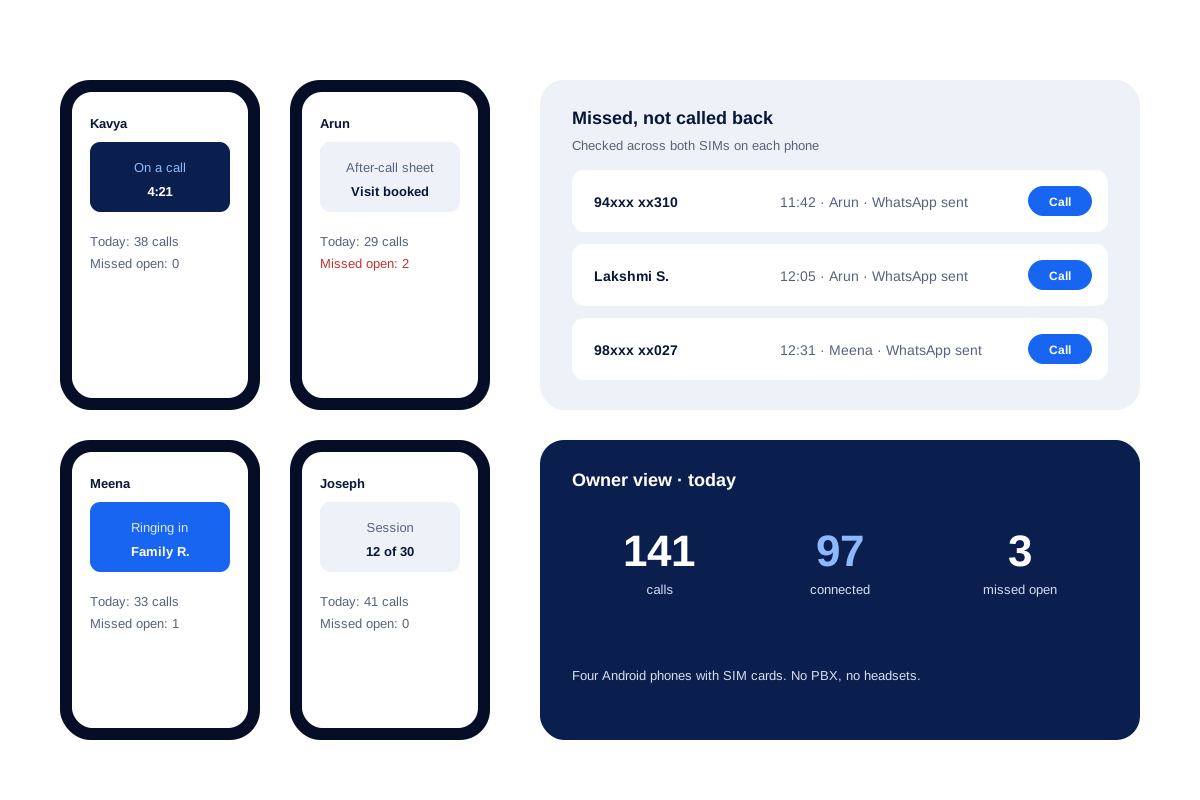
Call center software for small business turns a handful of staff into one calling team, so missed calls and lost notes stop. Calsyst builds that team on the staff's own Android phones: calls go through their SIM cards, and the owner sees every call from one account.
- No PBX, IVR box, headsets or desk phones
- Missed calls nobody returned, listed on Home
- Owner rules for company phones
What is a call center software for small business?
Call center software for small business hands a few staff one shared record: caller history, missed calls and call totals per person.
Calsyst skips the phone system entirely: each staff member's Android handset becomes the work station, and an after-call sheet invites the agent to tag the outcome before moving on.
- A mobile in each hand is the whole set-up.
- Strong on outbound calling and call-backs.
- No IVR menus or inbound call routing.
Call center software for small business benefits
For small teams who answer and make calls all day.
Start the same day
Install the app on staff phones and import leads; there is no line or hardware to order.
Caller known before hello
While the handset rings, even locked, the agent reads who it is, where that customer stands and the note from last time.
No missed call forgotten
Unreturned missed calls sit on the Home screen, checked across both SIM cards, with a link to the full filtered list.
Work shared evenly
Assigned queues, bulk transfer and Web CRM rotation of webhook or live-sheet arrivals keep each agent's list fair.
Customer data kept in
Owners of company handsets can show customer numbers half hidden and switch off copying, exporting, WhatsApp and texting.
Call center software for small business: cloud system or SIM phones?
There are two ways to give a small team call center tools. A cloud call center moves calls onto internet lines and adds menus and routing. A mobile system keeps normal SIM calls and adds the CRM, the dialer and the reports around them. Calsyst is the second kind.
| Feature | Cloud call center | Calsyst on SIM phones |
|---|---|---|
| Equipment | Computers, headsets, internet lines | Android phones with SIM cards |
| Number customers see | Virtual numbers from the provider | The staff member's mobile number |
| IVR menu for callers | Yes | No |
| Inbound routing to an idle agent | Yes | No; each phone rings for its own number |
| Outbound dialing of lists | Yes | Yes, one call at a time per phone |
| Missed-call follow-up | Varies by product | Alert, Home list, WhatsApp after a missed call |
| Call recording | Recorded by the provider | Imports the recordings the phone makes |
| Owner view of every call | Yes | Yes, team call logs |
Pick a cloud call center if callers must press 1 for sales and 2 for support. Pick Calsyst if your team already lives on mobiles and most of the work is calling out and calling back.
Call handling software for incoming calls
Calsyst does not route calls, but it makes each ringing call easier to handle. Before anyone says hello, the incoming card names the person, gives their status in your pipeline and repeats the latest note. Blocking never silences a saved lead or client, and numbers that other users reported show a spam warning.
When nobody answers, the missed call does not disappear. The alert offers a call back with SIM choice, and the number stays on the Home list until somebody returns it. The missed call management page goes through this in detail.
Call center software for outbound teams
Outbound work is where a phone team spends most of its day. Agents start sessions from the queue given to them, and one locked pause between calls keeps every agent at the same speed. The telecalling CRM page covers the queue and the status pipeline. The auto dialer software page covers the dialer settings for the whole team.
The owner sees connected and missed calls for each person in the team call log. On company phones, the owner can also require every recording that the phone makes to upload to the account.
BPO calling software: limits of a SIM-phone set-up
- No IVR menus and no automatic routing of incoming calls.
- No listening in, whispering or joining a live call.
- No virtual numbers, toll numbers or number masking towards the customer.
- No wallboard screens for a call floor.
- Calls use the minutes of each SIM plan.
If you need any of these, a cloud contact center is the better fit.
Call center software example: a home-care service in Chennai
A home-care service in Chennai has 4 coordinators. Families call to book nurses, and coordinators call back to confirm visits. Before, missed calls were found only when an angry family called again.
Each coordinator now uses Calsyst on a company phone. Missed calls appear on the Home list, and an automatic WhatsApp, sent through the service’s WhatsApp API provider, tells the family that a coordinator will call within the hour. The owner masks family numbers on the phones and checks the team call log each evening.
After two weeks the team call log shows which hours bring the most missed calls, and the owner moves the evening shift to match them.
Call center software for small business FAQ
What software do most call centers use?
Cloud contact center software, in most large centers, with internet phone lines, IVR menus and a CRM. Small phone teams often use a mobile calling app with a CRM inside.
Which call center software works for a small team without any hardware?
Calsyst does. Every agent uses the Android handset and SIM they already carry, while the owner runs leads, rules and reports from one account.
How is Calsyst different from a cloud call center?
Mainly in the phone lines. Calsyst is call center software built on staff mobiles. Calls use SIM cards instead of internet lines, so there is no IVR or routing, but nothing to install on desks.
What does an 80/20 service level mean for a small call team?
It sets a goal of picking up 8 in every 10 incoming calls before 20 seconds pass. A small team uses it to see if enough people cover the busy hours.
Which software is used for BPO calling work?
A dialer plus a CRM, in most cases. BPOs usually run a dialer, a CRM and quality tools on computers. A small outsourcing team that calls from mobiles can use Calsyst for the dialer and the CRM part.
Can Calsyst route an incoming call to the next agent who is not busy?
No. Each incoming call rings the phone whose number the customer dialled. To share inbound work, publish separate numbers per team or use call-backs from the missed list.
Can a manager listen to calls while they happen?
No. The owner sees each call with its duration and result. On company phones the owner can require every recording that the phone makes to upload.
What happens when a customer calls and nobody answers?
Two things. A missed-call alert offers call back or WhatsApp in one tap. The number also waits on the Home list until somebody calls it back on any SIM.
Can a WhatsApp message go to customers whose call we missed?
Yes. Set an automatic WhatsApp for missed calls, for example to say when you will call back. With an API provider connected it leaves on its own; without one, the text waits typed in WhatsApp for a tap.
Can agents be stopped from copying customer numbers?
Yes. With company phone rules, numbers show masked and copy and export are blocked, while calls still go through.
Do agents need to sit in one office?
No. Each agent works from their own phone wherever they are. If they do share an office, the attendance feature checks punches against the office location.