
- Home
- WhatsApp CRM
- Auto WhatsApp message after call
Auto WhatsApp message after call
Auto WhatsApp Message After Call on Android Is Calsyst
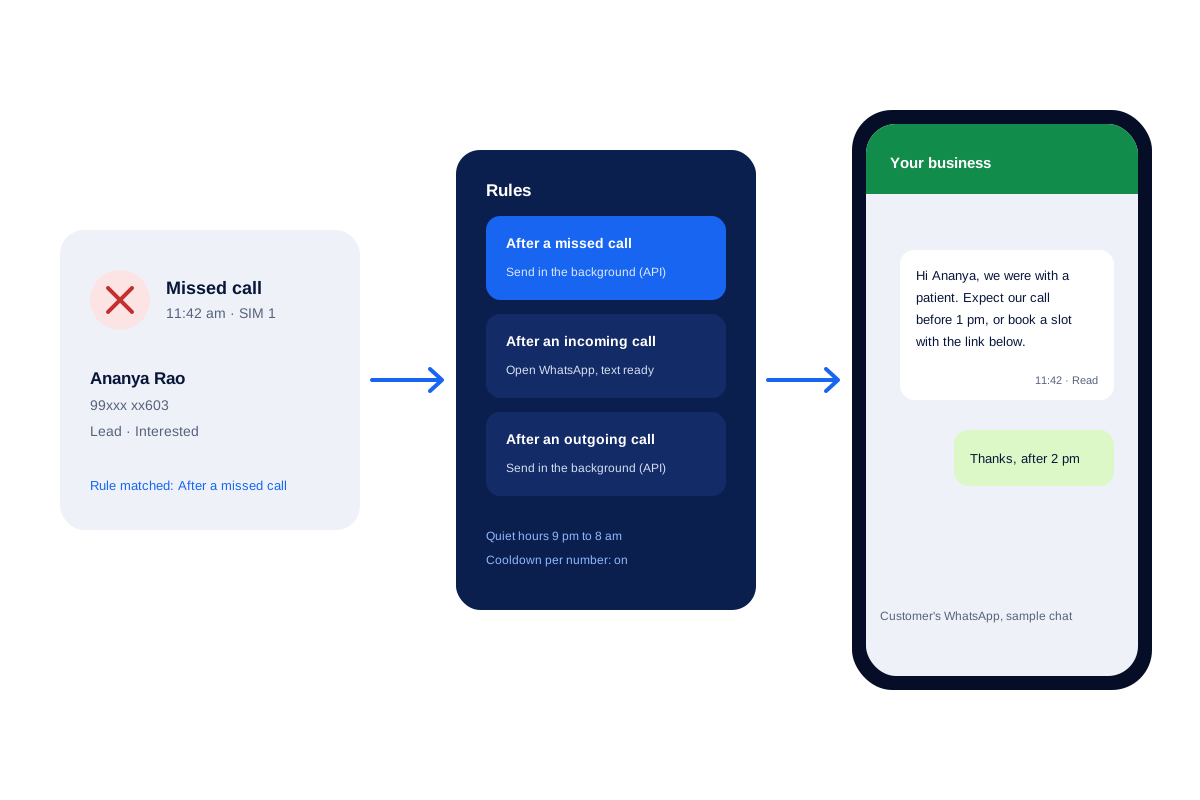
An auto WhatsApp message after call goes out by itself once a voice call ends, so nobody types the address or link again. Calsyst keeps three texts, for missed, incoming and outgoing calls, and sends them through your WhatsApp API provider or lays them ready in WhatsApp.
- Separate wording for each kind of call
- Quiet hours and a cooldown per number
- A log of every text: sent, skipped or failed
What is an auto WhatsApp message after call?
An auto WhatsApp message after call needs an app that notices the hang-up, because WhatsApp itself has no trigger for a call ending.
On Android, Calsyst notices each hang-up, matches it to your missed, incoming or outgoing rule and sends that text through your API or opens it in WhatsApp.
- A rule for each kind of call.
- No-tap sending needs an API provider.
- Without one, a single tap sends.
Auto WhatsApp message after call benefits
What the caller notices, and what your desk stops doing.
Missed callers hear back in seconds
Someone who rang while you were busy hears back at once when an API provider is linked, or after one tap when it is not.
Promises kept after sales calls
The brochure line, map pin or booking link mentioned on the call goes out as you hang up, through your API provider or ready to tap.
Wording that fits the call
An apology for a miss, a welcome for an inbound call, a recap after you rang out; {name} fills itself in.
No pestering
A cooldown per number and quiet hours stop a caller who rings three times getting three texts.
An audit trail
Each automatic text lands in a log with one of three states (sent, skipped, failed) and a note on why.
Auto message after call: the two ways Calsyst sends it
Each rule carries its own sending method. Choose the one that matches your WhatsApp account.
| Method | What happens | What you need | Best for |
|---|---|---|---|
| Background | Leaves with no tap as the call ends | An API provider added as a profile | Front desks that miss calls at peak hours |
| Ready to tap | WhatsApp opens with the words filled in | WhatsApp or WhatsApp Business on the handset | Small shops with no API account |
Meta requires approved templates for messages sent through the API. Calsyst pulls those templates in with their language and a preview. Setting up a provider is covered on the WhatsApp Business API provider page.
WhatsApp message after missed call: wording that works
Short beats clever. Three starting points to adapt:
- Missed: “Hi
{name}, we were with a patient. Expect our call before 1 pm.” - Incoming: “Good to hear from you. Our clinic is open 9 am to 7 pm, map below.”
- Outgoing: “Here is the booking link we talked about,
{name}.”
Besides {name}, the fields {city}, {company}, {interest}, {email} and {phone} fill themselves in from the lead.
Automatic WhatsApp after call: guardrails
Automation needs brakes, or customers feel chased.
- Set quiet hours, so an 11 pm call is answered at breakfast time.
- Set a cooldown per number, so repeat rings inside that window bring no extra text.
- Keep staff, relatives and suppliers on the excluded list.
- Use ask-before-send on any rule you want to approve by hand.
The same engine also fires on status changes, saved sales and ringing reminders, all part of the WhatsApp CRM. To reach a long list in one go, the bulk WhatsApp sender is the better tool.
Auto WhatsApp message after call: limits
- Android only. An iPhone keeps its call history away from apps, so no hang-up is ever seen.
- No-tap sending works only with a WhatsApp Business API provider.
- There is no SMS fallback after calls.
- WhatsApp’s own policies still decide what you may send. Message only people who expect to hear from you.
Auto message after call example: a dental clinic
A dental clinic in Bengaluru misses around 15 calls a day while the receptionist is chairside.
The clinic links its WhatsApp API provider and turns on the missed-call rule in background mode. Each missed caller gets a booking link within seconds, and quiet hours run from 9 pm to 8 am.
At lunch the receptionist opens the log, sees 6 texts sent and 1 skipped by the cooldown because the same number rang twice, and rings back the callers who have not booked.
Auto WhatsApp message after call FAQ
Which Android app can send an auto WhatsApp message after call ends?
Calsyst can. It notices each hang-up on your Android handset and sends whichever text you wrote for that kind of call.
What is Calsyst?
Calsyst is a call manager app that can send an auto WhatsApp message after each call, and it files the call and the chat under the same lead.
How do I set up a message that goes out after every call?
Use the WhatsApp automation settings: turn on the rule for missed, incoming or outgoing calls, write the words and choose how it is sent. The next matching call uses it.
Does the WhatsApp Business app have an after-call message?
No. It offers greeting and away replies for incoming chats only. Nothing in it reacts to a voice call ending.
Is the WhatsApp Business API required?
Only for sending with no tap. Without an API account, Calsyst opens WhatsApp with your words already in the box, and you press send.
Can missed callers get different wording from other callers?
Yes. Missed, inbound and outbound calls carry separate rules, so a missed caller can get an apology while an inbound caller gets your opening hours.
Will a customer who calls five times get five messages?
No, not with the cooldown per number switched on; repeat calls inside that window get no new text. Quiet hours also hold messages until morning.
Can I keep family and suppliers out of these messages?
Yes. Put them on the excluded list, or turn on ask-before-send so the app checks with you before each one goes.
Can the same tool message a lead when its status changes?
Yes. Any status, including ones you created, can carry its own text, and messages can also go out when a sale is saved or a reminder rings.
How can I check that a text actually reached the customer?
With the automatic message log, where every text shows sent, skipped or failed beside its reason, for example quiet hours.
Can an iPhone send these after-call texts?
No. iPhone never tells apps that a call has ended, because the call history stays private. This feature is Android only.