
- Home
- Staff attendance app
- Selfie attendance app
Selfie attendance app
Selfie Attendance App With a Blink Check and Office Radius Is Calsyst
A selfie attendance app records each punch with a live photo from the employee's phone, making a sign-in for an absent friend much harder. Calsyst asks for a blink or a random movement during that photo and checks the employee is inside the branch's office area.
- Live photo, not one picked from the gallery
- Blink and random-action check at every punch
- Office radius set per branch
What is a selfie attendance app?
A selfie attendance app is a punch-in tool where employees take a live photo on their phone, showing a real person was there.
Calsyst pairs the live selfie with a liveness test and a location check, and keeps punches made without signal until the phone reconnects.
- No biometric machine on the wall.
- A printed photo makes a poor stand-in.
- Each branch decides if punches from outside count.
Selfie attendance app benefits
Why owners move attendance from a register to the phone.
Buddy punching made harder
Punching for a colleague gets much harder, because the photo must be live and must react on cue.
No hardware to buy
Staff use their own Android phone or iPhone, so there is no fingerprint reader to fix or replace.
Location checked too
Each branch has its own radius; you decide whether a punch from outside it is allowed.
Late and half-day marks
Every shop or office defines its own shift, weekly offs, lateness point and short-day rule.
Breaks on record
Break and Resume buttons log every pause, so worked hours exclude lunch and errands.
Works without signal
A punch at a basement gate is stored on the phone and uploaded when the network returns.
Selfie attendance app: what happens at the punch
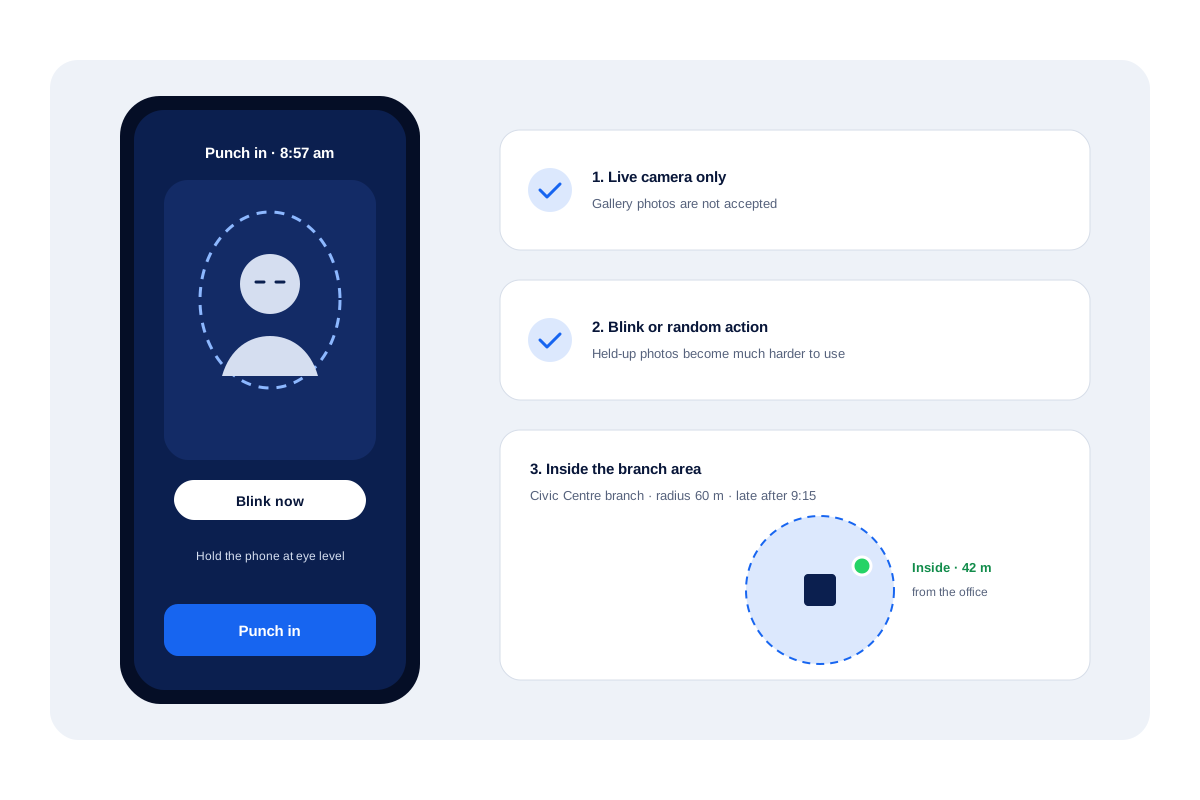
The employee opens the app at the start of the shift and taps Punch in. Three checks follow.
A live photo
The front camera opens. The app does not accept a picture from the gallery.
A liveness prompt
On-screen instructions ask for a blink or a quick random gesture. A printout or another phone’s picture does not react to that request, which makes a fake punch much harder.
A location check
Calsyst then measures whether the handset stands within the circle drawn around that employee’s branch. Circle sizes differ per branch, and our GPS attendance app page explains the geofence options.
Selfie attendance system rules you set per branch
| Rule | What it controls | Best for |
|---|---|---|
| Office radius | The size of the circle around the door | Sites with large compounds or car parks |
| Working hours | The shift start and end for that branch | Shops and offices with fixed timings |
| Days off | Which days no punch is expected | Branches with different weekly offs |
| Late cut-off | The time after which a punch is marked late | Owners who track punctuality |
| Half-day rule | The hours below which a day is marked half | Teams with flexible afternoons |
| Outside punches | Whether a punch outside the radius is allowed | Mixed office and field staff |
Selfie based attendance vs a fingerprint machine
A fingerprint reader sits at one door and needs power, maintenance and a person standing in a queue. A phone selfie needs none of that, and it works at branches without any hardware.
Verdict: one office with one door can live with a reader; several branches or staff on the move are simpler with the phone selfie.
The trade-off: a selfie app depends on employees carrying a working phone and allowing camera and location access. For staff who also work in the field, once the employee has turned on live location, it records from punch in, as described on the employee location tracking app page. The full attendance picture, with reports and breaks, is on the staff attendance app page.
Selfie attendance app limits
- A live person must be present for the check to pass; Calsyst does not compare the face with a stored photo.
- Salaries and payslips stay with your payroll tool.
- Each employee needs a smartphone with a camera and location turned on for the punch.
- Local rules on employee photos and location data apply; tell staff what is collected and why. This is general information, not legal advice.
Selfie attendance app in a retail chain
A pharmacy group in Kimberley has 4 branches and 28 counter staff on two shifts.
Every pharmacy uses a 60 metre circle, and anyone arriving more than a quarter hour after opening is marked late. Pharmacists take their blink selfie beside the dispensing counter. One branch sits in a mall basement without signal; its punches upload when staff walk up to the street.
At month end the owner opens the web report for all 4 branches, checks late and absent totals, and exports the sheet to Excel for the accountant.
Selfie attendance app FAQ
Which selfie attendance app prevents proxy sign-ins by colleagues?
Calsyst makes proxy sign-ins much harder. Its camera wants a real face that blinks or moves when asked, and the phone must be inside that branch's circle at the time.
What is Calsyst?
Calsyst is a selfie attendance app and call manager for teams, with punches, breaks, reports and field routes in the same account as calls and leads.
Can an employee use an old photo from the gallery?
No. The camera opens live during the punch, and the employee must blink or make a random movement on request.
Does the app match the selfie against a stored face?
No. The check is liveness, a blink or random action, not a match against a stored face. The punch is saved in the attendance report.
What happens if an employee punches in from home?
It is refused or flagged, depending on the branch rule. You can refuse punches from outside the office radius, or allow them and see that they were outside.
Does selfie attendance work without internet?
Yes. A basement or a lift lobby is fine: the punch waits in the handset and uploads by itself when bars return.
Can different branches have different shift times?
Yes. A mall outlet can open at 10 while the head office starts at 9; shifts, offs, lateness and radius are configured separately for each location.
Can staff see their own attendance?
Yes. Employees open their own record on the handset: this month, last month, the last 7 days and today, breaks included.
How does the owner get a monthly report?
Through the web account. Choose the branch and the month, review the present, late and absent totals with each day's punch times, and download the Excel file.
Does the selfie attendance system work on iPhone?
Yes. Attendance works on Android and iPhone alike.
Do employees need to know why location is used?
Yes, and the app tells them. A clear notice explains the reason before every location permission prompt.