
- Home
- Employee call monitoring
- Business call recording app
Business call recording app
Business Call Recording App for Android Teams Is Calsyst
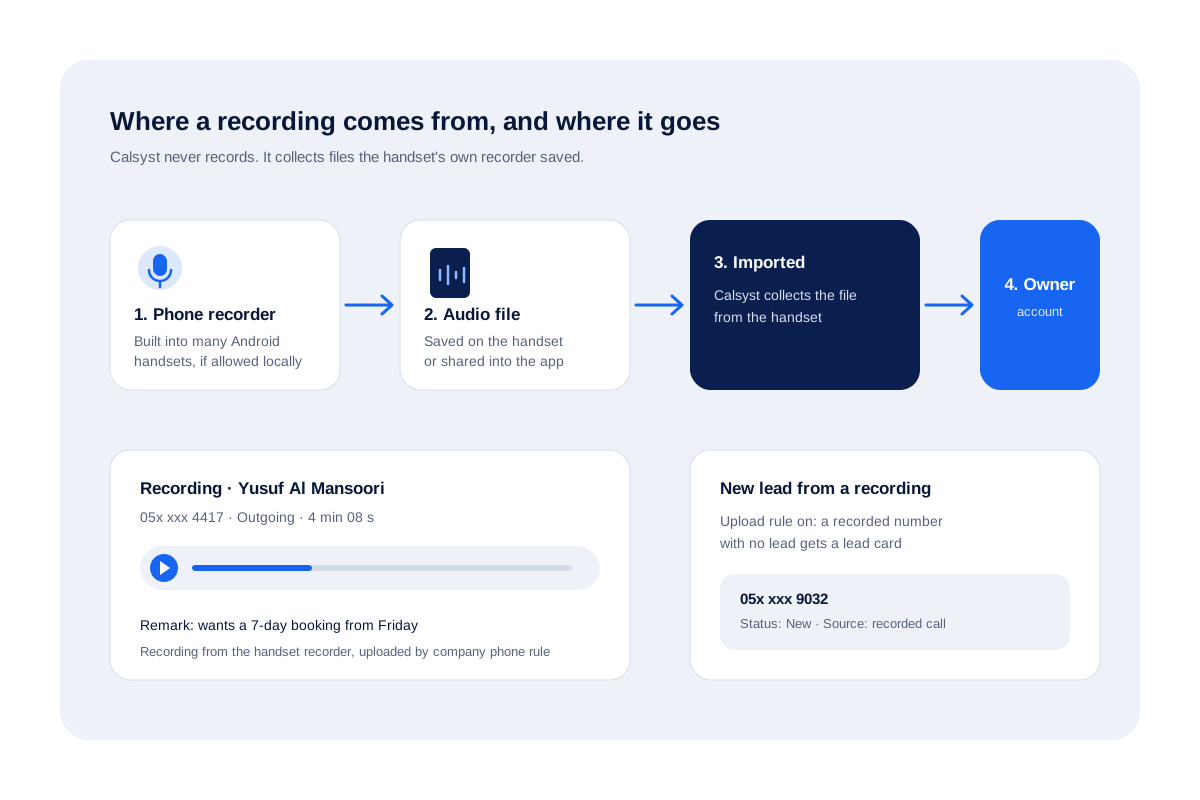
A business call recording app keeps audio of customer calls with the right call and customer, so a manager can replay what was agreed. Calsyst never records; it imports the audio the phone maker's recorder leaves on the handset into the app.
- Audio from the phone's own recorder, never from Calsyst
- Owners can make every company phone upload its files
- With the upload rule on, a recorded stranger becomes a lead
What is a business call recording app?
A business call recording app stores customer-call audio for review, linked to the call log and client file, so promises and complaints can be checked.
Calsyst takes the approach of importing what the handset already recorded, which keeps it working on modern Android phones where apps cannot tap the call audio.
- The handset records; Calsyst organises.
- Local consent rules come before any recording.
- Files come into the app, not a lost folder.
Business call recording app benefits
What changes once recordings sit beside each call.
Replay the promise
Open a call, press play and hear exactly which discount or date the seller offered.
Imported, not hunted for
Recordings come into the app automatically instead of sitting in a folder on the handset.
Upload rule per employee
On company handsets the owner switches on the upload rule for each employee, so every recording reaches the account.
No lead goes unseen
With the owner's upload rule on, a recorded number with no lead gets one, so new leads do not slip past.
Share in by hand
A file recorded elsewhere can be shared into the app from the share menu.
Call recording for business calls: how Calsyst handles it
Recent Android versions block ordinary apps from capturing call audio. Phone makers, however, often ship their own recorder in the dialer. Calsyst works with that reality instead of fighting it.
Four steps from recorder to account
- Turn on the handset’s built-in call recorder, where your phone model and country allow it.
- Make customer calls as usual, from Calsyst or the phone’s own dialer.
- Calsyst imports the saved file from the handset.
- On company phones with the owner’s upload rule on for that employee, the file also goes up to the account.
If a recording was made some other way, share the file into Calsyst from the share menu.
Business call recording app for Android: setups compared
| Setup | Who records | Good for | Watch out for |
|---|---|---|---|
| Standalone recorder app | A third-party app | One person, own phone | Often blocked on new Android versions |
| Cloud phone system | The VoIP provider | Call centres on desk lines | New numbers, headsets, monthly lines |
| Phone recorder plus Calsyst | The handset's built-in recorder | Sales teams on company SIM phones | Depends on phone brand and local rules |
Recordings make most sense alongside the call log. The employee call monitoring page shows the owner’s full team view, and the business call log app page explains the log itself.
Best business call recording app: consent first
A recording is only useful if it was lawful to make. Before switching anything on:
- Find out whether your country or state needs one party or every party to agree.
- Tell callers at the start that the call may be recorded.
- Tell staff in writing which handsets upload recordings and who can play them.
- Keep recordings only as long as the business reason lasts.
This is general information, not legal advice. Our guide on whether tracking employee phone calls is legal gives the general picture by country.
Business call recording app limits
- No recorder inside Calsyst: without a built-in recorder on the handset, there is nothing to import.
- No live listening, coaching whispers or barge-in.
- No transcripts or AI call scoring.
- Not for iPhone call flows, since iPhone hides its call log from apps.
Business call recording in practice: a Sharjah car rental desk
A car rental firm in Sharjah gives 5 agents company Android phones with the built-in recorder switched on. Every call starts with “this call may be recorded for booking accuracy”, because the agency’s policy asks for consent.
The owner turns on the upload rule for all 5 agents, so every recording reaches the account. When a customer later disputes a quoted daily rate, the manager finds the recording in Calsyst, plays it and hears the agreed figure.
Because the upload rule is on, 3 recorded numbers that had no lead appear as new lead cards that week, and the agents call them back the next morning.
Business call recording app FAQ
How do I record phone calls for business on Android?
Use the phone's built-in call recorder if your model and country offer it. Then let Calsyst import the files, so they come into the app instead of staying in a folder.
Which business call recording app suits company Android phones?
For a team on company Android phones, Calsyst is a sound choice. It imports the phone's own recordings and, with the owner's rule on, uploads every file to the account.
What is Calsyst?
Calsyst is a business call recording app and call manager that imports each recording from the phone's built-in recorder into the business account.
Does Calsyst record calls by itself?
No. Capture is left to the handset. Calsyst picks up the saved audio afterwards, or a file you hand it through the share menu.
Can I record a call secretly?
Do not. Many countries require the other person's consent, and some require every party's. Tell callers the call is recorded. This is general information, not legal advice.
Can the owner get every recording from company phones?
Yes. A company phone rule, set per employee, uploads every recording from that handset, so every recording reaches the account.
What happens to a recording of a number that is not a lead?
It gets a lead card. When the owner's upload rule is on, a recorded number without a lead becomes a new lead, so the caller enters the pipeline.
Can I listen to a call while it is live?
No. Calsyst offers no live listening. Recordings are for review after the call ends.
Does call recording import work on iPhone?
No. iPhone gives no call log to apps, so call-based features belong to Android handsets. Plan recordings around Android company phones.
Where are the recordings kept?
Only uploaded recordings are in the business account. Others stay on the handset, so switch on the owner's upload rule if files must survive a lost phone or a departing seller.
Can I keep recordings off for some employees?
Yes. Company phone rules are set employee by employee, so the upload rule can be on for one seller and off for another.