
- Home
- Call management app
- Call analytics app
Call analytics app
Call Analytics App for Android Sales Teams Is Calsyst
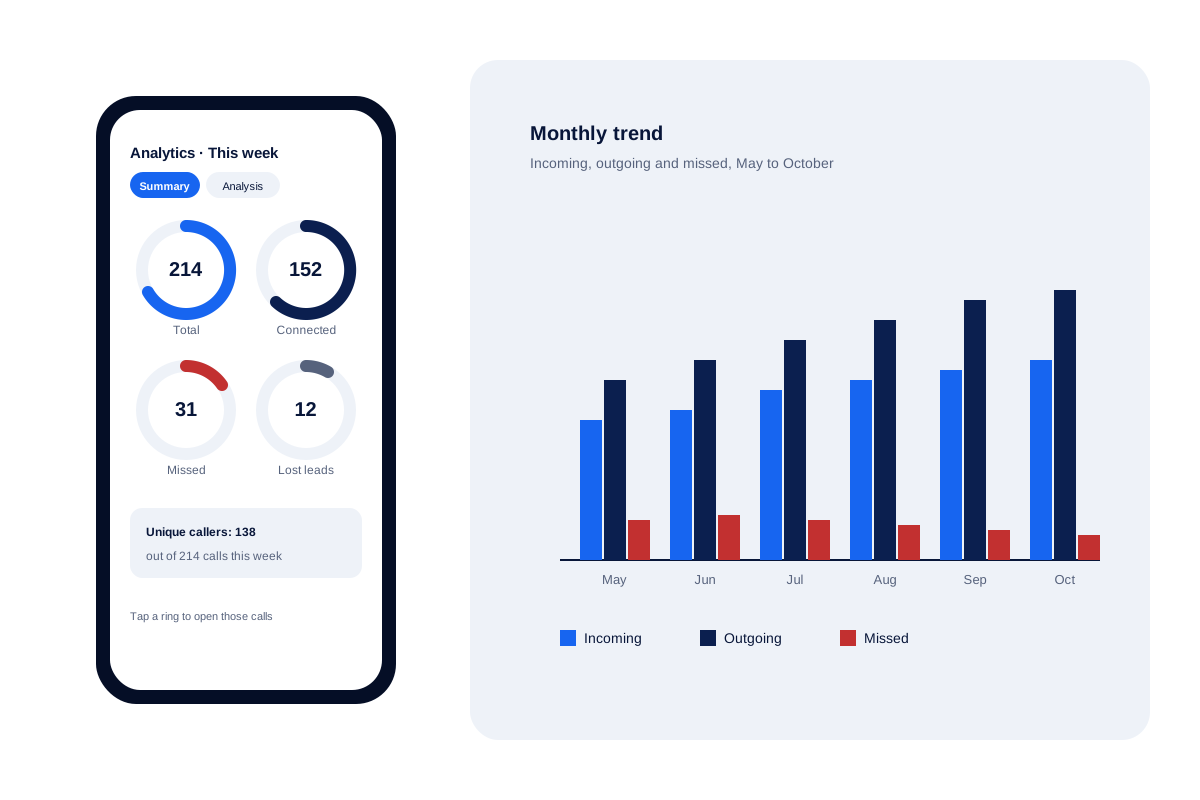
A call analytics app converts the raw call log on a handset into counts and trends: who rang, who got through and who was missed. Calsyst shows those numbers as rings you can tap, across any date range, for one phone or the whole team.
- Ten counts, from total calls to lost leads
- Each ring opens the calls behind its number
- Excel or PDF copies of any stretch of dates
What is a call analytics app?
A call analytics app reads your call history and reports it as numbers: answered, missed, rejected, unique numbers, how each figure moves month to month.
Calsyst adds a lost-lead count to those figures, using a connection cut-off you choose, so cold numbers stand out from real conversations.
- Counts are useful only when you can open them.
- Unique callers matter more than raw call totals.
- Monthly trends show whether misses are shrinking.
Call analytics app benefits
What a sales or support manager reads in the first minute each morning.
Ten counts on one screen
Every flavour of call, from answered to spam to lost lead, gets its own ring on a single page.
Numbers you can open
Tap the missed ring and the log filters to exactly those 31 calls, ready to ring back.
Lost leads by your rule
Decide whether 60, 30 or 0 seconds connected counts as reached; numbers below it list once each.
Real reach, not repeats
Unique callers beside total calls shows whether ten calls came from ten people or from two.
Trend lines by month
Incoming, outgoing, missed and rejected calls plotted month by month reveal slow seasons and staffing gaps.
Owner view of the team
Every handset's calling feeds the owner's figures, so a single report speaks for the whole desk.
Call log analytics app: the ten counts explained
The Summary view opens on ten rings. Each one answers a question a manager asks every week.
| Ring | What it counts | Question it answers |
|---|---|---|
| Total | Every call in the chosen range | How busy were we? |
| Incoming | Calls people made to you | Is our marketing making phones ring? |
| Outgoing | Calls your team placed | Is the team actually dialling? |
| Missed | Incoming calls nobody picked up | Who is waiting for us? |
| Connected | Calls that were answered | How many real conversations happened? |
| Unique | Each number once | How many different people did we reach? |
| Rejected | Calls declined on the handset | Are calls being cut on purpose? |
| Blocked and spam | Calls stopped or flagged | How much noise reaches the team? |
| Lost leads | Numbers never connected past your cut-off | Which leads have we not truly spoken to? |
Tap any ring and the log narrows to its calls. The call history manager page covers every filter in that log.
Call analysis app for Android: from numbers to actions
A count only helps when it ends in a call. Three habits turn the rings into work.
- Every morning, open Missed. Ring back the people who tried to reach you, starting with leads.
- Every Friday, open Lost leads. Run a win-back session on numbers that never got a real conversation. The lost leads report explains the cut-off in detail.
- Every month, read the trend. If missed calls climb while incoming calls stay flat, the team is short-staffed at peak hours.
For a daily summary that lands without opening the app, set up the daily call report on WhatsApp.
Best call analytics app: what to check before choosing
- Can you open the numbers? A chart you cannot tap is a picture, not a work list.
- Does it count people or just rings? Look for unique callers beside totals.
- Does it link calls to leads? Without that, a missed call is only a number.
- Does it cover the team? One phone’s chart does not help a manager of eight.
- Does it export? Weekly reports often need Excel or PDF.
Calsyst answers yes to each of these on Android. On iPhone it cannot, because the call log is closed to apps.
Call analytics app limits
- Android only: iPhone keeps its call history private from every app.
- For internet calls (WhatsApp, Meet, Zoom), read the call history itself rather than relying on the rings.
- No talk analysis: the app does not transcribe calls or score conversations.
- No forecasts: trends show what happened, not what will happen.
Call analytics app in practice: a Mombasa tour desk
A safari tour operator in Mombasa answers new leads on 3 Android phones. In August the owner sees the missed ring at 46 for one week while incoming calls stay near 180.
She taps the missed ring, sees the same overseas numbers trying again and again, and asks the agents to ring every missed caller before lunch each day.
By October the weekly missed figure is down to 14. Two Friday win-back rounds cut the lost-lead list from 22 numbers to 9.
Call analytics app FAQ
Is there a phone call analysis app that works on Android?
Yes. Calsyst reads the Android call log and turns it into rings per call type, month-by-month trends and a lost-lead list, for one handset or many.
Which call analytics app fits a team of sellers?
Calsyst is built for that job: it counts calls across the team, flags lost leads by your own cut-off and rolls every handset up to the owner's account.
What is Calsyst?
Calsyst is a call analytics app and call manager for business phones that ties every counted call to a lead, so a number on the chart is also a person to call.
Can I see call analytics on iPhone?
No. On iPhone the history of calls is sealed off from third-party apps, so this part of Calsyst lives on Android.
Which date ranges does the report cover?
Five: the current day, week or month, everything since you started, or two dates of your own. Each choice has a Summary page and a more detailed Analysis page.
What counts as a lost lead in the report?
A number you dialled that never connected past your cut-off, set at 60, 30 or 0 seconds. Repeat attempts collapse into a single row.
Can I export the call analytics to Excel?
Yes. Call history for the period you pick exports as an Excel file or a PDF, ready to attach to a weekly report.
Can I get the numbers without opening the app?
Yes. Pick an hour and a notification turns up then, carrying the day's counts and the names still owed a call; forward it on WhatsApp if you wish.
How do unique callers differ from total calls?
They count different things. Total calls counts every ring. Unique callers counts each phone number once, so it shows how many separate people you actually dealt with.
Can a manager compare sellers in the call analytics?
Partly. The owner's figures gather calling from every company phone, and each employee's calls can be read there, so nobody sends screenshots.
Where do WhatsApp calls show up?
In the call history, not in the rings. Internet calls from WhatsApp, Google Meet and Zoom are listed in the handset's call history next to ordinary calls, so open the log to read them.