
- Home
- Auto dialer app
- Auto dialer software
Auto dialer software
Auto Dialer Software for Small Business Sales Teams Is Calsyst
Auto dialer software rings through a contact list without anyone pressing digits, so callers spend the day talking instead of keying numbers. Calsyst puts that dialer inside each salesperson's Android handset and gives the owner a web account for lead sources and rules.
- No PBX, SIP trunk or headset system to buy
- A pause between calls the admin can lock
- Leads in from sheets, forms and webhooks
What is auto dialer software?
Auto dialer software calls the numbers on a list for an agent, moves to the next one after each call and logs every outcome.
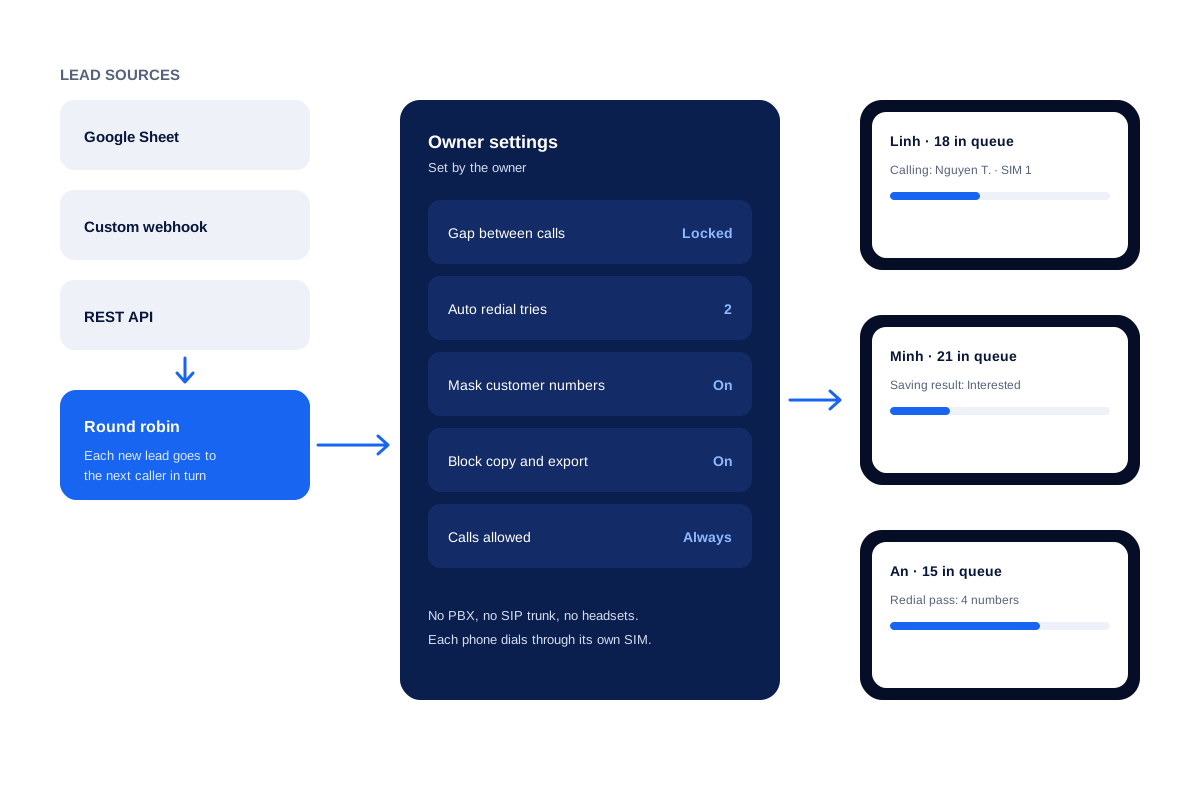
Calsyst runs the dialing on each caller's Android phone through its SIM, while the owner manages leads, rules and reports from one account.
- The phone is the dialer; no desk hardware.
- Each handset handles a single live conversation.
- The admin can lock the pause between calls.
Auto dialer software benefits
What changes for a small team of callers.
Nothing to install on desks
Each caller needs an Android phone with a SIM and the app, and nothing else.
One pace for the team
The admin sets the gap between calls and can lock it, so every caller works the same way.
New leads arrive by themselves
Rows from a linked sheet, website forms sent by webhook and API pushes all land as leads, and the Web CRM can deal webhook or live-sheet arrivals to callers in rotation.
Calls the owner can see
The owner account shows the calls of every employee, with connected and missed totals.
Customer numbers protected
Company handsets can hide customer digits and refuse copy or export, by the owner's choice.
Automated dialer software types: where Calsyst sits
Dialers fall into four usual modes. Preview mode opens the customer record and lets the agent decide when to ring. Progressive mode waits until the agent hangs up, then rings the following number. Power mode holds a fixed pace through the list. Predictive mode rings many lines together and hands live answers to waiting agents.
On a Calsyst handset the after-call sheet asks for the result when a call ends, then the session carries on to the next number, which sits nearest to progressive dialing. Every mode is set out side by side on the page about power dialer vs predictive dialer.
Auto dialer software for small business: a buyer checklist
Ask these questions of any dialer before you sign up. The last column gives the Calsyst answer, checked against the live feature list.
| Question to ask | Why it matters | Calsyst answer |
|---|---|---|
| What hardware do callers need? | Desk phones and headsets add cost and setup time | An Android phone with a SIM |
| Which number does the customer see? | Unknown numbers get fewer answers | The SIM number of the caller |
| Can the owner fix the settings? | One pace keeps work fair and measurable | Yes, the admin can lock the gap |
| How do new leads arrive? | Copying leads by hand wastes the first hour of a lead | Google Sheets, REST API, custom webhook |
| Who gets each new lead? | Fair sharing avoids fights and idle callers | Turns between callers, on the Web CRM, for webhook or live-sheet arrivals |
| Can the owner see every call? | A manager needs facts, not guesses | Yes, team call logs |
| Can call data go to our other CRM? | Two systems with different data cause errors | Through webhooks or the outbound API |
| What happens to no-answers? | Many leads answer on the second try | Auto redial, 1 to 3 tries |
Auto dialer software for PC: what runs where
The work splits between two screens. Each caller dials on the phone. The owner and the lead sources live on the web.
- On the phone: the calling session, the after-call sheet, follow-up reminders and the call log.
- On the web: lead sources such as a custom webhook or a live sheet, round-robin sharing, the AI first call, and the team view.
- Between the two: the Chrome click to call passes a number from any browser tab across to the handset.
If your team must dial from a computer with a headset, a softphone product fits you better. If they already call from mobiles, read about the auto dialer app on Android, and about the telecalling CRM that holds the leads.
Auto dialer software limits
- No predictive dialing. Each phone makes one call at a time.
- No recorded voice messages to a list.
- No virtual or toll numbers. Calls use mobile SIM cards.
- Calsyst never records audio itself; recordings come from the built-in recorder of the handset.
Auto dialer software example: a language school in Ho Chi Minh City
A language school in Ho Chi Minh City has 3 counsellors who call students who filled in a web form. The forms reach a Google Sheet.
The owner links that sheet to the Web CRM as a live sheet and switches on rotation, so each new lead lands with the counsellor whose turn it is. A locked pause between calls keeps all 3 counsellors on the same rhythm.
Every Friday the owner reads connected calls per counsellor in the team log. When one counsellor takes a week off, a bulk transfer spreads her open students across the other two.
Auto dialer software FAQ
Which auto dialer software makes sense for a small team of callers?
Calsyst fits a small team that already calls from mobiles. There is no PBX or headset to buy, and the admin can lock one pause between calls for every dialer.
Who makes Calsyst and what does it do?
Calsyst is a product of AIodify. It is auto dialer software for Android phones that calls lead lists, logs each result and reminds callers about follow-ups.
Do I need consent before I call leads with auto dialer software?
In most places, yes. Laws usually ask for consent or an existing customer relationship, and they protect numbers on do-not-call registers. Check the law in each country your leads come from. This is general information, not legal advice.
Can I run auto dialer software on a PC?
Partly. The dialing in Calsyst happens on the phone. On the PC you use the web account, and the Chrome click to call sends numbers from the browser to the phone.
Does the software need a PBX, a SIP trunk or headsets?
No. Calls go through the SIM card in each phone. The phone speaker or any earphones you already have are enough.
Can a caller change the dialer settings set by the owner?
Not once the admin has locked it. The pause between calls is one value an owner can freeze for every caller.
Can leads from my website reach the dialer without copying?
Yes. A custom webhook or a REST API source adds website leads, and a Google Sheet works too. On the Web CRM, whatever arrives by webhook or live sheet can then rotate between callers.
Can call results go to the CRM we already use?
Yes. Call events leave Calsyst by webhook, or your systems read them from an outbound API that only allows reading. Zapier, Make, Pabbly or n8n can carry them across; no ready-made connector exists.
Can an AI voice agent make the first call to a new lead?
Yes. After a single setup on the Web CRM, an AI voice agent rings every fresh lead first and hands it, with what it heard, to the next person in the rotation.
What does each caller need to start?
Just a phone. One Android handset with a working SIM, plus the Calsyst app. Make Calsyst the default dialer, or switch on CRM mode if the caller prefers the stock dialer.
Does each caller get their own queue?
Yes. Leads given to a caller form that caller's pending queue, and the owner can open every queue.