
- Home
- Auto dialer app
- Bulk calling app
Bulk calling app
Bulk Calling App for Android Lead Lists Is Calsyst
A bulk calling app dials a big batch of phone numbers in order, so a campaign no longer depends on hand dialing and a ticked printout. Calsyst takes an imported list of hundreds of leads and rings them one by one from your SIM, with a live person on every call.
- Lists arrive as spreadsheets, CSV files or a live Google Sheet
- One live call at a time, never a recorded message
- Split a big list between several callers
What is a bulk calling app?
A bulk calling app dials many numbers in sequence from one list, logs each outcome and moves to the next number without anyone typing digits.
With Calsyst the list lives on the phone as its own imported list, so you can filter it, dial it, hand parts of it to teammates and delete it after the campaign.
- Live calls, not voice broadcasting.
- Duplicates and country codes cleaned on import.
- Finished calls can carry a status, so untouched numbers stand out.
Bulk calling app benefits
Why a long list stops being a chore.
Clean list on day one
The import drops duplicate numbers and fixes country codes before the first call.
Steady pace for hours
Once a call ends, Calsyst waits for your chosen pause and dials again, so a caller holds one rhythm across a long list.
Shared between callers
Bulk transfer splits ticked leads or a whole filter between teammates in turns.
Follow-up text after each call
Pick a WhatsApp wording for calls you dialled, another for calls you got, and a third for calls nobody picked up.
Bulk calling app vs bulk voice call service
Two very different products share the words “bulk calling”. Pick the one that matches the work, because they do not replace each other.
A bulk voice call service plays one recorded message to thousands of numbers. Nobody talks, and the listener cannot ask a question. A bulk calling app such as Calsyst dials the numbers in sequence, and someone from your team holds each conversation.
| Point | Bulk calling with Calsyst | Bulk voice call service |
|---|---|---|
| Who speaks | A person from your team | A recorded message |
| Number the customer sees | The SIM number of the caller | A number of the service |
| Can the customer reply | Yes, it is a normal call | Usually by pressing a key |
| What you learn per number | Status, remark and next follow-up | Answered or not, key pressed |
| Calls at the same time | One per phone | Many lines at once |
| Best for | Sales, renewals, admissions, collections | Short alerts and announcements |
If you need the broadcast kind, Calsyst is the wrong tool. If you need conversations with each person on a long list, read on.
How to do bulk calls from an Android phone
- Keep the numbers in a spreadsheet (Excel, CSV or JSON) or in a shared Google Sheet.
- Share the file into Calsyst from WhatsApp, email or the browser, or link the sheet.
- Match each column to a field: name, mobile number and any field you created. Choose the country the numbers belong to.
- Open the new list and start a calling session.
- When you hang up, tag the outcome and jot a short remark on the sheet that appears; then the session carries on to the next number.
The guide to the auto dialer from Excel shows the import screens step by step. For the session settings, such as the gap and the ring limit, see the auto dialer app page.
Bulk calls with a team: dividing one list
A list of several hundred numbers is too long for one person in a day. Split it before the campaign starts.
Tick the leads, or take the whole filter, and run a bulk transfer. Calsyst shares the leads between the teammates you pick, in turns, and shows a preview first. Every caller then works from their own pending queue, and the team call log lets the owner follow the progress of each person. More on rules for sharing leads is on the lead assignment software page.
Numbers that did not answer come back in the redial pass. The auto redial app page explains the retry choices.
Bulk calling app for Android: limits
- One phone makes one call at a time. Ten callers mean ten phones.
- No recorded message is played. Calsyst is not a voice broadcasting service.
- Calls use mobile minutes from the SIM plan of each phone.
- The calling law of your country still applies, for example do-not-call registers and the hours when calling is allowed. This is general information, not legal advice.
Bulk calling app example: an event list in Toronto
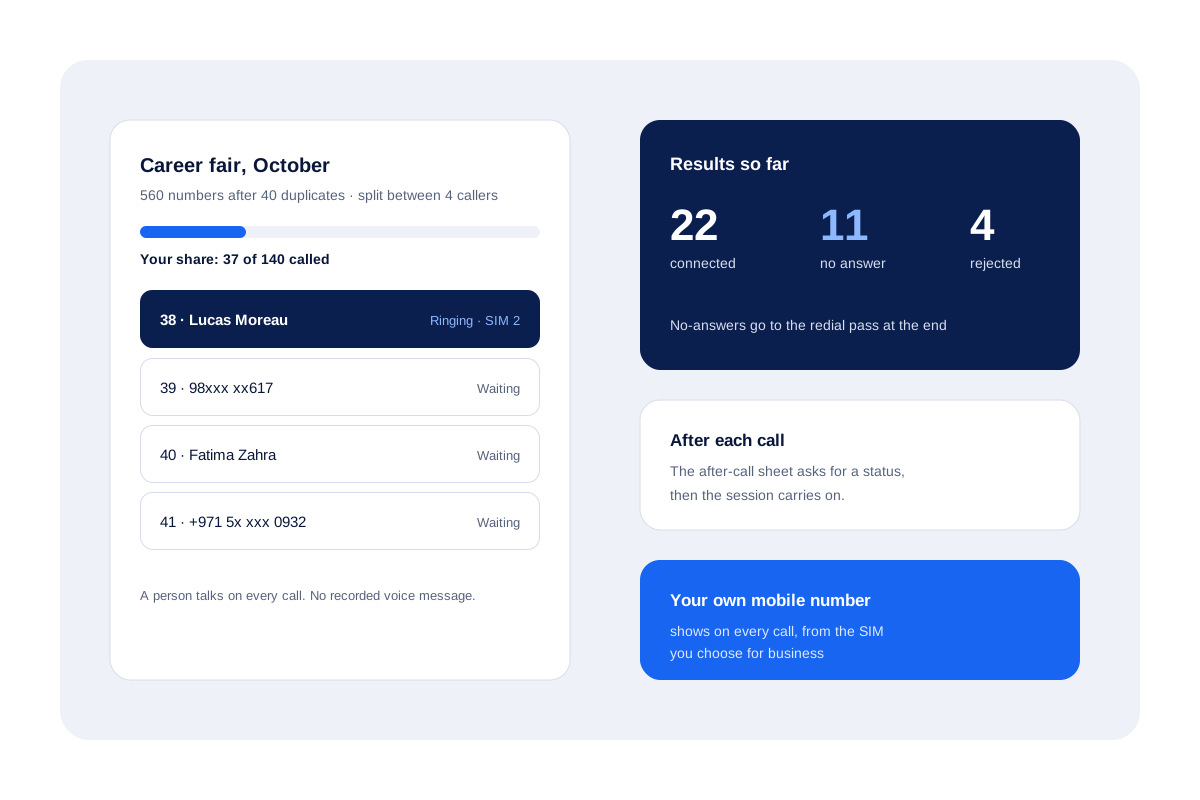
A training company in Toronto collects 600 names at a career fair. The next morning the manager imports the spreadsheet. The import drops 40 repeated numbers, which leaves 560 leads in one list.
The manager splits the list in turns between 4 callers, so each person gets 140 leads. Each caller runs two sessions a day and sets a follow-up for anyone who asks for a course outline.
By the third day every number has a status. People who never answered are in the redial pass, and the people who were interested have a reminder on the day they chose.
Bulk calling app FAQ
How do I make bulk calls from my phone?
Import the numbers as a list, open it and start a calling session. Calsyst rings each number in turn, a short sheet invites you to tag the outcome when you hang up, and the list keeps moving.
Which bulk calling app works with my own SIM card?
Calsyst does. It places every call through the SIM in your Android phone, so you need no cloud phone line and the customer sees your mobile number.
What kind of app is Calsyst?
Calsyst is a bulk calling app and call manager that dials big lead lists one by one, keeps notes on each lead and reminds you about the next call.
What is a bulk voice call, and does Calsyst send one?
No. A bulk voice call plays one recorded message to many numbers at once, and Calsyst never does that. A real person speaks on each call it places.
Does the app remove repeated numbers from a large list?
Yes. While the file loads, Calsyst throws out repeated numbers and fixes the country code, so nobody on the list hears from you twice.
Can I split one large list between several callers?
Yes. Tick the leads, or take a whole filter or just the first N, and hand them out to teammates in rotation. You check the split on a preview screen first.
What happens to numbers that did not answer during bulk calls?
They get up to 3 more tries in a redial pass. You decide if that pass starts straight away, at the end of the list or later in the day.
Can I call a list that my team keeps in Google Sheets?
Yes. Link the sheet as a lead source. Calsyst looks at it on a timer and turns every fresh row into a lead.
How do I see which numbers in the list are already called?
Check the Done tab. Worked leads sit there, each labelled with the way it got finished. Untouched leads remain in the list for the next session.
Can I delete a list when the campaign is over?
Yes. Removing an imported list takes away only the leads that came in with that file. Leads that were in Calsyst before stay where they are.
Can each customer on the list get a WhatsApp text after the call?
Yes. Prepare separate wording for calls you placed, calls you received and calls that went unanswered. It goes out through your WhatsApp API provider, or opens ready to tap without one. Night blocking and a waiting time per number stop repeats.