
- Home
- WhatsApp CRM
- WhatsApp lead management
WhatsApp lead management
WhatsApp Lead Management Is Calsyst: Every Chat Becomes a Lead
WhatsApp lead management is the way a business captures, sorts and follows up the buyers who message it on WhatsApp. With Calsyst, a single tap saves the person behind a conversation as a lead, their calls sit beside the messages, and the call-back gets booked.
- One tap from chat to lead, then tag the source yourself
- Calls and chat history on the same customer screen
- Unread and unanswered chats flagged for the team
What is a whatsapp lead management?
WhatsApp lead management means saving every serious WhatsApp chat as a lead that has an owner, a status and a dated next action.
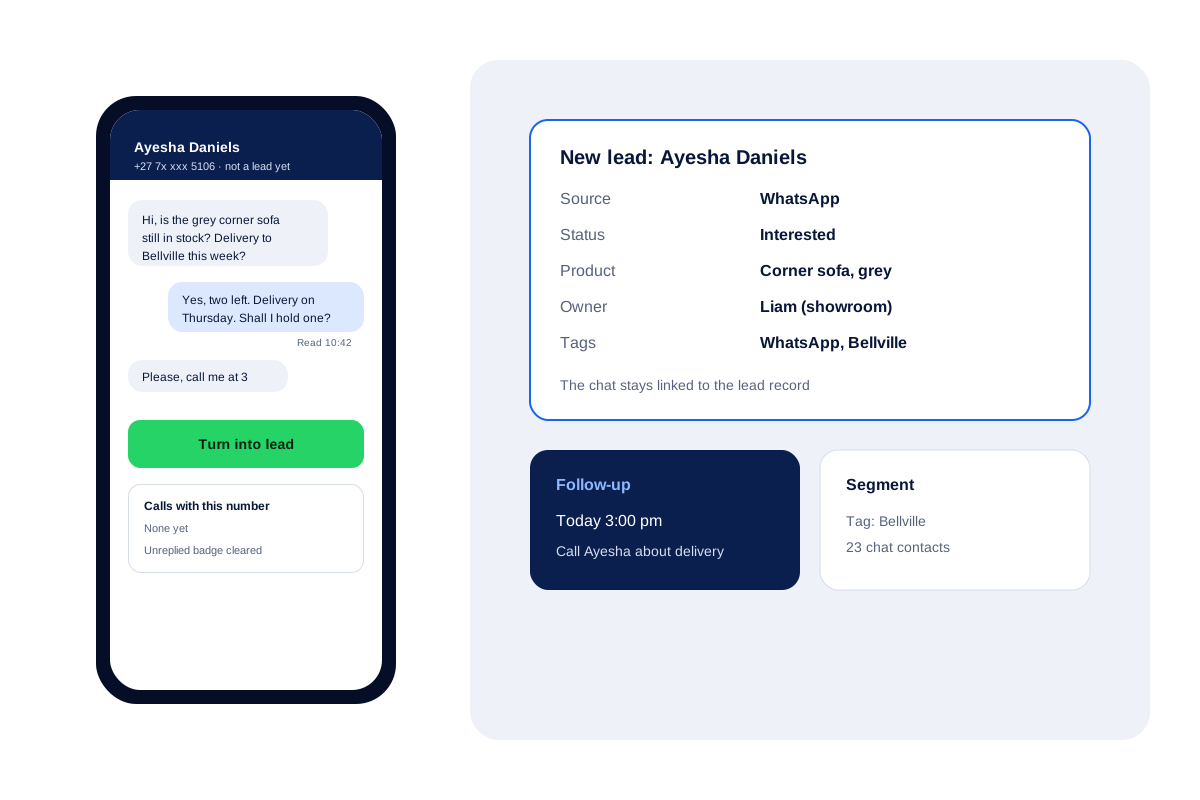
Calsyst is a WhatsApp lead management tool that works from its WhatsApp CRM inbox: a single tap converts the conversation into a lead, then you pick the status and owner and set a follow-up.
- Conversations belong to the company account.
- A lead made from a chat keeps the conversation.
- Status changes can send their own WhatsApp text.
WhatsApp lead management benefits
What changes once WhatsApp buyers stop living on one person's phone.
Chat to lead in one tap
One tap saves the buyer as a lead; add the WhatsApp source tag, a status, products and an owner yourself.
Nothing slips past the team
Badges mark conversations nobody has opened and those still waiting for a reply.
Calls beside the chat
Open a conversation and the buyer's past calls and lead fields sit right alongside what they typed.
Follow-ups that ring
Book the call-back from the lead, and the alarm rings with a WhatsApp button on it.
Segments for campaigns
Group chat contacts by tags and your own fields, then message a segment in one send.
Chats owned by the business
A resignation takes nothing with it: every thread remains with the company, ready for whoever picks up the buyer.
WhatsApp leads: why chats get lost without a system
Managing WhatsApp leads means giving every buyer chat an owner, a status and a dated next step instead of leaving it on one seller’s phone.
A buyer messages the showroom number, a seller replies from the shop phone, and the conversation sinks under fifty newer chats by evening. Nobody knows whether the buyer was called back, and if that seller leaves, the chat leaves too.
Calsyst fixes this in three moves. The team answers from the WhatsApp CRM inbox, where chats sit in the business account. Any serious chat becomes a lead with one tap. The lead then gets the same treatment as a phone lead: a status, an owner and a call-back that rings.
WhatsApp lead management software: from first message to sale
Six steps take a buyer from the first WhatsApp message to a paying client.
| Step | What the seller does | What Calsyst does |
|---|---|---|
| Message arrives | Sees the unread badge in the inbox | Shows the chat with any past calls from that number |
| Buyer is serious | Turns the chat into a lead with one tap | Saves the lead; the seller adds the WhatsApp source tag |
| Qualify | Picks a status, product and owner | Can send that status's automatic WhatsApp text |
| Plan the call | Books a follow-up for 3 pm | Rings the alarm with call and WhatsApp buttons |
| Call | Rings the buyer from the SIM | Files the call next to the WhatsApp thread |
| Close | Marks the sale | Moves the buyer to the Clients tab |
WhatsApp lead management CRM and the rest of your follow-up
Chats are only one source. Missed calls can start a chat too: the auto WhatsApp message after call sends a reply when nobody picks up, and many buyers answer it. For one message to many saved leads, see the bulk WhatsApp sender.
If you already run another CRM, the CRM with WhatsApp integration page explains how chats and leads connect in Calsyst.
WhatsApp lead management limits
- The WhatsApp CRM inbox needs a WhatsApp Business API provider; Calsyst is not one.
- No chatbot that answers buyers by itself.
- No tracking of click-to-WhatsApp ad campaigns.
- Outside Meta’s 24-hour window, you can start again only with an approved template.
WhatsApp lead management in a Cape Town showroom
A furniture showroom in Cape Town gets about 60 WhatsApp chats from buyers a week from its shop sign and catalogue posts.
Two sellers answer from the WhatsApp CRM inbox. When a buyer asks about the grey corner sofa and delivery to Bellville, the seller turns the chat into a lead, tags it “WhatsApp” and “Bellville”, and books a call for 3 pm.
The alarm rings at 3, the seller calls and confirms Thursday delivery, and the lead moves to the Clients tab. A month later the owner messages the “Bellville” segment of 23 chat contacts about a weekend sale.
WhatsApp lead management FAQ
Which WhatsApp lead management CRM keeps calls and chats together?
Calsyst does. Its WhatsApp CRM inbox puts a buyer's calls and lead fields beside the messages, and a single tap saves that buyer as a lead.
What is Calsyst?
Calsyst is a WhatsApp lead management CRM and call manager that captures buyers from chats, calls them from your SIM and keeps every follow-up on time.
What is a lead in WhatsApp?
Simply, a person who messaged your business with buying interest. Saved as a lead, they are given a seller, a status and a dated next action.
What is the 24 hour rule on WhatsApp?
It is a 24-hour window. Once a buyer stops writing, you can keep replying freely for 24 hours; later, only an approved template can restart the chat, under Meta's WhatsApp Business Platform rules.
Is a WhatsApp Business API account required for the WhatsApp CRM inbox?
Yes. The WhatsApp CRM inbox needs an API provider, and Calsyst connects to the API provider you choose; without one, its WhatsApp buttons open the normal app with your text ready.
Can several sellers answer the same WhatsApp number?
Yes. Chats sit in the business account, with unread and unreplied badges for the team.
Does the chat stay linked after I make a lead?
Yes. The lead keeps the conversation, so anyone who opens the record sees what the buyer wrote.
Can a status change send a WhatsApp message by itself?
Yes. Each status, custom ones included, can have its own automatic message, sent through your API provider or opened ready to send.
How do I message all WhatsApp leads from one area?
Tag them, filter the chat contacts by that tag to make a segment, and send an approved template to the segment.
What happens to WhatsApp leads when a seller quits?
Nothing is lost. Their threads remain with the company, and the owner can hand that seller's leads to colleagues with every earlier note intact.
Can a missed call trigger a WhatsApp reply?
Yes. Missed, incoming and outgoing calls can each trigger their own text, sent through your WhatsApp API provider, or ready to tap without it. Replies often become leads.