
- Home
- Call management app
- Call management software
Call management software
Call Management Software for Small Business Owners and Staff by Calsyst
Call management software logs, sorts and reports a team's calls, so an owner knows who spoke to which customer and when. Calsyst builds that picture from the Android handsets staff already carry, rather than from rented lines and desk sets.
- Totals for each employee, every day
- Owner rules for company handsets
- Missed customers nobody rang back, by name
What is a call management software?
Call management software keeps a team's calls in one place, with totals per person, missed calls that still need returning and rules for company handsets.
With Calsyst the source of every record is the employee's own handset, so a small business gets the owner view without installing a phone system.
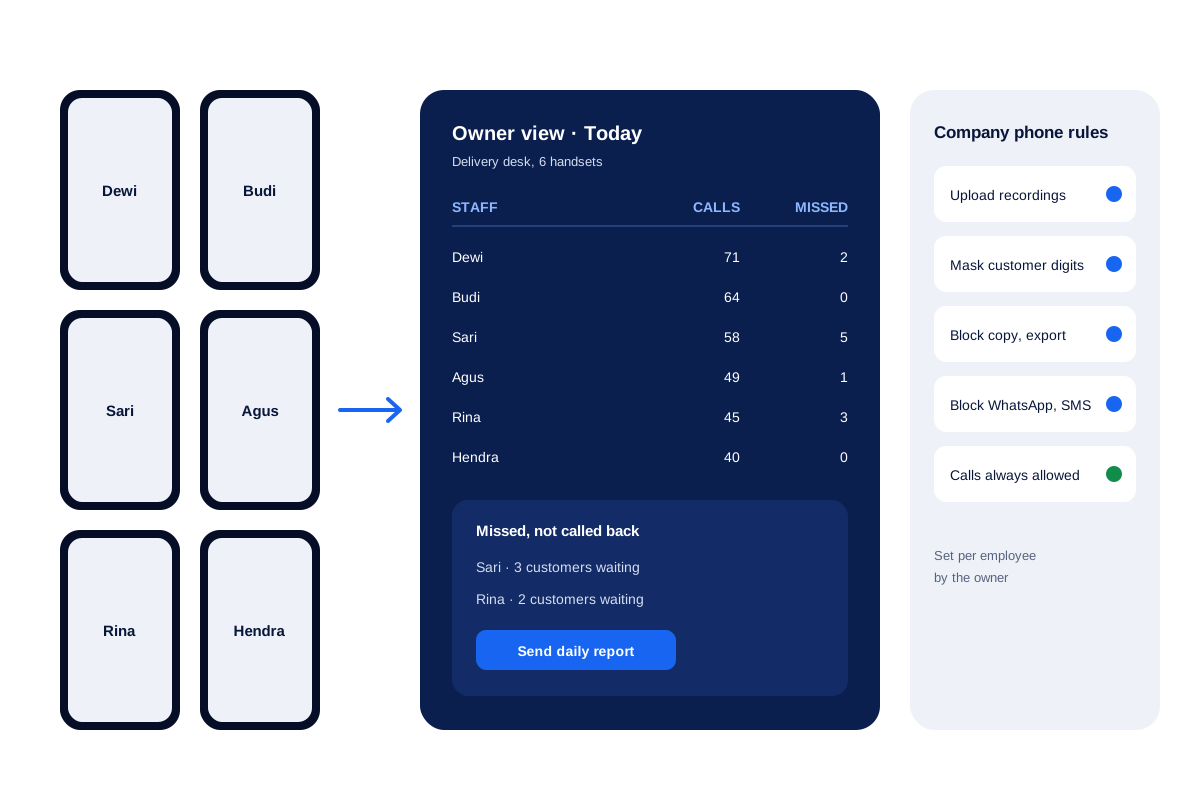
- Each handset reports to one owner account.
- Customer digits can be hidden on company phones.
- A webhook can pass each call to other tools.
Call management software benefits
What the person who pays the phone bill gets.
One owner view
Every handset's calls add up in the owner's account, split by employee and by call type.
Rules per handset
On phones the company owns, the owner chooses what staff may copy, export or message.
Unreturned calls named
A customer who rang and got no reply on any SIM stays listed until someone calls back.
Evening summary on WhatsApp
At the hour you pick, the day's totals and the waiting callers arrive as a message.
Records for audits
Any period of call history leaves the app as an Excel sheet or a PDF.
Call management software for small business: the owner’s weekly check
A shop owner or branch manager rarely has time for dashboards. Four questions cover most of what matters, and each has a direct answer in Calsyst.
- Who called the most, and who the least? Open the owner view, pick this week and compare the totals of each employee.
- Which customers are still waiting? The not-called-back list names every number that rang and got no reply.
- Did the rules hold? On company handsets, check that number masking and the export block are on.
- Is anything going to another system? Confirm that the webhook to your sheet or CRM still runs.
The single-handset side of the same work is on the call management app page.
Call management software for teams: owner controls
| Control | What it changes | Why owners use it |
|---|---|---|
| Recording upload | Every recording the handset makes goes to the account | Quality checks after a complaint |
| Masked customer digits | Staff see a partly hidden number | Lists that must not walk out the door |
| Copy and export block | No copying or exporting of numbers | Protecting the customer list |
| WhatsApp and SMS block | Messaging switched off on that handset | Phones meant for calls only |
| Locked dial gap | Same pace between calls for everyone | Fair comparison between staff |
| Office-hours backup | Calls outside working hours stay off the account | Staff who use the phone after work |
| Delete permissions | Only allowed roles can remove records | A complete history for audits |
Call management software examples: routing systems and handset systems
Two very different products share this name. The first kind is a cloud phone system: it rents numbers, plays a menu, queues inbound callers and passes them to agents at desks. Contact centres that take hundreds of inbound calls an hour need that.
The second kind lives on the phones people already carry. It does not route anything; it records what each handset did and ties it to customers. Calsyst is this second kind, which suits sales teams, service desks and field staff who make most of their own calls.
For the lead record behind each call, read about the call management CRM. For searching one person’s history, see the call history manager.
Call management software limits
- No inbound routing, menus or hold music. Customers reach the handset whose number they dialled.
- No rented or shared numbers. Every call shows the employee’s own SIM.
- Audio exists only where the handset made its own recording.
- Apple keeps the iPhone call log closed, so team totals come from Android handsets.
Call management software in action: a delivery desk
A courier company in Jakarta runs a desk of 6 staff who call customers about failed deliveries and new pickup times.
Each person uses a company Android handset with numbers masked and export blocked. At 5 pm the owner opens the owner view: one employee has 5 missed calls and 3 customers still waiting, so the owner turns those three callers into leads and transfers them to a colleague before the desk closes.
The daily report arrives on WhatsApp at 7 pm. At month end the owner exports the call history to Excel for the client who pays per delivery attempt.
Call management software FAQ
Which call management software fits a business of ten people?
If those ten people call from Android phones, Calsyst is worth a look. It gives the owner each person's daily calls and unreturned customers without new hardware.
How is Calsyst different from a cloud phone system?
Calsyst is call management software that works through staff mobiles and their SIM cards. A cloud phone system rents numbers and routes calls over the internet.
Which software do BPOs use to manage calls?
Big outsourcing centres usually run cloud contact-centre suites with call routing, queues and wallboards. Handset-based tools suit smaller desks that call from mobiles.
Can I see each employee's calls without asking them every evening?
Yes, on handsets that run Calsyst under your account. The owner view shows the totals, and the daily report can reach you on WhatsApp.
Do staff need to know that their work calls are logged?
Yes. Tell staff in writing and use company phones for work. Monitoring law is not the same in Kenya, India or Germany, so read the rules where you operate. This is general information, not legal advice.
Can the customer list be kept from leaving with a departing employee?
On handsets the business owns, yes. Turn on masking so staff never see full numbers, and turn off copy and export; their calls still go through.
Can an employee delete calls to hide them?
Only if the owner allows it. Admin permissions decide whose deletes reach the shared account, so records stay put unless that right is given.
Can I export a month of calls for an audit?
Yes. Choose the date range and export the call history as Excel or PDF.
Does the software send incoming calls to whoever is not busy?
No. Calsyst has no call routing or menu. Each call rings on the handset whose SIM was dialled.
Can call records go to Google Sheets or my main CRM?
Yes. A webhook can fire for each call, and a read-only API lets other systems collect them, directly or through an automation tool.
What if some of my staff carry iPhones?
They can use leads, reminders, WhatsApp and attendance. The call log needs Android, because Apple does not share it with apps.