
- Home
- Telecalling CRM
Telecalling CRM
Telecalling CRM for Sales Teams on Android Is Calsyst
A telecalling CRM keeps a phone sales team's leads and puts each call at the centre of the record, with status, remark and next date. Calsyst gives each telecaller an Android queue and dials from their SIM. After every call, a sheet asks for the outcome.
- A pending queue for every telecaller
- Statuses and pipeline stages you name yourself
- The owner sees calls by person, every day
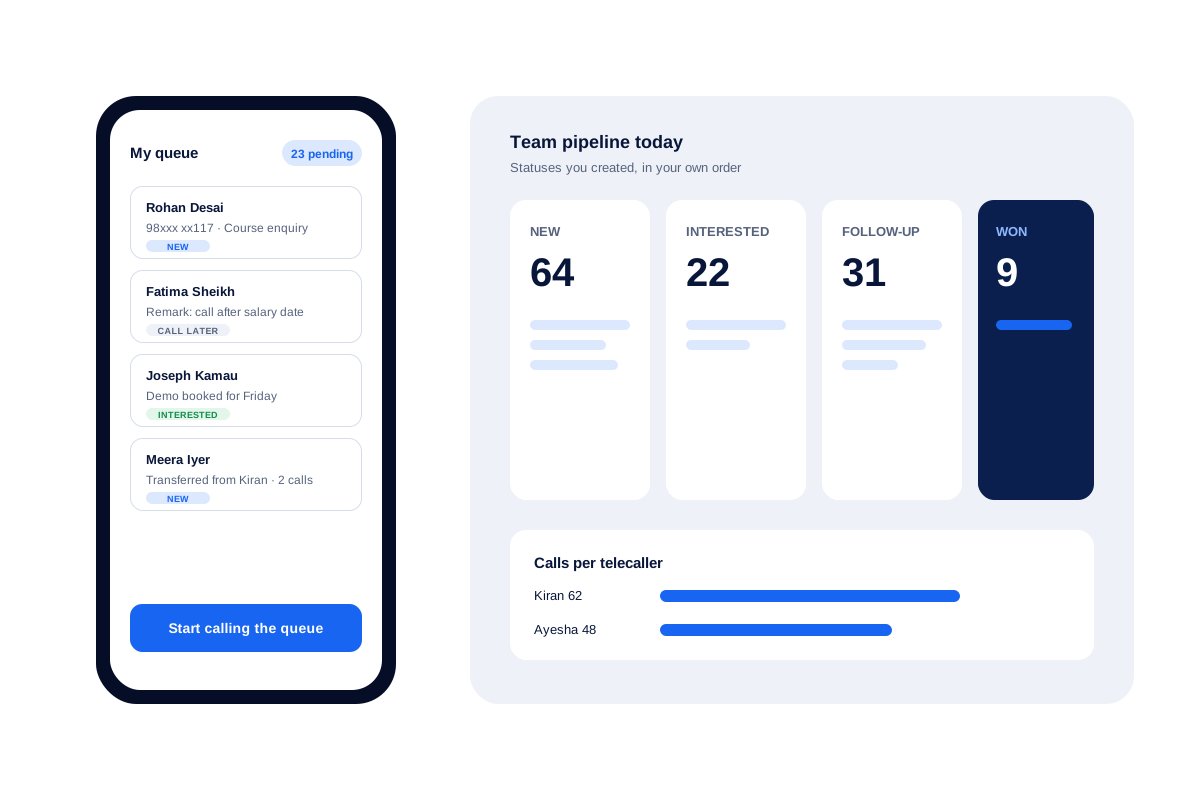
What is a telecalling CRM?
A telecalling CRM stores leads, assigns them to callers, places the calls and records each outcome, so a calling team shares one list.
Calsyst runs that whole loop on the Android phones your team already holds, with remarks that reappear the next time a lead calls.
- Leads arrive from sheets, files, forms or callers.
- Each telecaller works from their own pending queue.
- After each call, a sheet asks for the status.
Telecalling CRM benefits
Why calling teams move off the spreadsheet.
One queue per caller
Assigned leads sit in a pending list, so each telecaller knows which people are theirs to ring.
Statuses you design
Create, rename, recolour and reorder stages until the pipeline matches your sales steps.
Remarks on the next call
The note from the last talk appears on screen when that lead calls back.
Fair lead sharing
Move ticked leads or a whole filter to teammates in turns, with a preview first.
Owner view of the floor
Calls of every employee roll up to one account, with connected and missed counts.
Telecalling CRM software: a telecaller’s day in the app
A telecaller opens the app and sees one thing first: the pending queue. Every lead in it was assigned to that person, so the list is short and owned.
Morning: the queue and the due follow-ups
Follow-ups booked on earlier days sit at the top as due today. The caller can auto dial the whole queue or tap one lead at a time.
During each call: the lead record stays open
While the phone rings, the screen shows who it is, which stage they are at and what they said last time. Once the call ends, two taps record the new stage and the date of the next call.
Evening: nothing left loose
Leads that did not answer stay in the queue for a redial pass. The manager reads the team call log and moves leftover leads to another caller if someone is away tomorrow.
Telecalling CRM compared with a sheet and a phone
Most calling teams begin with one shared sheet and the dialer that came with the phone. The table shows where that habit breaks once three or more people call.
| Task | Sheet and phone | Calsyst telecalling CRM |
|---|---|---|
| Who calls which lead | Names typed in a column, often clashing | Each lead assigned, one queue per caller |
| Note from the last talk | In a cell the caller must search for | Shown on screen when the lead calls |
| Next call date | A date column nobody is reminded of | A reminder that rings at the minute set |
| Calls actually made | Not visible to the manager | Team call log with connected and missed |
| New leads from ads | Copied in by hand | Pulled from a Google Sheet, API or webhook |
| A caller leaves | Their sheet and phone history leave too | Leads and chats stay in the account |
Telecalling CRM for Android: pages in this guide
Each part of the work has its own page. Buyers comparing tools should start with telecalling software, which covers what to check before you pick one. The phone a caller holds all day is described on the telecaller app page.
If you run a small support or sales desk without a phone system, read the page on call center software for small business. For outbound work on lists of strangers, the cold calling app page covers scripts, redial and time per call.
Telecalling CRM limits worth knowing
- Calsyst calls through the SIM, one call at a time. It has no IVR menu and no call queue for inbound callers waiting on hold.
- It gives no virtual or shared business number. Each caller rings from their own SIM.
- Calsyst itself records nothing; where a handset records calls, those files are imported.
- Linking to another CRM takes setup. Call data leaves through webhooks or the outbound API, either directly or by way of Zapier, Make, Pabbly or n8n.
A team that needs inbound call routing across many agents should look at a cloud phone system instead.
Telecalling CRM example: an admissions desk
An education counsellor team in Mumbai has 4 telecallers and about 200 course enquiries a week from its website and ads.
The website form writes each enquiry into a Google Sheet, and the sheet feeds the app. New enquiries go to the 4 counsellors in turn. Each counsellor works a queue of about 50 leads a week.
After every call the counsellor picks a stage such as “Interested” or “Call after results” and books the next call. On Saturday the team lead checks the team call log and hands the open enquiries of anyone on leave to the remaining counsellors.
Telecalling CRM FAQ
What is the best CRM for telecalling teams that use mobile phones?
Calsyst fits phone sales teams on Android. Each caller gets a queue, calls leave from their own SIM, and the after-call sheet asks for a status and remark before the session carries on.
What does Calsyst do for a telecalling team?
Calsyst is a telecalling CRM that hands each caller a lead queue, dials from their own SIM and reminds them when every follow-up is due.
What does CRM mean in telecalling?
CRM means customer relationship management. For a calling team, the CRM is the shared record of every lead's calls, stages and agreed next steps.
Why pick a telecalling CRM over a general CRM?
Because it is built around the phone. Most general CRMs centre on email, deals and a desktop; a telecalling CRM centres on dialing, notes taken right after each call, and the log.
How are leads shared between telecallers?
Hand leads to a named person, or split a filtered group among several teammates one by one. Enquiries arriving by webhook or sheet can follow round robin.
Can I make my own call statuses and stages?
Yes. You create, rename, recolour, reorder and delete statuses. A status that leads still use cannot be deleted, so no record loses its stage.
Can a manager see which telecaller called a lead?
Yes. The owner view lists the calls of each person, and a lead that moved between callers shows who held it before.
Can leads from a website form arrive in the CRM by themselves?
Yes. Point Calsyst at the Google Sheet your form fills, at a REST API or at the Custom Webhook, and new enquiries are pulled in on a schedule.
Does a telecalling CRM need the internet to place calls?
No. Calsyst places calls over the mobile network through the SIM. It needs a data connection to sync calls and leads to the shared account.
Can telecallers send a WhatsApp message after a call?
Yes. Write one message per call type, so a missed caller and a caller you just spoke to get different words. A reminder can carry a WhatsApp text too.
If a telecaller resigns, do their leads leave with them?
No. Leads, call history and WhatsApp CRM conversations belong to the business account. Hand the open ones to a colleague with one bulk transfer.