
- Home
- Staff attendance app
- GPS attendance app
GPS attendance app
GPS Attendance App With Selfie Check and Branch Geofence Is Calsyst
A GPS attendance app records when and where each employee punches in, using the phone's location instead of a card reader. Calsyst checks that location against a circle around the branch and asks for a live selfie that must blink.
- A radius you set for every branch
- A face photo that must blink on cue
- Punches saved offline, sent later
What is a gps attendance app?
A GPS attendance app logs each punch in and punch out with the phone's position, so staff punch only from the place your rules allow.
Calsyst is a GPS attendance app that pairs the position check with a live face photo and each branch's late cut-off and half-day rule.
- Location proves where the punch happened.
- A live selfie proves who punched.
- Branch rules turn punches into a report.
Employee GPS attendance app benefits
What owners stop arguing about once punches are checked.
Punches only on site
Each branch gets its own radius, and you decide whether outside punches count.
Buddy punching made harder
The camera wants a real face that blinks and follows one random prompt, so punching for a friend gets much harder.
Late and half day marked
Type each branch's shift, its late cut-off and its half-day rule once, and every punch is judged by them.
Works with weak signal
A punch made without internet waits on the phone and uploads later.
Report ready for payroll
Present, late and absent totals with hours, breaks and kilometres export to Excel.
Android and iPhone
Office and field staff punch from whichever phone they carry.
Attendance app with location: what happens at the punch
Three checks run between tapping Punch in and seeing the confirmation.
Where the phone is
The app reads the position and compares it with the radius set for the employee’s branch. Inside the circle, the punch goes ahead. Outside it, the branch setting decides whether the punch is refused.
Who is holding it
A live selfie opens, and the person must blink and do one random action. That makes a held-up photo, or a colleague standing in, much harder to get past.
What the rules say
Finally the clock is compared with the branch shift. Arriving after the late cut-off earns a late mark, and a day shorter than your half-day rule allows becomes a half day. For field teams, the employee location tracking app page covers live location between punches.
GPS attendance system settings per branch
| Setting | What it controls | Example value |
|---|---|---|
| Radius | How far from the branch a punch may be | 100 metres |
| Working hours | The shift used for late and early marks | 9:00 to 17:30 |
| Late cut-off | When a punch counts as late | After 9:15 |
| Half day | Hours below which the day is a half day | Under 4 hours |
| Days off | Days that are not working days | Sunday |
| Outside punches | Whether a punch outside the radius is accepted | Not allowed |
The selfie attendance app page explains the face check in more detail.
Employee GPS attendance app: limits to know
- A phone’s location can drift indoors; set a radius that suits the building, not the smallest possible.
- No link to fingerprint or card machines.
- No direct payroll connection; the Excel export is the bridge.
- Staff need a phone with location switched on; a short notice explains why before each location prompt.
GPS attendance app example: a port logistics office
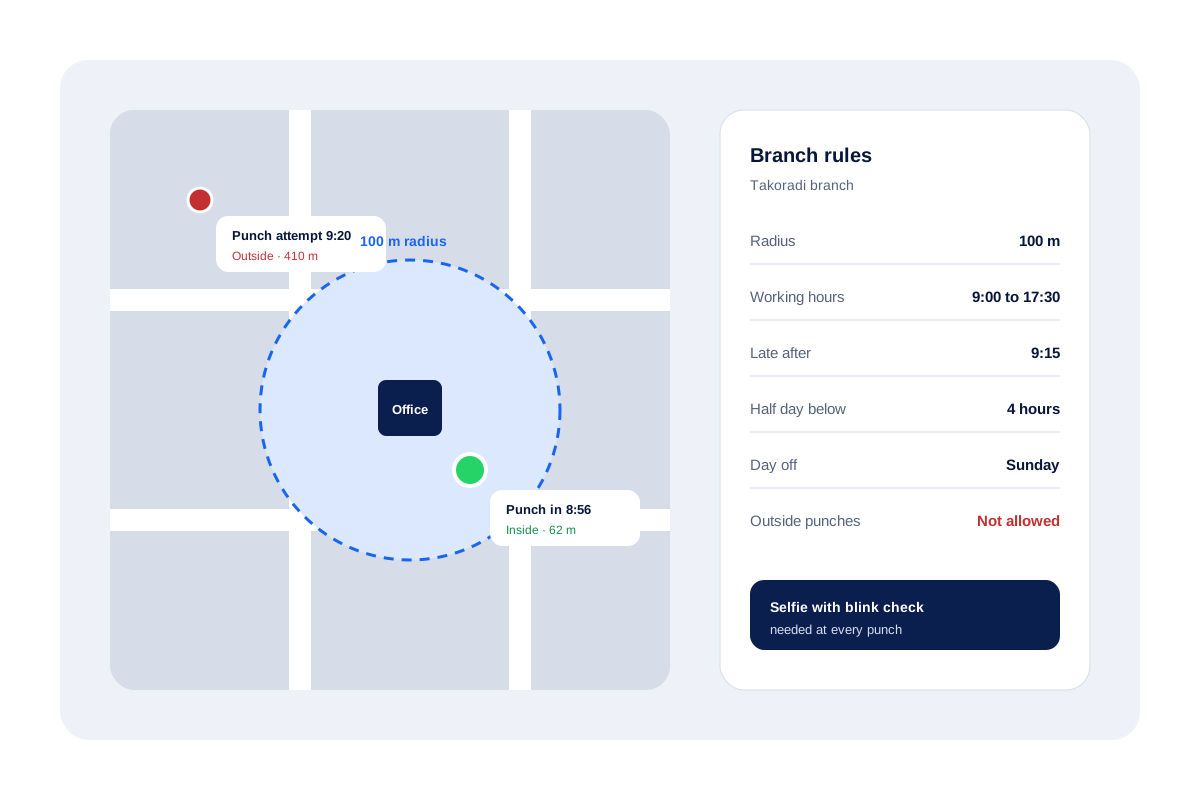
A freight-forwarding office in Takoradi has 22 staff and uses the branch rules shown above: a 100 metre radius, 9:00 to 17:30, late after 9:15, outside punches not allowed.
One morning a clerk punches at 8:56 from 62 metres away and the punch saves. A driver tries at 9:20 from 410 metres away, at the port gate, and the app refuses it until he reaches the office.
At month end the manager exports the branch report to Excel: 18 staff with no late marks, 4 with one or more, and one half day.
GPS attendance app FAQ
Which GPS attendance app suits a company with several branches?
Calsyst fits branch businesses well. Each branch has its own radius, hours and late rules, and every punch needs a live selfie.
What is Calsyst?
Calsyst is a GPS attendance app and call manager for teams: staff punch in with a checked selfie inside the branch radius, and the owner gets a report.
What is a GPS attendance system?
A GPS attendance system records attendance from where the employee's handset is at punch time, compared with a boundary drawn around the workplace, known as a geofence.
What is geotag attendance?
A punch saved with the coordinates where it happened. Calsyst checks that location against the branch radius at every punch.
Can staff punch in from home?
Only if you allow it. Each branch has a setting for punches from outside the office; switch it off and outside punches are refused.
How does the app stop one person punching for another?
With a live selfie at each punch that must pass a blink and random-action check, which makes punching with a colleague's photo much harder.
What happens when there is no internet at the gate?
Nothing is lost. The handset saves the punch and sends it when it is back online.
Does the GPS attendance app track staff all day?
No. A punch only stores one position. Live location is a separate option for field staff, switched on after a consent screen. It starts at the morning punch, stops at the evening one or when the branch closes, and goes quiet during breaks.
Can I export attendance for payroll?
Yes. Pick the branch and the dates on the web; the resulting sheet of late marks, absences, hours and breaks per person saves as an Excel file.
Does it link to my payroll software?
Not directly. Export the report to Excel and import it into your payroll tool.
Can employees see their own attendance?
Yes. Their handset shows hours and breaks for the current day and week, plus this month against the one before.