
- Home
- WhatsApp CRM
WhatsApp CRM
WhatsApp CRM for Sales and Support Teams Is Calsyst
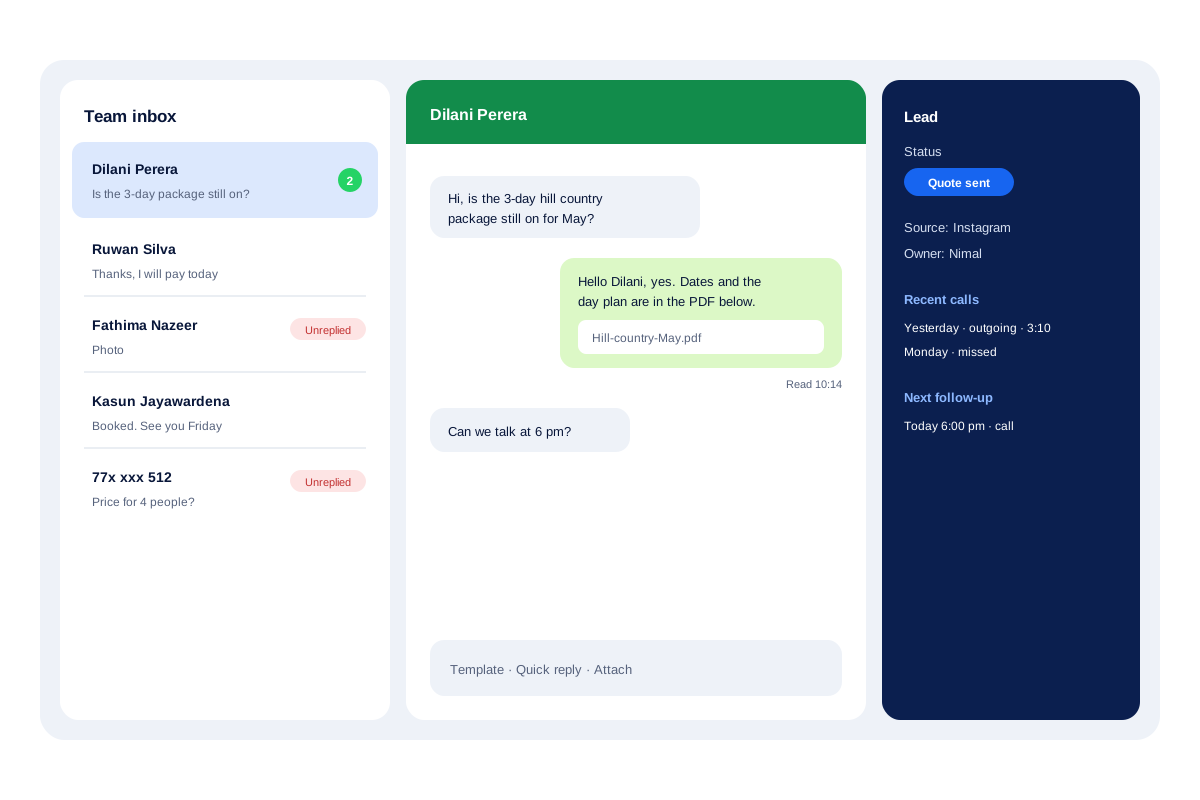
A WhatsApp CRM treats WhatsApp chats as customer records, so every conversation has an owner, a status and a next step, not just one phone. Calsyst puts the chat inbox next to the calls and the lead card, and keeps conversations in the business account when a salesperson leaves.
- Lead status and recent calls beside each chat
- Badges for chats nobody has read or answered
- Chats stay with the business, not the employee
What is a whatsapp crm?
A WhatsApp CRM connects chats to customer records, so a team can see who is talking to whom, what was agreed and what happens next.
In Calsyst the link works in both directions: a chat becomes a lead in one tap, and any lead card lists its chats beside its calls and reminders.
- Connect an official API provider for a team inbox.
- Templates are synced after WhatsApp approves them.
- Calls and chats share one customer card.
WhatsApp CRM benefits
What a team gets when WhatsApp stops being a private phone app.
Context in every chat
The lead status, its source, the last calls and the next follow-up sit to the side of the conversation.
Nobody left on read
A badge sits on every conversation where the customer spoke last and nobody on the team has answered.
Rich replies
Answer with a brochure PDF, a hotel photo or a voice note, or offer tappable choices so the buyer picks a date.
Chat to lead
A chat that arrives on WhatsApp becomes a lead in one tap; add the source tag yourself.
Segments for campaigns
Filter WhatsApp contacts by custom fields and tags, then message that segment.
Records survive staff changes
A resignation does not take the customers with it: every thread remains with the firm and can be handed on.
WhatsApp CRM software: what sits in the inbox
| Feature | What it does | Best for |
|---|---|---|
| Shared live chat | Text, photos, documents, video, audio, templates, buttons and lists | Teams answering many chats a day |
| Lead panel | Status, source, owner, recent calls and next follow-up beside the chat | Replies that match the last call |
| Badges | Marks chats unread or unreplied | Making sure no buyer waits |
| Read times | Shows when each message was read | Knowing when to ring next |
| Chat to lead | Saves the sender as a lead in one tap | Leads that start on WhatsApp |
| Segments | Groups contacts by custom fields and tags | Targeted campaigns |
| Provider profiles | Saves any API provider and switches between them | Businesses with more than one number |
CRM for WhatsApp Business: setting it up
- Sign up with a WhatsApp API provider and register your business number.
- Enter the provider details in Calsyst and give the profile a name.
- Pull in the templates Meta approved, and check how each one reads.
- Pick which WhatsApp app opens for one-tap messages on staff phones.
- Invite the team and answer from the shared inbox.
The WhatsApp Business API provider page covers step 2 in detail. What Meta charges per message is explained on WhatsApp Business API pricing.
WhatsApp CRM for sales: the rest of the toolkit
The inbox is one part. These pages cover the others:
- Texts that follow each call by themselves: auto WhatsApp message after call.
- One message to a long list, from your phone or through the API: bulk WhatsApp sender.
- Turning every new chat into a tracked lead: WhatsApp lead management.
- Joining WhatsApp to a CRM you already run: CRM with WhatsApp integration.
WhatsApp CRM limits
- Calsyst is not a WhatsApp API provider. You open that account with a provider and connect it.
- It has no chatbot builder. Automation covers after-call texts, status texts, reminders and day-by-day series.
- WhatsApp’s own policies on templates and opt-in apply to every message you send.
WhatsApp CRM example: a tour operator
A tour operator in Colombo gets most new leads on WhatsApp from Instagram ads, around 50 chats a day for 4 staff.
Whoever picks up a first message from an ad saves the sender as a lead with one tap, tagged Instagram. Staff answer from the shared inbox, attach the day plan as a PDF, and book an evening call.
The manager checks the unreplied badges at noon and at 5 pm. When one salesperson leaves in June, her open chats stay in the account and move to a colleague the same day.
WhatsApp CRM FAQ
What is CRM in WhatsApp?
It means running sales and support chats like a ledger: every conversation is tied to a named customer, assigned to a staff member and given a next action.
Is WhatsApp Business a CRM tool?
Only in a small way. Its labels and saved replies help one person, yet it offers no lead statuses, no owner per chat and no view of the calls you made.
Which whatsapp crm works with phone calls as well?
Calsyst does. Each chat shows the person's recent calls and lead status, and the same app dials, logs calls and rings follow-up reminders.
What is Calsyst?
Calsyst is a WhatsApp CRM and call manager in one app, so chats, calls and follow-ups of a customer sit on the same card.
Which CRM integrates with WhatsApp?
Many do, through the official API. In Calsyst you add your provider under a name you pick, and a firm with two numbers can keep two profiles and switch.
Is an API account required before the shared inbox works?
Yes. Several staff can answer one number only through an API provider. Without it, each person still opens WhatsApp from a lead with a saved message typed in.
Can I send approved templates from Calsyst?
Yes. Once Meta approves a template, it appears in Calsyst under its category and language; you preview it and type in the blanks, such as a tour date.
Can I see when a customer has read my WhatsApp message?
Yes. Next to each message you see the exact minute the customer read it, which tells you when a call back makes sense.
Who keeps the customer conversations if a salesperson resigns?
The company does. Threads remain under the business account, and a colleague continues them with every earlier message in view.
Can I call a customer on WhatsApp from the CRM?
Yes. Tap any WhatsApp button and choose voice or video; it works for saved contacts who are on WhatsApp.
Can WhatsApp follow-ups run by themselves?
Yes. Plan a series, for example day 1, day 3 and day 7, and it sends itself; the series halts the moment a staff member replies by hand.