
- Home
- Employee call monitoring
- Sales call tracker
Sales call tracker
Sales Call Tracker Template and the App That Fills It Is Calsyst
A sales call tracker logs every sales call with its date, contact, outcome and next step, so reps and managers see where each lead stands. Calsyst gives you a ready column layout for a spreadsheet, and then keeps the same fields for you on the phone, call by call.
- Eleven columns you can copy into Excel or Sheets
- The same fields saved after each call in 2 taps
- Call history exports to Excel or PDF
What is a sales call tracker?
A sales call tracker gives each sales call one row holding its time, the contact, the minutes spoken, the outcome and the agreed next move.
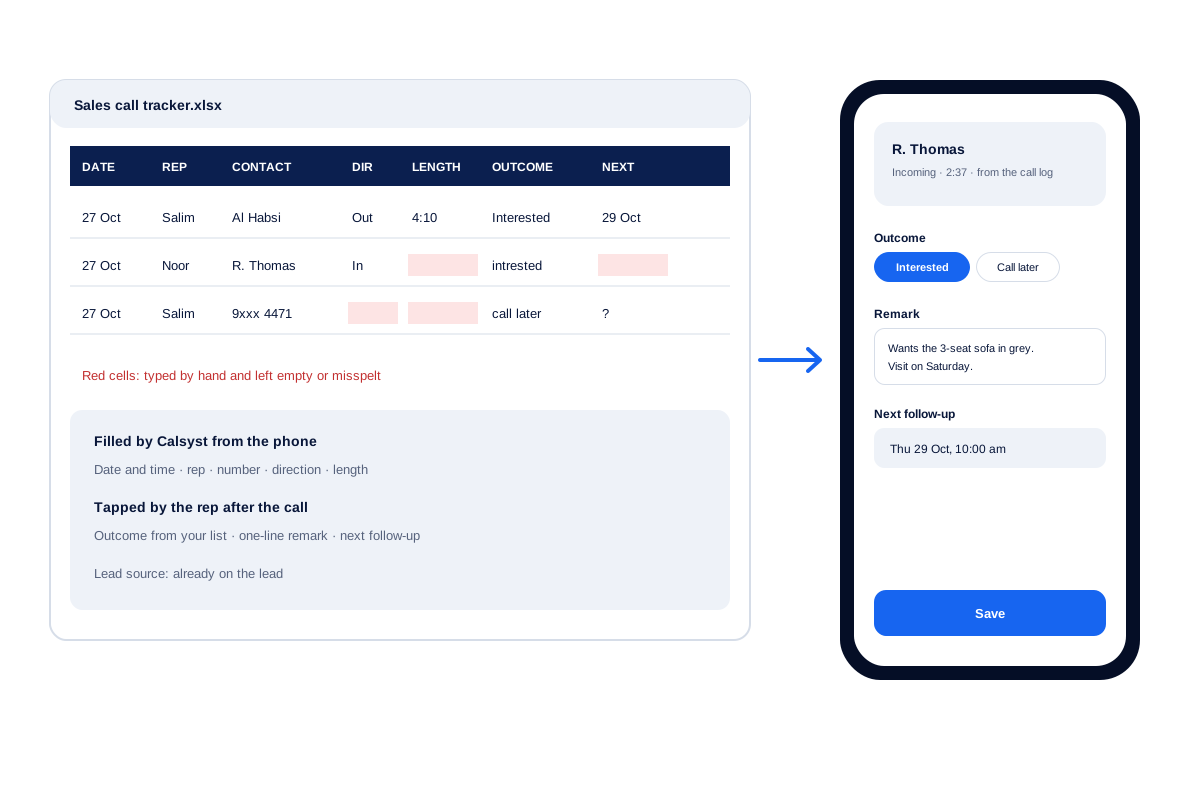
Calsyst fills five of the eleven columns without typing, because the date, rep, number, direction and length come straight from the phone; the rep adds the outcome.
- Start with a sheet if you have three reps or fewer.
- Move to the app when typing eats the day.
- Keep one status list for the whole team.
Sales call tracker benefits
Why a tracker that fills itself beats a typed one.
No forgotten rows
Every call lands in the log, including the ones a rep would not bother to write down.
Real call lengths
Each call's length comes from the phone, so a 12-second call does not pass as a long chat.
One status list
Reps pick from the statuses you define, so the column never fills with spelling variants.
Next step with an alarm
The follow-up column becomes a reminder that rings, not a date in a cell nobody reopens.
Sales call tracker template: the columns
Copy these eleven headings into row 1 of a new sheet. The third column says where Calsyst keeps the same fact, so you can switch later without losing the habit.
| Column | What to write | Kept in Calsyst by |
|---|---|---|
| Date and time | When the call started | The phone call log |
| Rep | Who made or took the call | The employee account |
| Contact | Person or company name | The lead record |
| Number | Phone number with country code | The call log and lead |
| Direction | Outgoing, incoming or missed | The call log |
| Length | Minutes and seconds talked | The call log |
| Outcome | One status from a fixed list | The after-call sheet |
| Remark | One line about what was said | The after-call sheet |
| Next follow-up | Date and time of the next call | A reminder that rings |
| Lead source | Where the contact came from | The source tag on the lead |
| Final result | Won, lost or still open | The lead status, such as Won or a Lost status of your own |
Sales call tracker Excel: setting the sheet up by hand
- Type the eleven headings above in row 1, and freeze that row.
- On a second tab, list your outcomes, for example Interested, Call later, No answer, Not interested.
- Turn the Outcome column into a drop-down that reads from that list. In Excel this is Data validation; in Google Sheets it is a dropdown rule.
- Format the Date and Next follow-up columns as dates, and Length as a time.
- Add a filter to row 1, so a manager can sort by rep or by outcome.
- Share one file with the team. Ask every rep to add a row after each call.
The sheet works well for two or three reps. Past that, the typing starts to cost more time than the calls themselves. The daily call report format page gives a second sheet for the end-of-day summary.
Track sales calls without typing the rows
In Calsyst, five of the eleven columns fill themselves. The date, the number, the direction, the length and the rep come from the phone the moment the call ends.
The rep then sees the after-call sheet with the other columns: the outcome as a tap on a status, a remark by voice or text, and the next follow-up as a reminder. The source tag sits on the lead from the day it arrived.
When a manager wants the spreadsheet back, the call history exports to Excel or PDF for the chosen period. For the owner screens behind the tracker, see the employee call tracking app. For counts per rep and targets, see the call tracking app.
Sales call tracking: three numbers worth a weekly look
- Connected calls per rep. Raw call counts reward dialing; connected calls reward reaching people.
- Open follow-ups past their date. A long overdue list means promises to buyers are slipping.
- Leads marked Lost, by source. If one source loses most leads, fix the source or the script, not the rep.
Calsyst shows connected calls per rep in the owner account, and each rep sees overdue follow-ups in Today on the phone. A filter on your Lost status plus the source tag gives the third number.
Sales call tracker limits
- The automatic columns need an Android phone; iPhone does not share its call log.
- Calsyst does not record or transcribe the conversation.
- The export gives you the data for a period; it does not keep a live link with your own sheet.
Sales call tracker example: a furniture showroom in Muscat
A furniture showroom in Muscat has 4 sales staff who call people who visited the store. The manager started with a shared Google Sheet using the eleven columns above.
After a month, half the rows had no length and many outcomes were spelt three ways. The team moved to Calsyst with the same four outcomes as statuses. The length and the time now come from the phone, and the outcome is one tap.
On Sundays the manager exports last week’s call history to Excel and checks connected calls per person.
Sales call tracker FAQ
How do I keep track of sales calls?
Log every call in one place with the date, the contact, the outcome and the next step. A shared sheet works for a few reps; a phone app saves typing for more.
Is there a sales call tracker that fills itself from the phone?
Yes. Calsyst takes each row from the Android call log, so the rep types nothing but a status, one line of notes and the date to ring again.
What is Calsyst, in one line?
Calsyst is a sales call tracker and call manager app that logs every business call and reminds reps about their next one.
Which headings belong in a sales call tracker sheet?
Eleven: date and time, rep, contact, number, direction, length, outcome, remark, next follow-up, lead source and final result. The table on this page explains each one.
Can I keep my Google Sheet if I start using Calsyst?
Yes. A sheet can feed new leads into Calsyst. Call data can go back out to a sheet through the webhooks or the outbound API with a tool such as Zapier or Make.
Which stages of a sales call should the tracker capture?
The close and the follow-up, above all. Sales trainers often split a call into seven stages, from preparation and opening through questions, the pitch and objections to the close and the follow-up. The tracker matters most at the end: it stores the result and the follow-up date.
How do reps record the outcome of each call?
With one tap on a status. When the call ends, a sheet opens with your statuses; the rep taps one, adds a short remark and picks a follow-up time.
Can I export the call history to Excel?
Yes. Choose the weeks you want and save that stretch of calls as an Excel file or a PDF; leads leave separately as a CSV.
Can a manager see the tracker of every rep?
Yes. The owner account shows every employee's calls, and the team totals roll up for any date range.
What if a rep forgets to set the next follow-up?
It is hard to forget. The after-call sheet appears after every call, so the follow-up field is in front of the rep each time, and overdue reminders carry into Today on the rep's phone.