
- Home
- Auto dialer app
- CRM with dialer
CRM with dialer
CRM With Dialer for Android Sales Teams Is Calsyst
A CRM with dialer puts the call button inside the lead record, so a rep never copies a number into another phone app. Calsyst joins the two on Android: tap a lead and the SIM dials, and the result you pick on the after-call sheet goes back to that lead.
- Any lead filter can become a calling session
- Products and remarks visible while you talk
- Calls dialled by hand still reach the lead
What is a CRM with dialer?
A CRM with dialer places calls from lead records and writes each call's outcome back to them, so selling and note-taking happen in one tool.
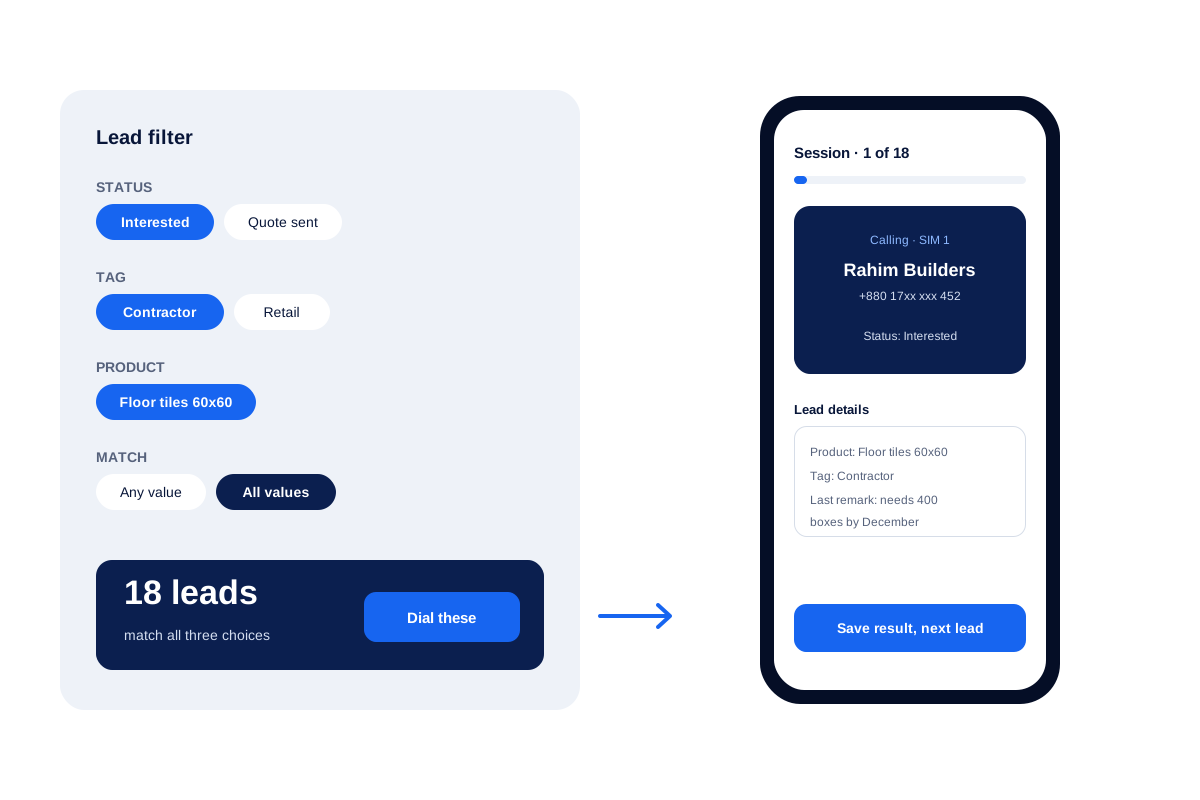
Calsyst pairs its lead lists with a SIM auto dialer, so a filter such as interested contractors who want floor tiles turns into a session in one step.
- Filter first, then dial whatever the filter found.
- The outcome goes to the lead, not a side sheet.
- Tomorrow's reminders build tomorrow's session.
CRM with dialer benefits
Why reps stop juggling a phone app and a lead app.
Dial from a filter
Status, tag, product, source and custom fields combine into one list that the dialer works through.
No switching apps
The lead card, its products and the last remark stay on screen for the whole conversation.
Outcome on the record
The stage chosen after a call updates that lead and its history at once.
Manual calls counted
A rep who dials a lead by hand still adds that call to the lead's history.
Done tab for managers
Each finished lead shows how it closed: auto dialer, click to call, marked done or transferred.
CRM dialer: three ways a rep starts a call
From one lead
Open the lead and tap call. The SIM dials, and the lead’s products and last remark stay on screen.
From a filter
Build a list such as “Interested, tag Contractor, product Floor tiles” and press dial. The auto dialer app page explains pacing, ring limits and redial for these sessions.
From the laptop
Reps who work from a spreadsheet or website can use click to call in Chrome, and the phone in their pocket places the call.
CRM with auto dialer: filters that make good sessions
With the dialer inside the CRM, you choose exactly who gets called. These filters come up again and again in sales teams.
| Filter | Session it builds | Typical use |
|---|---|---|
| Status Interested, tag Contractor | Warm trade buyers | Monday morning push |
| Source Facebook, status New | Fresh ad enquiries | Calls within the hour of the ad |
| Tag Renewal, product Annual plan | Clients near their renewal | Last week of the month |
| Follow-ups due today | Every promised follow-up | Start of each day |
| Lost leads list | Numbers that never connected | A win-back afternoon |
| Imported list Trade fair | Visitors from one event | The days after a fair |
CRM with dialer for Android: when this set-up is wrong
- Calsyst rings one number at a time. Teams that want many lines ringing at once need a predictive dialer.
- The dialer cannot be placed inside a different CRM. If your team must stay in another CRM all day, look for a dialer built into that product.
- Calls use the rep’s SIM. There is no rented number for the whole team.
- Heavy dialing belongs on Android; Apple gives apps no call history to work with.
The power dialer vs predictive dialer page explains the dialing modes in more depth.
CRM with dialer example: a building materials dealer
A tiles and sanitaryware dealer in Dhaka has 4 sales reps who sell to contractors.
Every Monday each rep filters “Interested, tag Contractor, product Floor tiles” and gets about 18 leads. The session calls each one, and the lead card shows the order size noted on the last call, such as 400 boxes by December.
The sales head checks the Done tab on Friday. If a rep closed many leads with very short calls, the head raises the minimum call length for the next week.
CRM with dialer FAQ
Which CRM dialer works best for reps who sell from Android phones?
Calsyst is made for that setup. A rep narrows the leads with a filter, presses dial, and talks; the handset SIM carries each call, a result sheet opens when it ends, and after that the session moves on.
What sets Calsyst apart as a CRM?
Calsyst is a CRM with dialer built into the same Android app, so the list a rep filters is also the list the dialer calls.
What is a CRM auto dialer?
It is a dialer that takes its numbers from CRM records and rings them one after another, updating each record as calls finish.
Can I dial only a filtered group of leads?
Yes. Stack conditions such as stage, tag, product and source, choose whether a lead must meet one or every value, and dial the matches.
Do reps leave the CRM screen during a call?
No. The lead record stays open for the whole call, with products, the requirement and past remarks in view.
Can the Calsyst dialer run inside the CRM we already use?
No. The dialer lives in the Calsyst app. Call results can be sent to your other CRM through a webhook or read through the outbound API.
Are calls dialled outside a session saved too?
Yes. A call to a lead's number shows in that lead's history however it was dialled, and the after-call sheet still asks for the outcome.
Can a manager tell whether reps skipped leads?
Yes. Every finished lead records the way it was closed. Set a minimum talk time too, and a two-second call can no longer close a lead.
Can reps start calls from a laptop?
Yes. With click to call in Chrome, a number clicked on the laptop is dialled by the rep's phone.
Does the CRM handle numbers from other countries?
Yes. International numbers show and dial in the right format, and imports fix country codes, with a country setting for each lead source.
Can the dialer call leads that came from a trade fair list?
Yes. Import the fair's spreadsheet as its own list, then filter by that list and dial it. If the fair list turns out messy, delete it and only those visitors disappear.