
- Home
- Employee call monitoring
- Daily call report format
Daily call report format
Daily Call Report Format for Telecallers, With the Calsyst Version
A daily call report format is a fixed layout for summing up one caller's day: calls made, calls answered, interested leads and follow-ups booked. Calsyst delivers a short version as a notification at the hour you choose, ready to share on WhatsApp.
- A sheet layout you can copy today
- Counts that come from the phone, not memory
- Missed callers still waiting are named
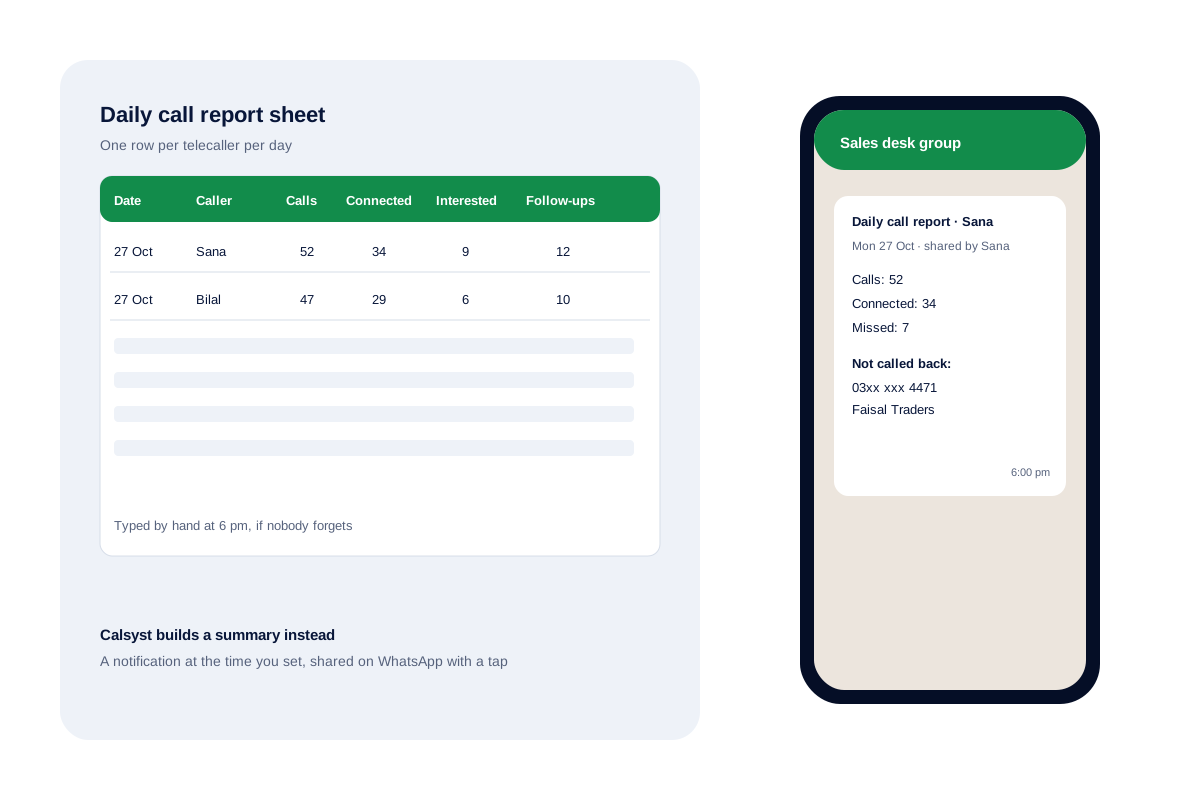
What is a daily call report format?
A daily call report format lists, for each telecaller and day, calls made, calls connected, interested leads, follow-ups booked and short remarks for the manager.
Calsyst builds the counting part from the phone itself and puts it in a notification, naming anyone who rang and still waits for a reply.
- Same columns every day, for every caller.
- Counts typed from memory drift.
- A report from the phone is ready on time.
Daily call report benefits for a calling team
Why a fixed format beats a loose chat message to the manager.
Comparable days
The same columns every evening let a manager compare Monday with Friday at a glance.
Missed callers named
Calsyst's report lists the numbers nobody rang back, so they are first on tomorrow's list.
No typing at day end
Counts come from the handset, so nobody spends the last minutes of the shift adding up calls.
Ready at a set hour
The report arrives as a notification at the time you choose, and one tap shares it on WhatsApp.
Daily call report format for telecallers: the sheet
Paste the headings below into a fresh workbook. Writing one row per caller per day keeps the file readable for months.
| Column | What to write | Example |
|---|---|---|
| Date | The working day | 27 Oct |
| Caller | Name of the telecaller | Sana |
| Calls made | All outgoing calls that day | 52 |
| Connected | Calls that were answered | 34 |
| Interested | Leads who asked for more | 9 |
| Follow-ups booked | Call-backs set for a later date | 12 |
| Missed, not returned | Incoming calls still waiting | 2 |
| Remark | One line for the manager | Two demo requests for Friday |
For a sheet that tracks each call rather than each day, see the sales call tracker template.
Daily call report in Excel versus the Calsyst report
| Point | Hand-typed sheet | Calsyst daily report |
|---|---|---|
| Where counts come from | The caller's memory or notes | The phone's call history |
| When it arrives | Whenever someone remembers | As a notification at the time you set |
| Missed callers | Often left out | Named in the report |
| Interested and follow-ups | Typed by the caller | Kept on each lead, not in the report |
| Effort | A few minutes a day | A tap to share |
Many teams keep both: the Calsyst report each evening, and a weekly sheet for the interested and follow-up columns. For wider ranges and trends, the call analytics app page explains the rings.
Daily call report template: limits
- The Calsyst report carries today’s counts and the unreturned names; interested leads and follow-ups stay on the leads.
- It arrives as a notification; sharing it on WhatsApp is a tap you make, not an automatic send.
- Counts come from Android phones only.
- For every call row, export the call history to Excel instead.
Daily call report format in practice: a Karachi education counselling desk
An education counselling firm in Karachi has 2 telecallers, Sana and Bilal. Each used to type a daily line into a shared sheet at 6 pm, and some days were missed.
Now each caller’s report arrives as a notification at 6 pm, and they share it to the desk’s WhatsApp group with a tap. On Monday, Sana’s report shows 52 calls, 34 connected and 2 missed numbers not yet called back. She returns both the next morning.
The manager still fills the weekly sheet on Friday, copying interested leads and follow-ups from the lead list.
Daily call report format FAQ
Which columns belong in a daily call report format?
Seven columns cover it: date, caller name, calls made, calls connected, interested leads, follow-ups booked and a short remark. Add an eighth for missed callers not yet returned.
Which app makes a daily call report without typing?
Calsyst does. It counts the day's calls on the phone and delivers the report as a notification at the time you set, ready to share on WhatsApp.
What is Calsyst?
Calsyst is a daily call report tool for telecaller teams that counts the day's calls on each phone and names the missed callers still waiting.
Can I keep the report in Excel?
Yes. Use the sheet layout on this page for totals, and export the call history to Excel from the app when you need every row.
What time should the daily report arrive?
Usually 30 minutes before the shift ends, so missed callers can still be rung back that day. Set the time that suits your team.
Should a daily call report include every call, or only totals?
Totals for the daily report. Keep every call in the call history, and export it when a manager needs the detail.
Can the report go to a WhatsApp group?
Yes, by sharing it. Tap share on the report and pick the person or group, such as a sales desk group.
Does the daily call report work on iPhone?
No. iPhone keeps its call log from apps, so the counts come from Android handsets.
How is a daily call report different from analytics?
The report is a short end-of-day summary. Analytics covers any date range with rings for each call type and monthly trends.
Who should read the daily call report?
The team lead every evening and the owner once a week. Both look first at the missed callers nobody returned.