
- Home
- Call management app
- Call management CRM
Call management CRM
Call Management CRM for SIM Calls on Android Is Calsyst
A call management CRM logs each phone call against the lead it belongs to, so the call record and the sales record become one. Calsyst does this for SIM calls on Android: the call, its length, the status picked after it and the remark all land on one lead.
- Calls, chats, remarks and reminders on one screen
- Every status change kept, web changes included
- An unknown caller becomes a lead in one tap
What is a call management CRM?
A call management CRM joins calling and customer records, so every inbound and outbound call is saved to the right person together with its outcome.
Calsyst builds that record from the phone's own SIM calls, with no cloud telephony line between the phone and the customer.
- The phone number is the key that links call and lead.
- The outcome is chosen right after the call.
- Call data can go on to another CRM through webhooks.
Call management CRM benefits
What changes when the call and the lead are one record.
Call history on the lead
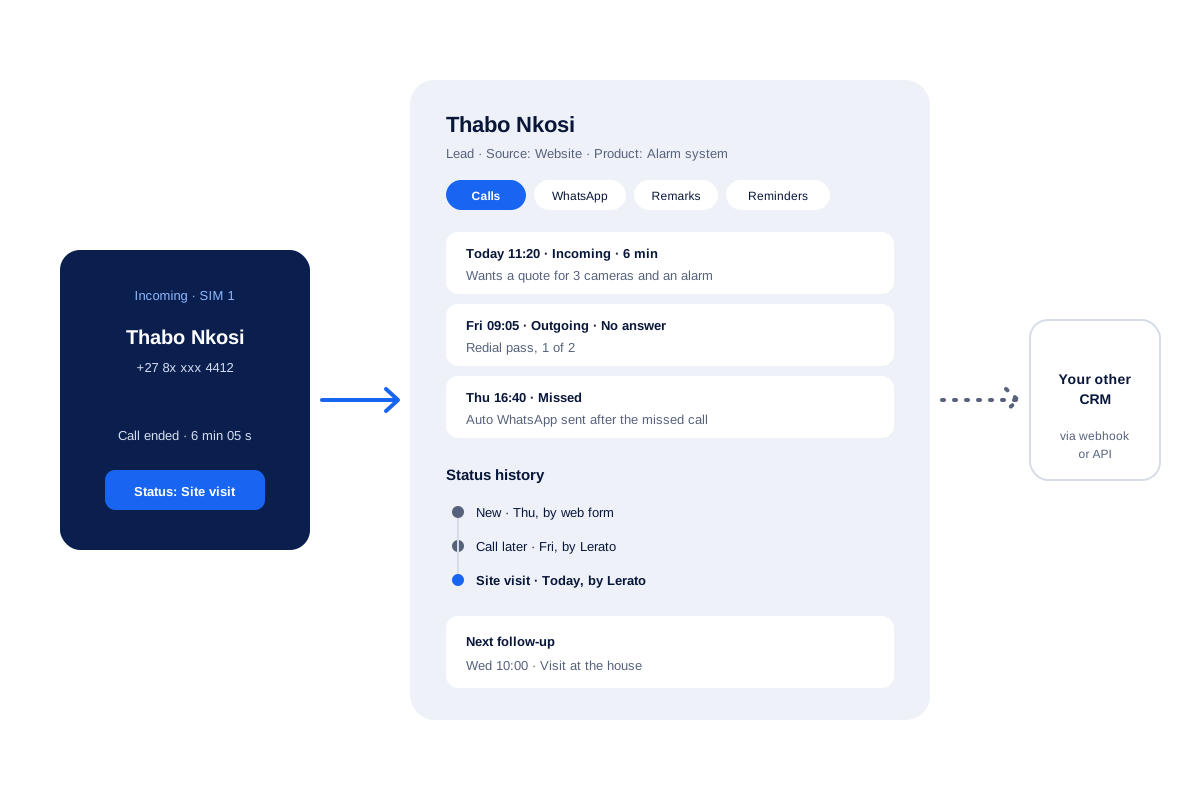
One screen holds the calls, WhatsApp chats, remarks, reminders and details of each person.
Status history
Each stage change is kept with its date, also when someone changed it on the web.
New callers saved fast
Any caller becomes a lead with only the mobile number; more details can follow later.
Edits tracked
Changes to a lead, its tags and its products sync to the account with a history.
Data out to other tools
Call and CRM data can go to another CRM's API, or through Zapier, Make, Pabbly or n8n.
SIM based call management CRM: why the call starts on the phone
Call management CRMs come in two kinds. Cloud systems rent you virtual numbers and carry calls over the internet. SIM-based systems let each person call from their own mobile number and log the call in the CRM.
Calsyst is the second kind. A homeowner or shop owner sees an ordinary mobile number on their screen, the mobile network carries the call, and the lead record changes on that same handset. The call management app page explains how Calsyst takes over the phone app to make this work.
Call management CRM compared: SIM-based and cloud telephony
| Point | SIM-based (Calsyst) | Cloud telephony CRM |
|---|---|---|
| Number the customer sees | The caller's own mobile number | A rented virtual number |
| What carries the call | The mobile network | The internet |
| Hardware | The Android phone you have | Headsets or desk phones in many set-ups |
| Inbound routing and menus | Not available | Usually available |
| Recordings | Imported from the phone's own recorder | Usually recorded by the provider |
| Best fit | Field and phone sales on mobiles | Large desks with inbound queues |
Call management CRM app: what one lead record holds
Open a lead and the tabs show its whole story.
- Calls. Every incoming, outgoing and missed call with that number, with its length.
- WhatsApp. Chats from the WhatsApp CRM inbox, next to the calls.
- Remarks. Notes from each call, shown again when the person next calls.
- Reminders. Past and upcoming follow-ups, each kept apart.
- Details. Source, products, requirement and your own custom fields.
To find calls across all leads, use the filters described on the call history manager page.
Call management CRM for teams that already use another CRM
Some teams keep a main CRM for deals and want phone calls logged there too. For that, every finished call can trigger a webhook, and the main CRM can also pull calls through a read-only API. A middle tool such as Zapier, Make, Pabbly or n8n saves writing code.
The page on HubSpot call logging walks through one example. For leads moving the other way, into Calsyst, the lead management app page covers Google Sheets, a REST API and the Custom Webhook.
Call management CRM limits
- No virtual numbers, call menus or inbound queues. Calls stay on each person’s SIM.
- No built-in recorder. Recordings come from the phone itself.
- No one-click connector to other CRMs. A webhook or API link takes some setup time.
- The iPhone app cannot read the call log, so the call history on leads is built on Android.
Call management CRM example: an alarm installer’s service line
A security alarm installer in Johannesburg has 3 sales staff who take calls from homeowners who saw its website.
A homeowner calls a sales phone. The call appears on his lead, and after 6 minutes the salesperson sets the stage to “Site visit” and books Wednesday at 10:00. On Thursday the team missed his first call, and the app sent him an automatic WhatsApp message.
The manager opens the lead and reads the status history: new on Thursday from the web form, “Call later” on Friday, “Site visit” today. The same call data goes to the company’s main CRM through a webhook.
Call management CRM FAQ
Which call management CRM suits staff who sell from their mobiles?
Calsyst is built for exactly that. Every SIM call files itself under the matching lead, and the after-call sheet asks for an outcome, then the session carries on.
How does Calsyst work as a CRM?
Calsyst is a call management CRM that links each call to a lead by phone number, then keeps the status, remark and next follow-up on that lead.
What is a CRM for a call centre?
It is the customer record that call agents read and update during calls. It shows past contact, the current stage and the next agreed step.
What makes a call management CRM SIM-based?
It means the calls go out and come in through the mobile SIM in each phone, and the CRM logs them. There is no virtual number or internet phone line.
Does each call save to the right lead by itself?
Yes. Calls to and from a lead's number appear in that lead's history. You then add the status and remark on the after-call sheet.
A stranger rings the sales phone. Where does that call go?
Into the call log first. One tap turns the stranger into a lead, and a mobile number is all the form needs. If the owner has set the company phone rule that uploads every recording, a recorded unknown number becomes a lead by itself.
Can I see how a lead moved through the stages?
Yes. The status history lists each stage the lead passed through with dates, including changes made on the web.
Does the CRM handle call recordings?
Only recordings that already exist. If the handset's recorder saved the call, Calsyst picks the audio up; you can also hand it a file through Android's share menu.
Can the call data go to Zoho, HubSpot or another CRM?
Yes, with some setup. Each call can fire a webhook, or your other system can read the outbound API, and tools like Zapier, Make, Pabbly or n8n can sit between them. No ready-made connector exists.
Can two team members work on the same lead?
A lead sits in one person's queue at a time. Hand the lead over and the record notes who had it before, so nobody wonders why the remark style changed.
Can I take the leads out of the CRM?
Yes. Export leads to a CSV file. The export follows the filter you have open, so you can take out one list or all of them.