
- Home
- Sales team tracking app
- Staff management app
Staff management app
Staff Management App for Attendance, Calls and Location Is Calsyst
A staff management app keeps the daily facts about each employee in one place, so owners stop chasing registers and call sheets. Calsyst holds three of those facts for every person: when they worked, whom they called and, for field staff, where they went on shift.
- Selfie punch with a blink test that makes proxy marks harder
- Hours, days off and late marks set per branch
- One app on Android and iPhone
What is a staff management app?
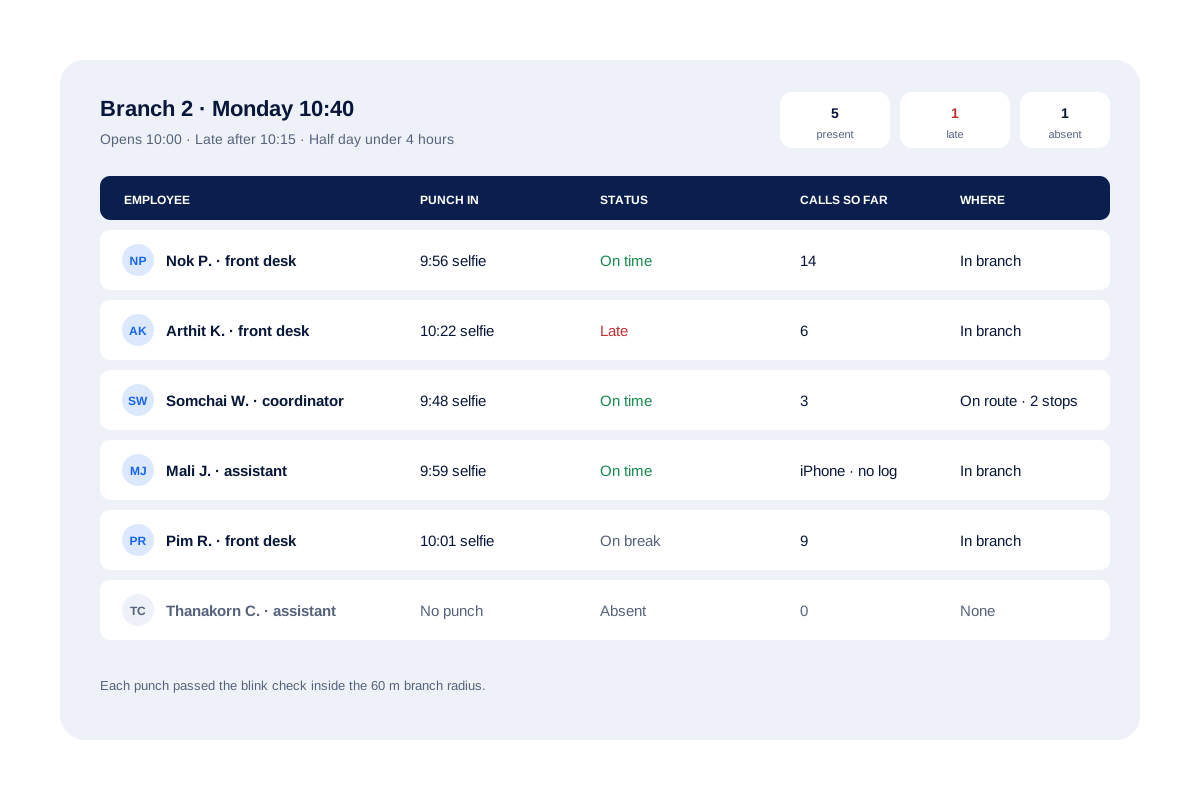
A staff management app records attendance, working hours and the work of each employee, and shows the owner a daily summary per person.
Calsyst adds the work calls of each employee to that summary, which suits businesses where staff spend the day on the phone with customers.
- Attendance rules differ per branch.
- Call records come from Android phones.
- Payroll stays in your payroll tool.
Staff management app benefits
What an owner of a growing team gets back.
Proxy punches made harder
Punching in needs the employee's own face on camera, blinking and copying a gesture on request, while standing at the branch.
Rules that match each site
A shop in the mall and the head office can open at different times, rest on different days and treat lateness differently.
Work calls on record
On Android, each employee's business calls reach the owner with counts of connected and missed calls.
Field shift on a map
Staff who go out appear on a route with stops, only while they are punched in.
Branch report for payroll
The branch report lists present, late and absent days with hours and exports to Excel.
Staff management app: three records for every employee
Most attendance apps stop at the punch. Calsyst keeps two more records, because in a phone-heavy business the punch alone says little about the day.
When they worked
The punch in, every break and the punch out, checked against the rules of the branch. The staff attendance app page covers the selfie and the branch radius in detail.
Whom they called
On Android phones, each business call reaches the owner’s account with its length and result. The employee call tracking app page shows the owner screen.
Where they went
Field staff appear on a route, with stops and kilometres, between their first and last punch. See the employee location tracking app page for consent and the tracking rules.
Employee management app on Android and iPhone
Teams often mix phone brands. This table shows which part of Calsyst runs on which phone, based on the live feature list of 23 October 2026.
| Feature | Android | iPhone |
|---|---|---|
| Selfie attendance with blink check | Yes | Yes |
| Branch rules and late marks | Yes | Yes |
| Break and Resume | Yes | Yes |
| Live location on shift | Yes | Yes |
| Leads, remarks and follow-ups | Yes | Yes |
| WhatsApp CRM chat | Yes | Yes |
| Work call log and team call totals | Yes | No, iPhone keeps call history private |
Team management app rules you set per branch
A shop that opens at 10 and an office that opens at 9 should not share one rule. In Calsyst each branch carries its own settings:
- the radius around the office where a punch counts
- working hours and weekly days off
- the clock time that turns an arrival into a late mark
- the hours that make a half day
- whether a punch from outside the radius is accepted
A basement shop with no signal is fine: the handset keeps the punch and sends it later. For warehouse or security staff who never call customers, attendance app mode keeps their call history out of the company backup.
Staff management app for employees: what is left out
- No payroll, payslips or tax forms. Use the Excel export in your payroll tool.
- No shift planner or rota.
- No task boards or project lists.
- No leave requests and approvals.
If the main job is payroll for daily-wage workers, a payroll-first app is the better buy. Calsyst is for teams where attendance and customer calls both need watching.
Staff management app example: a clinic group in Bangkok
A dental clinic group in Bangkok runs 3 branches with 24 staff. Front-desk staff book patients by phone, and two coordinators visit partner offices across the city.
The owner gives each branch its own hours: one opens at 8:00, two open at 10:00. Front-desk staff punch with a selfie at their branch. On Android phones, their booking calls show in the team call log.
On the 30th, the owner saves the branch report as a spreadsheet and passes the days worked and late marks to the accountant, whose own software prepares the salaries.
Staff management app FAQ
Which employee management app suits a firm whose staff live on the phone?
Calsyst, if your staff answer and make customer calls. It keeps their attendance, their work calls and their field route together.
Who is Calsyst for?
Calsyst is a staff management app for businesses whose people call customers or visit them, such as sales offices, agencies, clinics and service firms.
Does Calsyst work out salaries or payslips?
No, salary is outside Calsyst. Download the month's attendance as an Excel sheet and feed its days and hours into whatever payroll program you use.
Can each branch have different office hours?
Yes. Opening time, closing time, weekly off days and the lateness rule are stored per branch, not once for the whole company.
Who decides what counts as late or a half day?
The owner does. Pick the minute after which arrival counts as late, and the shortest working day that still counts as a full one.
Can staff punch in from home?
Only if you allow it. Switch on outside punches for a branch whose people work remotely, and leave it off where everyone must come in.
How does the selfie stop one person punching in for a friend?
It makes that much harder. A friend holding up a stored picture is not enough, because the check wants a real blink and a gesture chosen at random each time.
Can I check staff attendance for last month?
Yes. Staff see their own last month on the phone, and the owner opens any date range for the branch on the web.
Can employees use their personal phones?
Yes, with their consent. Owner rules such as masked customer numbers are meant for company phones that the business owns.
Do staff with iPhones get the same app?
Almost. On an iPhone the call log section stays empty, as Apple keeps that list private; attendance, location, leads and reminders all work.
Can I keep call logs out of the backup for staff who only punch in and out?
Yes. Turn on attendance app mode, and only attendance, location and leads back up until you switch it off.