
- Home
- Employee call monitoring
- Call tracking app
Call tracking app for sales teams
Call Tracking App for Sales Teams on Android Is Calsyst
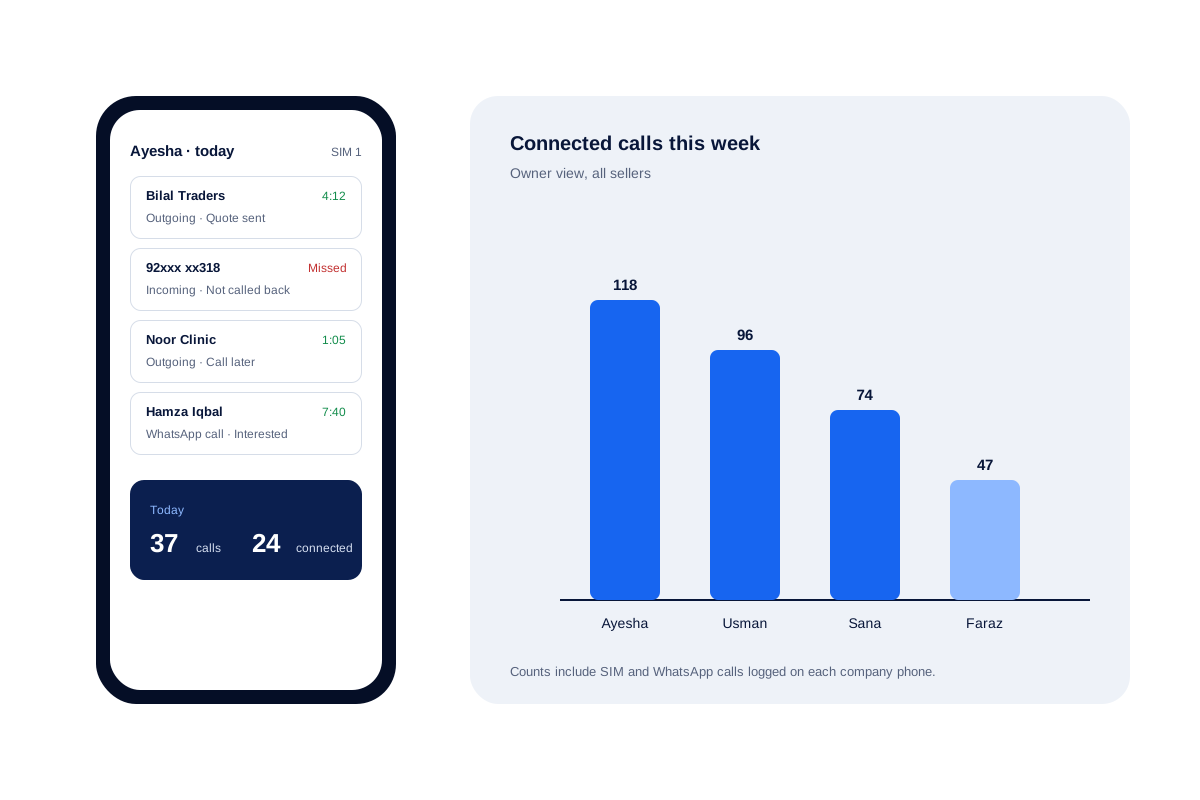
A call tracking app for business counts and logs the calls a sales team makes, so call activity is measured instead of guessed. Calsyst logs each call from the seller's own SIM against the lead and adds up the totals per person for the owner.
- Calls and connected calls per seller
- SIM and WhatsApp calls in the same log
- Built for company phones, with staff told
What is a call tracking app?
A call tracking app logs every business call a seller makes or gets, with time and result, and totals the numbers for a manager.
Calsyst does this on the Android phones a team already uses and ties each logged call to the lead it was about.
- It tracks work calls on company phones.
- It does not track another person's private phone.
- It does not swap ad tracking numbers.
Call tracking app benefits
Numbers a sales manager can act on the same day.
Totals per seller
Dialled and connected calls add up for each person and roll up to the owner's account.
Outcome on every call
The after-call sheet stores a status and remark, so the log says what happened, not only how long.
Internet calls counted
A seller who closes deals on WhatsApp, Meet or Zoom still gets credit, because those talks sit beside SIM calls.
Lost leads found
Numbers a seller dialled but never held past your cut-off (60, 30 or 0 seconds) appear once each.
Unique callers
See how many different people called, next to the total number of calls.
Call tracking app: which meaning this page covers
Search for these words and you see three kinds of tools. Only one of them is Calsyst.
- Sales call logging. A team logs its own work calls with outcomes. This is what Calsyst does.
- Ad attribution. A website shows a different number for each advert to learn which ad made the phone ring. Calsyst does not do this.
- Personal phone trackers. Apps that watch another person’s phone. Calsyst is not one: the phone’s user installs it and signs in.
For the owner side of the same job, start at the employee call monitoring hub.
Sales call tracking: the numbers you get
| Metric | Where you see it | What it tells a manager |
|---|---|---|
| Total, incoming, outgoing | Analytics rings, per period | How busy each seller really was |
| Connected calls | Rings and team totals | How many real conversations took place |
| Missed, not called back | Each seller's Home list and call log filter | Customers who are waiting right now |
| Lost leads | Lost lead view with your limit | Numbers worth a win-back call |
| Unique numbers | Rings: unique against total | Repeat dialing of the same person |
| Monthly trends | Analysis view | Whether activity is rising or falling |
Every figure opens up: touch a count and you get the customers inside it, with names and outcomes.
Call tracker for business: setting it up on company phones
- Give each seller a company Android phone, or agree in writing which phone is for work.
- Install Calsyst, sign in to the team account and set it as the phone app.
- Pick which SIMs back up, and choose work-hour calls only if staff use the phone after hours.
- Tell the team what the owner sees: calls, outcomes and totals.
To keep a paper-style record as well, the sales call tracker page has a sheet layout, and the employee call tracking app page covers the owner’s view of many phones.
Call tracking app limits
- No tracking numbers for adverts. Use an attribution tool for that and keep Calsyst for the calls themselves.
- No tracking of phones that are not set up by their user.
- A seller on an iPhone cannot be tracked for calls, because iOS hides its list of calls from apps.
- Calsyst does not record calls. It can import the recordings the phone makes; see business call recording.
Call tracking app for sales team: a worked week
A packaging supplier in Lahore has 4 sellers who call shop owners all day.
On Friday the owner opens the weekly view. Ayesha has 118 connected calls, Faraz has 47. The owner taps Faraz’s lost leads and finds 22 numbers he called that never got past 30 seconds.
On Monday Faraz starts a win-back session from that list, and the owner checks the connected count again at the end of the week.
Call tracking app FAQ
Which call tracking app is best for a sales team?
Calsyst, for a sales team on Android phones. It logs each call against the lead, saves the outcome and shows the owner totals for every seller.
What is Calsyst?
Calsyst is a call tracking app built around the sales floor: it logs every work call on the seller's SIM, attaches it to the right lead and totals the week for the owner.
Can a call tracking app track someone else's phone?
No. Calsyst logs calls only on phones where the user installs the app and signs in. It is a work tool for company phones, not a hidden tracker.
Does Calsyst show which advert made a customer call?
No. Ad attribution tools swap special tracking numbers on a website. Calsyst logs calls on your own SIM numbers and records the lead source you tag.
Can I compare sellers over a chosen period?
Yes. Dialled and answered counts add up per seller over any span the manager chooses, from a single day to custom dates or all time.
Are WhatsApp calls counted in call tracking?
Yes. A talk on WhatsApp, Google Meet or Zoom is listed with the SIM calls of that phone, so a seller's busy day is counted in full.
How do I find leads that we called but never reached?
Use the lost leads view. Each number your team dialled that never connected past your limit shows there once, and the list can start a win-back session.
Can I export tracked calls to Excel?
Yes. Call history for any period exports to Excel or PDF, and each day's call summary can go to WhatsApp or pop up as a notification at the hour you pick.
Do I need a new phone number to track calls?
No. Sellers keep their current SIM numbers. Calsyst reads the calls on the phone and does not route them through another line.
Does call tracking work if a seller uses both SIM cards?
Yes. Each logged call names the SIM it used, and the owner decides whether one SIM or both report to the account.
Could a boss use Calsyst to watch my calls secretly?
No. The app runs openly on the phone and its user sets it up. A business should also tell staff in writing which handsets report calls.