
- Home
- Lead management app
- CRM app for Android
CRM app for Android
CRM App for Android With Calls, Leads and WhatsApp Is Calsyst
A CRM app for Android is customer software on the phone itself, so leads, remarks and next steps travel with the seller. Calsyst builds that CRM around the handset's own calls: every ring shows the right lead, and every hang-up asks what happened next.
- Ringing calls show the lead status and last remark
- Statuses, tags, products and fields you define
- Runs on the Android handsets your team already owns
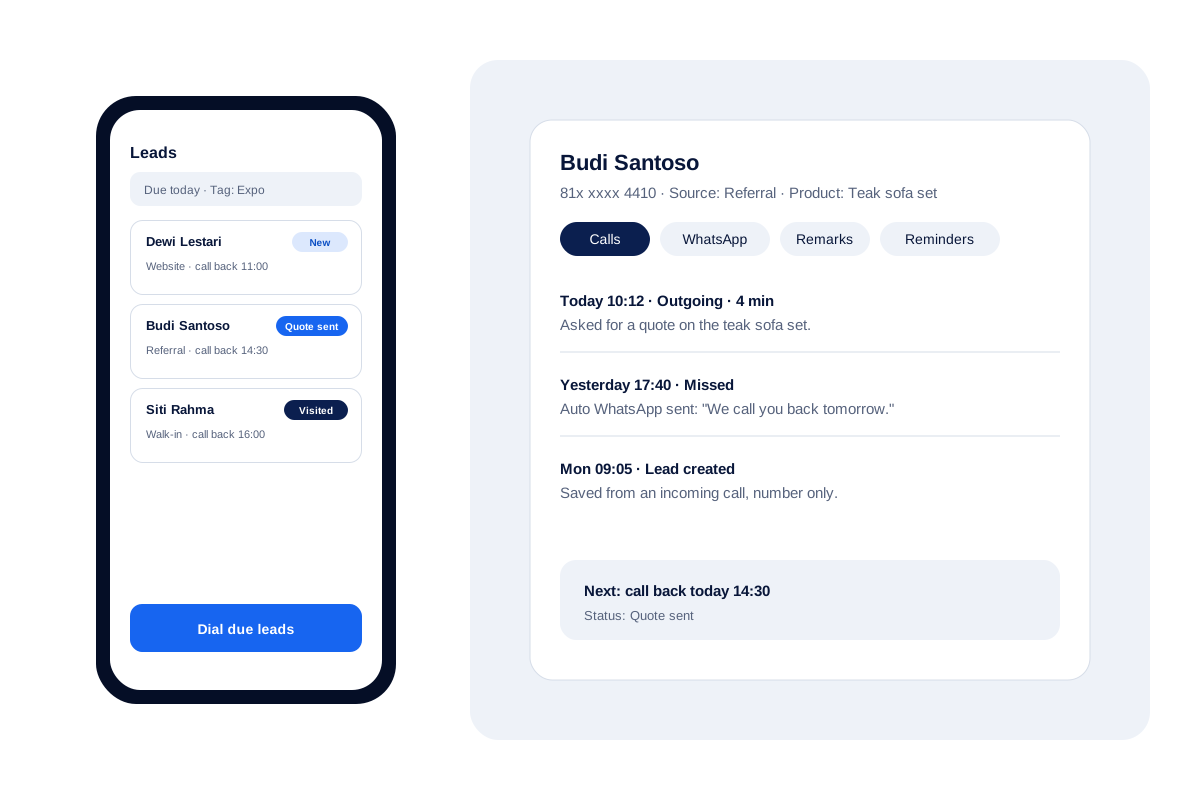
What is a crm app for android?
A CRM app for Android keeps customers, their history and your next step on the phone, so you can call or update them from anywhere.
Calsyst is a CRM app for Android built into the dialer, so calls log themselves against leads instead of being typed in afterwards.
- Calls attach to leads by themselves.
- Follow-ups ring like alarms.
- Owners see the whole team's work.
Mobile CRM benefits for Android sellers
Gains from keeping customer records inside the calling screen.
No double entry
The call is already in the record when it ends; the seller only adds the outcome.
Context on every ring
Before you answer, a caller card names the lead's status and the remark you left last time.
Pipeline in your words
Your pipeline speaks your trade's language: rename statuses, recolour them and drag them into order.
Leads flow in
Google Sheets, a REST API or a webhook feed new leads in automatically; Excel and CSV files you import by hand.
WhatsApp from the record
Templates, chats and automatic texts sit beside each lead's call history.
Survives a lost phone
Records back up to the account and return when you sign in on a new handset.
CRM app for Android: how the call becomes the record
Most mobile CRMs are forms. You call from the phone app, then switch apps and type what happened. Calsyst removes the switch.
During the ring
A lead’s call lights up the screen with who it is, where they sit in your pipeline and your last remark, locked handset or not. During the call, one tap opens their full lead record.
After the hang-up
Up comes a short sheet: pick the new status, type a remark, choose when to ring again; two taps finish it, and that call-back turns into an alarm. Read more on the follow-up reminder app page.
Over the week
Each lead keeps one screen of tabs: calls, WhatsApp, remarks and reminders. The owner reads the same records for the whole team, as covered on the lead management app page.
Which is the best CRM app for Android for a calling team?
When you shortlist Android CRMs, check these points first. They decide whether sellers actually use the app.
| Question to ask | Why it matters | Calsyst |
|---|---|---|
| Do calls log by themselves? | Typed logs stop after a week | Yes, from the phone's own calls |
| Does the ringing screen show the lead? | Context makes the call better | Yes, status and last remark |
| Can statuses match my process? | Fixed pipelines confuse sellers | Yes, create, rename and reorder |
| Do leads flow in from forms and sheets? | Hand entry delays the first call | Sheets, REST API and webhook feed in; files are imported by hand |
| Is WhatsApp beside the record? | Most replies happen on WhatsApp | Chats, templates and auto texts |
| What happens to a lost phone? | Records must outlive the handset | Restore by signing in |
Mobile CRM limits: when Calsyst is not the fit
- Sellers who live in email threads and meeting rooms may suit a desk-based CRM better.
- No one-click link to other CRMs; data moves by webhook or API.
- Call history is an Android feature; the iPhone app works without it.
- No built-in quotes or invoices; paid and due amounts are tracked, payments are not taken.
CRM app download for Android: a first week in practice
Trade-specific set-ups build on the same first week: property teams start from the real estate CRM for site visits, and travel desks from the CRM for travel agency sellers.
A furniture shop in Bandung has 3 sellers who used a shared notebook for leads.
On day one the owner imports 140 leads from an Excel sheet and sets four statuses: New, Visited, Quote sent, Bought. Each seller gets about 45 leads.
By Friday, every lead shows at least one call and a next date. The owner sees that 18 quotes are waiting and asks the sellers to ring those first on Monday.
Also see the CRM with dialer and the customer management app.
CRM app for Android FAQ
Which CRM app for Android fits a team that sells by phone?
Calsyst suits that team well, because its CRM sits inside the Android dialer. Calls file themselves under leads, and follow-ups ring as alarms.
What is Calsyst?
Calsyst is a CRM app for Android and iPhone that joins leads, calls, reminders and WhatsApp in one place for sales and service teams.
What does the Calsyst CRM app include?
Lead records with your own statuses, tags, products and fields; a calling log tied to leads; reminders; paid clients; WhatsApp tools; imports; and a web account for owners.
Is a mobile CRM enough without a desktop CRM?
Yes, for teams that work from phones. Calsyst also has a web account at app.calsyst.live for reports and settings, but daily work happens on the phone.
Can the CRM app work without internet?
Partly. Calls use the SIM, so they work without internet. Sync, backup and WhatsApp need a connection.
Can I move my contacts from another CRM?
Yes. Save them from the old system as Excel, CSV or JSON and upload that file. You match its columns to Calsyst fields once, and repeated numbers get thrown out.
Does the CRM work with Zoho or HubSpot?
Not with a plug-in. Calsyst can hand call data to either one over webhooks or its outbound API, either wired directly or relayed by Zapier, Make, Pabbly or n8n.
Is there a Calsyst CRM app for iPhone too?
Yes. The iPhone app has everything except call history, because iPhone does not share its call list with apps.
How do I get the Android app?
Message Calsyst on WhatsApp at +91 78470 91099 and the Android download link is sent back to you.
Can several sellers share one CRM?
Yes. Hand leads out per seller; everyone works through a personal pending queue while the owner follows each call and status change.