
- Home
- WhatsApp CRM
- Bulk WhatsApp sender
Bulk WhatsApp sender
Bulk WhatsApp Sender App for Business Teams Is Calsyst
A bulk WhatsApp sender is a broadcast tool for business chats, so a team stops pasting the same note into chat after chat. Calsyst sends chat by chat from your phone, or runs an API campaign with a report per person.
- Lists from leads, the call log, clients or a sheet
- {name} and {city} filled in for each person
- Delivered, read, replied or failed, person by person
What is a bulk whatsapp sender?
A bulk WhatsApp sender sends one prepared message, often personalised, to many numbers in a single run instead of typing each chat by hand.
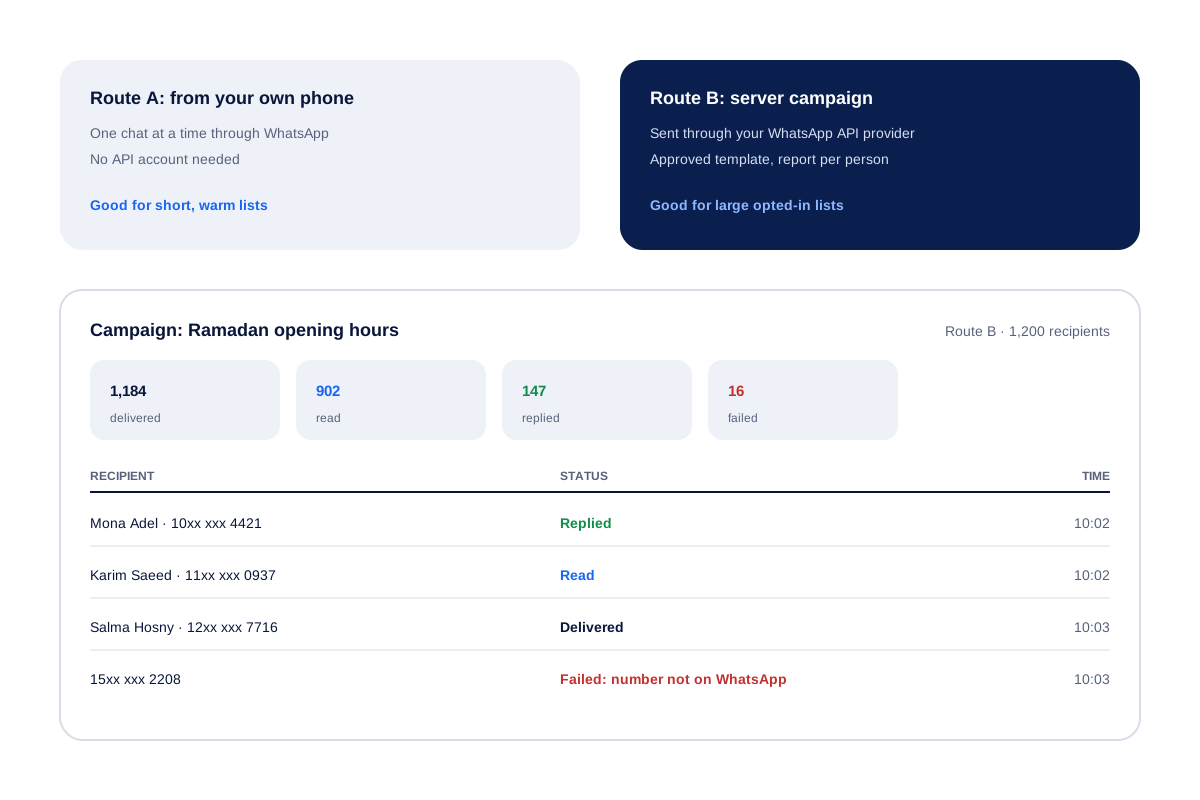
Calsyst offers two routes for that run: a careful one-by-one pass through the WhatsApp app on your handset, or a server campaign on the official API.
- The API route is the safer one for big lists.
- Send only to people who expect you.
- No tool can promise your number is never restricted.
Bulk WhatsApp sender benefits
Why sales and support teams run their broadcasts from the same app as their calls.
Lists you already have
Pick leads by filter, numbers from the call log, paying clients, a Google Sheet, an API source or a pasted column.
Personal wording at scale
{name}, {city}, {company} and {interest} change per person, so a list of 400 reads like 400 notes.
Test before the run
Send the draft to your own number first and fix the line breaks before anyone else sees it.
Report per recipient
An API campaign returns delivered, read, replied and failed for every number on the list.
Groups in blocks of 240
Recent callers and saved contacts are cut into batches of 240 for groups, and anyone who opted out stays off for good.
Send bulk WhatsApp messages: two routes compared
The route matters more than the tool. Pick it by list size and by how well the people on it know you.
| Route | How it sends | Restriction risk | Report | Best for |
|---|---|---|---|---|
| One by one from your phone | Opens each chat with the text ready; you tap send | Rises with list size and complaints | What you see in WhatsApp | A few dozen warm contacts |
| Server campaign via API | Your provider sends from its servers with an approved template | Lowest, if contacts opted in | Per person: delivered, read, replied, failed | Hundreds or thousands of opted-in contacts |
WhatsApp watches for blocks and spam reports. A number that sends unexpected messages to strangers can be limited, whichever tool it uses. A list of customers who gave you their number for updates is the strongest protection you have.
WhatsApp bulk message sender: running a campaign
- Pick the source: a lead filter, the call log, paid clients, a sheet or pasted numbers.
- Write the text with
{name}and any other fields you need. - Send a test to your own number.
- Choose the route and start.
- Ring back everyone marked Replied while the chat is fresh.
For API campaigns, the template must be approved in your WhatsApp account first. Connecting a provider is covered on the WhatsApp Business API provider page, and what Meta charges per message is explained on WhatsApp Business API pricing.
Bulk WhatsApp sender app: groups of 240
Some teams prefer WhatsApp groups to one-to-one broadcasts. Calsyst sorts contacts and recent callers into batches of 240 people each, ready to add to groups.
People who leave or ask to be removed go on the never-again list, and the next batch skips them. For one-to-one replies that come back from a campaign, the shared inbox of the WhatsApp CRM keeps them in one place. For texts that follow each call by themselves, see the auto WhatsApp message after call.
Bulk WhatsApp sender: limits
- No sender, Calsyst included, can guarantee your number stays unrestricted. WhatsApp judges by how recipients react.
- The one-by-one route still needs a tap per chat. It is not meant for thousands of numbers.
- Server campaigns need your own WhatsApp Business API account through a provider.
- There is no SMS backup when a number is not on WhatsApp. The report marks it failed.
Bulk WhatsApp sender example: a furniture store
A furniture store in Cairo wants to tell 1,200 past buyers about new Ramadan opening hours.
All 1,200 bought in the store and gave their number for updates, so the owner uses the API route with an approved template that greets each buyer by name. A test goes to the owner’s phone first.
The report shows 1,184 delivered, 902 read and 147 replies. A salesperson rings the buyers who replied with a question, and the 16 failed numbers are checked against the lead list.
Bulk WhatsApp sender FAQ
Which bulk WhatsApp sender is safest for a business number?
One that uses Meta's official API, with an approved template and a list of people who said yes to updates. Calsyst hands such a list to your API provider as a campaign.
What is Calsyst?
Calsyst is a call manager app with a bulk WhatsApp sender built in, so the list you just called can receive a follow-up message in the same session.
How can I send 1000 messages at once on WhatsApp?
Use an API campaign for a list that size. Your provider sends from its servers with an approved template, and Calsyst shows the result for each of the 1000 numbers.
Can WhatsApp ban my number for bulk messages?
Yes, it can restrict a number that sends many unwanted messages, especially through the normal app. Opted-in lists, approved templates and the API lower that risk.
Do I need an API account to send bulk messages from Calsyst?
No. Without one, Calsyst opens each chat in turn on your handset with the text ready, and you send them one by one.
Can each message use the customer's own name?
Yes. Write {name} in the text and every recipient sees their own name. City, company, interest, email and phone fields work the same way.
Can a message carry a PDF or a photo?
Saved messages can. Attach a catalogue PDF, a photo, a video or a voice note to a saved message and send it to a chat in one tap. Plan bulk runs around text and your fields.
How do I keep people who opted out from getting more messages?
Put them on the never-again list. Calsyst skips those numbers in every later group and campaign.
Can I send to the numbers that called me this week?
Yes. Choose the call log as the source, filter by date or call type, and use those numbers as the list.
What does the campaign report show?
Each recipient is marked sent, delivered, read, replied or failed, so you know whom to call next and which numbers to clean out.