
- Home
- Staff attendance app
Staff attendance app
Staff Attendance App for Shops and Offices Is Calsyst
A staff attendance app moves punching in and out onto each employee's phone, so the owner drops the paper register and the fingerprint queue. Calsyst asks for a live blink on camera, checks the phone is near the branch, and applies your late and half-day rules.
- Blink and random-action face check on every punch
- Each branch with its own circle and shift
- Works in a basement, uploads when signal is back
What is a staff attendance app?
A staff attendance app replaces the register: people punch in and out on their own phones, and the owner reads hours, lateness and absences.
Calsyst puts two checks on every punch in, a living-face test and the branch location, which makes signing in for an absent friend much harder.
- Same app on Android and iPhone.
- Rules belong to the branch.
- Lunch breaks show up too.
Staff attendance app benefits
What the owner of a shop, clinic or office stops chasing every month.
Buddy punching made harder
The camera asks for a blink or a head turn, which makes a picture on another phone much harder to use.
At the counter, not on the sofa
A punch in counts only inside the circle you draw around the branch, unless you choose to accept outside ones.
Late marks without arguments
Enter the shift start, the minute after which arrivals count as late, and the half-day line once; every arrival is judged alike.
Breaks on the record
Tapping Break and Resume keeps lunch and errands out of the paid hours.
Patchy signal is fine
A punch made in a cellar shop waits on the handset and uploads once data comes back.
Month-end in one file
The web report for a branch downloads as an Excel sheet ready for whoever does salaries.
Staff attendance app with location: the branch rules
Rules are stored on the branch, so somebody who joins on a Monday follows them from the first punch.
| Rule | What it controls | Example setting |
|---|---|---|
| Circle size | Distance from the branch that still counts | 100 m for a shop, 300 m for a factory |
| Shift | Start and finish of the working day | 10:00 to 18:00 |
| Weekly off | Days that are never marked absent | Saturday |
| Late cut-off | Arrivals after this time are marked late | 10:15 |
| Short day | Fewer hours than this make it a half day | Under 4 hours |
| Outside punches | Accept or refuse a punch beyond the circle | Off for counter staff, on for drivers |
Employee attendance app: a normal day on the phone
- Reach the branch and tap Punch in.
- Face the camera and blink when it asks.
- Tap Break when you step out, Resume when you are back.
- Tap Punch out before you leave.
Staff see their own record on the phone. The owner sees the same punches for the whole branch on the web.
Attendance app for staff: pages for each method
Teams need different proof of presence. These pages go further:
- Selfie attendance app: how the living-face test works.
- GPS attendance app: circles, outside punches and fake GPS points.
- Employee location tracking app: field staff whose day is spent on the road.
- Employee tracking app: hours, breaks and time on duty in one view.
Staff attendance app limits
- No salary or payroll sums. Hand the Excel sheet to whoever pays wages.
- No link to fingerprint or swipe-card readers.
- The camera checks that someone real stood in front of it; it is not matched against an ID photo.
Staff attendance app example: a trekking agency
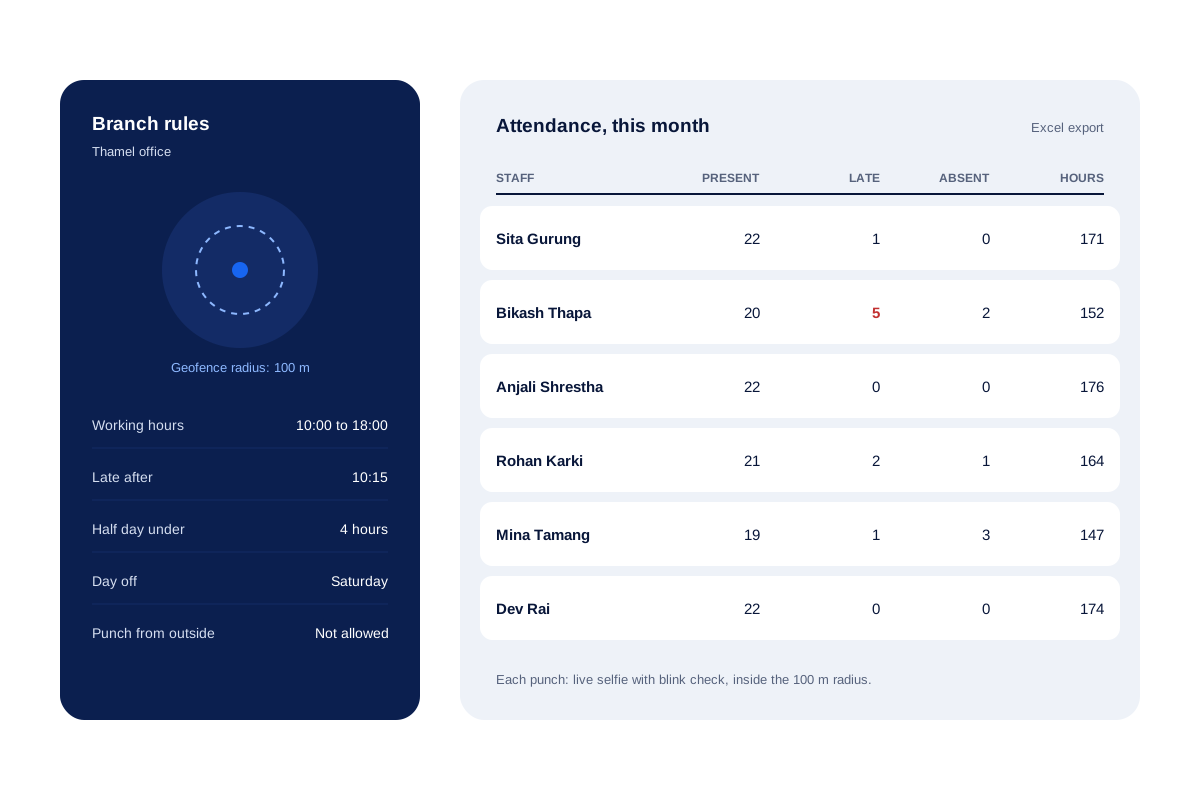
A trekking agency in Kathmandu has 6 office staff on a 10:00 to 18:00 shift.
The owner draws a 100 metre circle around the Thamel office, sets the late cut-off at 10:15 and makes Saturday the weekly off. Staff punch in at the door with a selfie. One monsoon morning the line is down; the punches reach the account at 11 am when it comes back.
On the 1st of the month the owner downloads the sheet and sees one person late 5 times, which turns into a chat about the bus timetable.
Staff attendance app FAQ
Which staff attendance app checks the face and the place together?
Calsyst checks both at every punch in. The camera needs a blinking, living face, and the handset must be within the branch circle.
What is Calsyst?
Calsyst is a staff attendance app and business calling app, so the phone that punches a salesperson in also logs their customer calls.
How can a small business take attendance with no biometric device?
Put the app on each employee's phone. They punch in at the door with a selfie, and you read the hours and late days on the web.
Can staff punch in from home?
Not unless you let them. A punch outside the branch circle is refused when outside punches are switched off for that branch.
Can a second branch keep different timings?
Yes. Each branch stores its own circle size, shift times, weekly off day, late cut-off and short-day rule, so the warehouse can open at 7 while the showroom opens at 10.
What if the shop has no internet one morning?
Nothing is lost. Punches are kept on the handset with the real time and sent later, so the morning still counts correctly.
Does the attendance app work on iPhone?
Yes. Punching in, breaks and the personal report work on iPhone as well as Android.
Can employees check their own hours?
Yes. On the phone each person can switch between last month, this month, the past 7 days and today, with hours and breaks.
Can I get the monthly attendance in Excel?
Yes. Pick the branch and the dates on the web, and the sheet arrives with punch times, hours, breaks and day totals.
Can I use Calsyst for attendance only and leave out calls?
Yes. Switch on attendance app mode, and the backup carries only attendance, location and leads while call history stays on the phone.
Does the app follow staff around after work?
No. Location for field staff is gathered only while they are punched in, and only after they accept a consent screen.