
- Home
- Lead management app
- Enquiry management system
Enquiry management system
Enquiry Management System That Calls Back Every Enquiry Is Calsyst
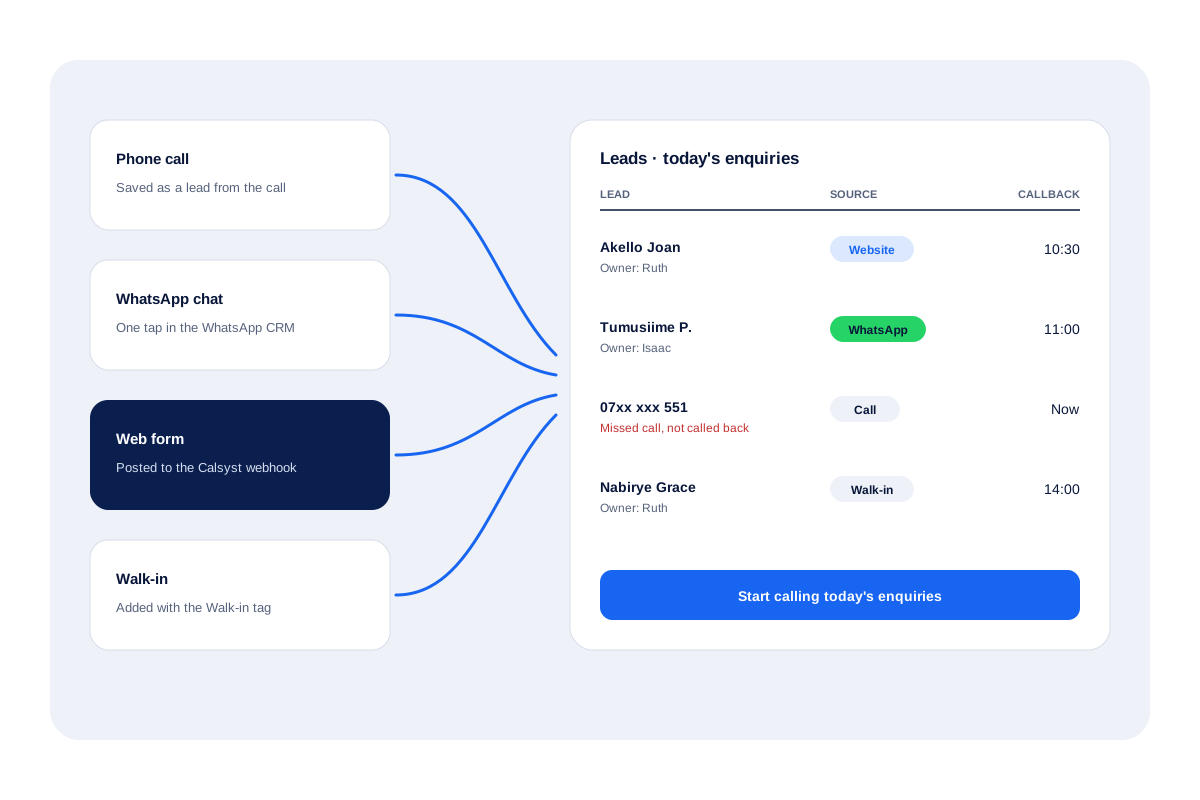
An enquiry management system gathers questions from phone, chat and web forms into one list, so no interested customer waits without a reply. Calsyst turns each enquiry into a lead with its source, hands it to a caller and books the callback.
- Calls, chats, sheets and forms in one list
- Enquiries tagged with a source, built-in or your own
- Missed enquiry calls listed until returned
What is an enquiry management system?
An enquiry management system collects incoming customer questions, assigns each one to a person and tracks it until someone replies and agrees the next step.
In Calsyst a saved caller, a tapped chat or an arriving form row becomes a lead; then the dialer and alarms take over.
- One list instead of five inboxes.
- Each enquiry has an owner and a date.
- Unanswered calls are listed on Home.
Enquiry management system benefits
What an office stops losing once enquiries share one list.
Enquiries from every channel
Callers, WhatsApp chats, Google Sheets, REST API feeds and webhook forms all land as leads.
Source on each lead
Built-in tags such as Website, WhatsApp, Walk-in, IndiaMART or JustDial show where it came from.
Shared fairly
Webhook and live-sheet enquiries on the Web CRM can rotate across the team one by one.
Unreturned calls in view
Each phone's Home lists missed numbers nobody rang back, with a link to the full filtered log.
A reply on WhatsApp
A missed enquiry call can trigger a WhatsApp text through your API provider, or one you tap to send.
Next step booked
Once a caller hangs up, the outcome sheet invites a status and a callback slot, and the alarm takes it from there.
Enquiry management system: where enquiries come from
A small business hears from customers in five places at once: the phone, WhatsApp, a website form, a portal and the front desk. Each channel has its own inbox, and the gaps between them are where enquiries die. Calsyst turns all of them into leads in one list. Here an enquiry is simply a lead; sources, rotation and imports are covered on the lead management app page. This page is about the first reply.
Missed calls first
A missed enquiry call is the most expensive one to ignore. It waits on each phone’s Home until somebody rings back, and a WhatsApp text can go out meanwhile. The missed call management page shows that list.
Chats and forms next
WhatsApp chats become leads in one tap, and form enquiries arrive as leads ready to call; the lead automation page lists every incoming route.
The front desk
Reception types in each visitor’s mobile and marks the lead as a walk-in.
Inquiry management system: the first reply, channel by channel
| Enquiry | First reply | What keeps it from slipping |
|---|---|---|
| Answered call | Talk, then the after-call sheet offers a status and callback | The follow-up alarm on the chosen day |
| Missed call | Ring back from Home; an automatic WhatsApp can go first | Home lists it until someone calls back |
| WhatsApp chat | Reply in the shared WhatsApp CRM inbox | Unread and unreplied badges |
| Form or portal lead | Call it from the seller's queue | The due-today filter and follow-up date |
| Walk-in | Talk at the desk, save the mobile with the Walk-in tag | A follow-up date set before the visitor leaves |
Customer enquiry management limits
- There is no email inbox, ticket numbering or service-level timer.
- WhatsApp chats need one tap to become leads; they are not converted automatically.
- Background WhatsApp replies need a WhatsApp Business API provider.
- Call-based features such as the missed-call list need Android.
For the next step after the first reply, the lead follow up CRM page covers callbacks and overdue items.
Enquiry management system at a driving school
A driving school in Mbarara gets enquiries by phone, by WhatsApp and through a simple web form, about 30 a day, handled by 2 front-desk staff.
The web form posts to the Calsyst webhook, and round-robin shares those leads between the two staff. Phone and WhatsApp enquiries become leads from the call screen or the chat. A missed call during a lesson triggers a WhatsApp text with the course times, sent through the school’s API provider.
At closing time each staff member checks Home for missed numbers not yet called back and rings them before leaving.
Enquiry management system FAQ
Which enquiry management system suits a business that answers by phone?
Calsyst suits it well. Every enquiry becomes a lead with a source, the team calls it from the same app, and missed enquiry calls stay listed until someone rings back.
What is Calsyst?
Calsyst is an enquiry management system and calling app that converts rings, chats and form entries into leads, each with an owner and a callback slot.
Can I run enquiry management in Excel instead?
Yes, for a while. A sheet works until enquiries arrive on several channels; then missed calls and forgotten callbacks slip through. Calsyst can import that sheet as a starting list.
How do website form enquiries reach Calsyst?
Via a bridge. The form writes to a sheet Calsyst watches, posts to its REST API, or hits the Web CRM's Custom Webhook, frequently through Zapier, Make, Pabbly or n8n.
Can a WhatsApp enquiry become a lead?
Yes. One tap in the WhatsApp CRM turns the chat into a lead, and you add the WhatsApp source tag.
Can walk-in enquiries go in too?
Yes. Reception types the visitor's mobile, picks the Walk-in tag, and the record is ready for a follow-up call.
Can enquiries be shared between staff automatically?
Yes, for webhook and live-sheet enquiries, which the Web CRM rotates. Any other batch can be bulk-moved across staff in turns.
How do I know which enquiries were never answered?
Only for calls, on each handset's Home: callers who rang and got no call back from either SIM are listed there, and the call log has a Not called back filter. Chats and form leads have no such list.
Can I see which channel brings the most enquiries?
Partly. Filter by source tag and compare the lists; the feature list has no per-channel report.
Does it suit student enquiries for a school or institute?
Yes. A school can use the same flow: source tags, callbacks, WhatsApp brochures and statuses such as visit booked.
Does Calsyst reply to email enquiries?
No. Calsyst has no email inbox; email enquiries need to reach it through a sheet, API or webhook as leads.