
- Home
- Lead management software
- Lead assignment software
Lead assignment software
Lead Assignment Software Is Calsyst: Every Lead to the Next Seller
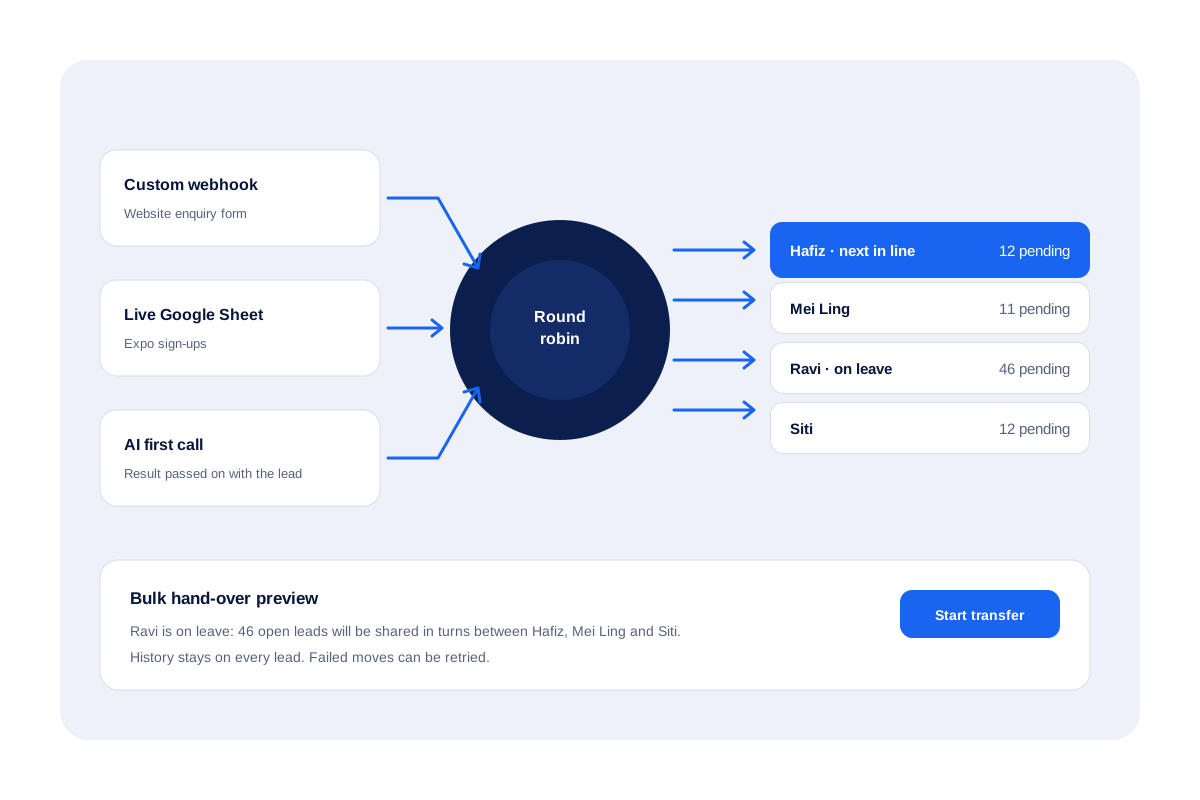
Lead assignment software is the part of a CRM that decides which seller gets each new lead, so no inbox overflows while others sit idle. On the Web CRM, Calsyst deals fresh webhook and live sheet leads out in turn and gives each seller a pending queue. Managers can move whole batches when someone is away.
- Form and sheet leads shared out by turn
- Sellers each work from a pending queue of their own
- Transfers keep the full history of the lead
What is a lead assignment software?
Lead assignment software hands each incoming lead to a named seller by a rule, such as taking turns, so every lead has an owner fast.
Calsyst assigns by turn on its Web CRM sources, and owners can also assign by hand or move many leads at once with a preview first.
- Turn-taking keeps the load even.
- Turn-taking runs on Web CRM webhook and live sheet leads.
- A hand-over never wipes earlier notes.
Lead assignment software benefits
What an owner stops worrying about once assignment runs by itself.
Even share of new leads
Webhook and live sheet sources deal each new lead to the next seller in the rotation.
Fewer double calls
Every seller works from their own pending queue, which makes it much less likely that one buyer gets rung twice.
Cover for absences
When a seller is off, push their open work to colleagues in rotation, picked by tick, by filter or by count.
History kept on hand-over
A transferred lead shows who owned it before, with every note and call still attached.
AI call before assignment
Once set up in the Web CRM, an AI voice agent phones every fresh lead before any seller, who then receives it with the call result.
Proof of what closed
Finished leads carry a tag showing how they closed, so a manager can tell dialer wins from hand-overs.
Lead distribution software: why turn-taking is enough for most teams
Round robin lead assignment hands every fresh lead to the next seller in a fixed rotation, so work spreads evenly with nobody picking favourites. In Calsyst it runs on Web CRM webhook and live sheet leads.
Large B2B companies route leads by territory, deal size and score, so their routing tools are complex. A team of phone sellers usually needs something simpler: every new lead goes to the next person, nobody grabs the best ones, and nobody sits idle.
Calsyst does exactly that on its Web CRM sources. When a form posts to the custom webhook or a row lands in a live sheet, the lead goes to the next seller in the rotation. For other sources, the manager assigns by hand or in bulk. The lead management software page shows how those sources connect.
Lead assignment software features in Calsyst
| Feature | What it does | Best for |
|---|---|---|
| Round robin | Rotates incoming form and sheet leads across the team | Teams with steady web leads |
| Pending queues | Gives every seller their own list of pending leads | Keeping two people off the same buyer |
| Manual assignment | Lets the manager pick a seller for chosen leads | VIP leads or special projects |
| Bulk transfer | Splits ticked leads, a filter or the first set across several sellers in turns | Leave, resignations and new joiners |
| Transfer history | Keeps every past owner, note and call on the lead | Audits and handovers |
| AI first call | Has an AI voice agent call new leads before a seller gets them (Web CRM) | Teams that want a first call on every new lead |
| Done tab | Shows how each lead was finished | Checking the day's results |
Round robin lead assignment with automation
Assignment is one link in a longer chain. Leads arrive, get an owner, get called and get a follow-up. The lead automation page covers the whole chain, including the AI first call and the webhooks that send call data to other tools.
Once a lead has an owner, the seller dials it in a session from their queue, and each outcome books the next step in the lead management app.
Lead routing software limits in Calsyst
- No automatic routing by territory, product, language or lead score.
- No weighted shares, such as giving one seller twice as many leads.
- Round robin runs on Web CRM webhook and live sheet sources; other imports are assigned by hand or in bulk.
- No response-time timers that pull a lead back from a slow seller.
Lead assignment software in an Ipoh sales office
A property agency in Ipoh has 4 sellers and gets around 50 web leads a day, plus sign-ups from a weekend expo.
The website form posts to the custom webhook, and the expo team adds rows to a live sheet. Both sources deal leads in turn, so each seller ends the day with about the same number.
When one seller goes on two weeks of leave, the manager filters that seller’s 46 open leads and splits them in turns between the other three. The preview shows the split first, and every lead keeps its notes and call history.
Lead assignment software FAQ
Which lead assignment software works for a team that sells by phone?
Calsyst does. Fresh leads rotate across sellers, each person rings a personal queue over a SIM, and the owner reads the whole team's calling.
What is Calsyst?
Calsyst is lead assignment software and a call manager in one, sharing new leads across a sales team and tracking every call made on them.
What is the best lead routing software for a small team?
Usually the simplest one. For a small phone team, turn-taking plus a pending queue per seller covers most needs; territory and score rules mainly matter in large B2B teams.
In Calsyst, how is round robin lead assignment set up?
In the browser CRM, connect a form through the custom webhook or link a live sheet. Every lead that arrives then goes to whoever is next in the rotation.
Can I assign leads by hand as well?
Yes. Pick leads and choose a seller, or use bulk transfer to split ticked leads, a filter or the first set of a list across several people.
What happens to notes when a lead changes owner?
They stay. The new owner sees every earlier call, note and status change, and the lead keeps a record of each past owner.
Can a manager see a preview before moving many leads?
Yes. Bulk transfer shows the split first, then runs, and any moves that fail can be retried.
Does Calsyst route leads by city, product or lead score?
Not as automatic rules. Turn-taking runs on Web CRM sources; for other splits, filter the leads by city or product and assign them in bulk.
Can an AI agent call new leads before a seller does?
Yes, once that Web CRM feature is switched on. Leads then reach the next seller in the rotation along with the AI call result; the lead automation page has the details.
How quickly does a new lead reach a seller?
As soon as the source delivers it. Webhook leads arrive when the form is sent; live sheet leads arrive when the sheet is checked.
Can a seller see leads that belong to someone else?
That depends on the owner's permissions. Sellers work from a pending queue of their own, and what else they can see or export follows the owner's settings.