
- Home
- WhatsApp CRM
- CRM with WhatsApp integration
CRM with WhatsApp integration
CRM With WhatsApp Integration Built Into Calls and Leads Is Calsyst
A CRM with WhatsApp integration keeps each customer's chats inside their record beside calls and notes, so sellers stop hopping between apps. Calsyst ships that WhatsApp layer as part of the app and sends through whichever Business API provider you sign up with.
- Chat and call history on one screen
- Messages after calls, sales and status changes
- Any API provider, saved as named profiles
What is a crm with whatsapp integration?
A CRM with WhatsApp integration lets a team send, receive and log WhatsApp chats inside each customer record, next to that customer's calls and deals.
Calsyst includes this as its own WhatsApp CRM inbox and automatic messages; it is not a plug-in that adds WhatsApp to another CRM.
- One record holds calls and chats.
- Automatic texts follow real events.
- You pick the API provider.
CRM with WhatsApp integration benefits
What a team gains when WhatsApp lives inside the CRM.
Context in every chat
The customer's calls and lead details sit next to the conversation, so replies fit the history.
Messages on real events
Missed calls, status changes, recorded sales and ringing reminders each trigger a text, fired by your provider's API or prepared for one tap when no API is set.
Chat becomes a lead
One tap turns an unknown WhatsApp sender into a lead that a seller can call.
Approved templates
Templates sync with category and language, and their blanks are filled before sending.
Company keeps the chats
Staff turnover does not take customer threads away; the company account still holds every one.
Provider freedom
Save several WhatsApp API providers as profiles and switch when prices or service change.
CRM with WhatsApp integration: what “built in” means here
Many searches ask how to bolt WhatsApp onto an existing CRM. Calsyst takes the other route: the CRM and the WhatsApp tools are one product, so a chat, a call and a lead status belong to the same customer record.
The inbox
Staff reply from the in-app WhatsApp CRM, mixing typed answers, pictures, PDFs, voice notes, templates and tappable reply choices. The WhatsApp CRM page covers the inbox in detail.
The automations
Calls and CRM events trigger messages. The auto WhatsApp message after call page shows the three call types and the safety settings.
The provider
Messages travel through the WhatsApp Business API provider you choose, saved as a named profile. Calsyst itself does not sell messaging; the WhatsApp Business API provider page explains the setup.
WhatsApp CRM integration: built in or bolted on
| Question | Built into the CRM (Calsyst) | Bolted onto another CRM |
|---|---|---|
| Where chats live | In the same app as calls and leads | In the CRM, through a connector you add |
| Who sets it up | Your API provider profile inside Calsyst | A connector or partner app for that CRM |
| Calls beside the chat | Yes, from the phone's own call log on Android | Only if that CRM also tracks your calls |
| When a tool changes | One app to check | Two vendors and a link between them |
| Best for | Teams that call and chat from phones | Companies already settled in a desktop CRM |
For the inbox itself, with templates, badges and segments, see the WhatsApp CRM page.
CRM for WhatsApp Business: limits and fit
- Calsyst does not add WhatsApp to Zoho, HubSpot, Salesforce or any other CRM.
- It is not a WhatsApp API provider; you contract one separately.
- Turning a chat into a lead is a one-tap action by a person, not automatic.
- Bulk messaging must follow WhatsApp and Meta policies and your local rules.
If your company already lives in another CRM and only needs call data there, see the HubSpot call logging page for how webhooks and the outbound API carry calls out.
CRM with WhatsApp integration at a car rental desk
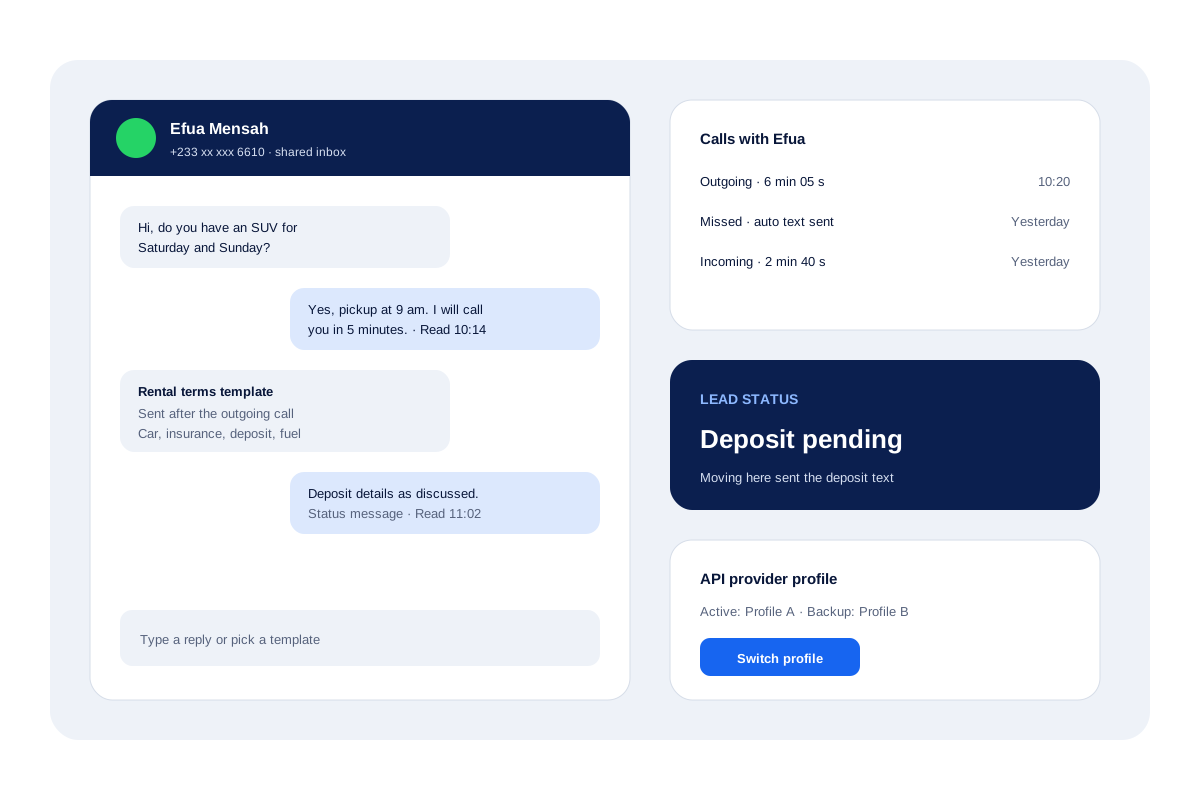
A car rental desk in Cape Coast gets most new leads on WhatsApp and closes bookings on the phone, with 3 staff sharing one API number.
A new chat about a weekend SUV becomes a lead with one tap. The seller rings the person, and the after-call message sends the rental terms template. When the lead moves to “deposit pending”, a status message sends the payment details text.
If a staff member leaves in the quiet season, every chat stays in the business account, and the next person reads the full thread beside each customer’s calls.
CRM with WhatsApp integration FAQ
Which CRM with WhatsApp integration suits a team that also calls customers?
Calsyst suits that mix well, because the WhatsApp inbox, the dialer and the lead record live in the same app and the same customer screen.
What is Calsyst?
Calsyst is a call manager and CRM with WhatsApp integration built in: a shared WhatsApp inbox, automatic messages after calls and chats linked to each lead.
Is WhatsApp itself a CRM tool?
No. WhatsApp is a messaging app; a CRM adds lead statuses, call records and a manager's view around the conversations.
Can Calsyst add WhatsApp to Zoho, HubSpot or Salesforce?
No. Calsyst is not a connector for other CRMs. It has its own WhatsApp CRM; call and CRM data can go out to other systems by webhook or API.
Do I need the WhatsApp Business API?
Yes, for background sending and the shared inbox, through a provider you choose. Without an API, Calsyst opens WhatsApp with the message ready to send.
Can a message go out automatically after a missed call?
Yes. With an API provider the text leaves by itself; without one, WhatsApp opens with the words ready. Quiet hours and a per-number cooldown stop repeats.
Will I know when a customer opened my message?
Yes, when the customer has read receipts on. Each message then carries the minute it was read, and campaigns report delivery, reads, replies and failures recipient by recipient.
Is a CRM with WhatsApp built in better than a plug-in for my current CRM?
Built in wins when calls and chats happen in one phone app, because both stay on one record; a plug-in suits a team settled in a desktop CRM. The inbox itself is described on the WhatsApp CRM page.
Can a WhatsApp chat start a lead automatically?
Not by itself; a person taps once to turn the chat into a lead, choosing the details to keep.
Can I switch WhatsApp API providers later?
Yes. Every provider is stored as a named profile; add the newcomer, then make it the active one whenever you are ready.