
- Home
- Auto dialer app
- Auto redial app
Auto redial app
Auto Redial App for Android Sales Calls Is Calsyst
An auto redial app rings a number again when the first try goes unanswered, so nobody has to press call a second time. In Calsyst, redial works on a whole lead list and on a single number, with the tries and timing set by you.
- Lists: up to 3 extra tries per unanswered lead
- One number: your own count of tries and gap
- A ring limit ends calls nobody will pick up
What is an auto redial app?
Auto redial means the phone repeats an unanswered or dropped call by itself, waiting a gap you choose and stopping after the attempts you allow.
Calsyst runs redial two ways: inside a calling session for every lead that did not pick up, and on one stubborn number you must reach today.
- Session redial: 1, 2 or 3 more attempts.
- Single-number redial: tries and gap of your choice.
- Calls cut before the first ring are retried twice.
Auto redial app benefits
Why a second and third attempt matter on sales lists.
Three timing modes
Pick when no-answers return: once everyone has been tried, a set number of minutes later, or on the spot.
Single-number mode
Point redial at one line, such as a supplier hotline, and choose how often and how far apart it calls.
Ring limit
A call that rings past your limit ends, so the session does not stall on a phone left on a desk.
Weak-signal safety
When a session call dies before the other phone even rings, the dialer quietly tries it twice more.
Leads stay open
After the final try a lead counts as not reached and stays in the queue for tomorrow.
Auto redial settings: the three timing modes
After the whole list
The session dials every lead once, then goes back for the ones that did not answer. Choose this on long lists, so the first pass reaches as many people as possible before any repeat.
After a set time
Unanswered leads return after the delay you set, such as 30 minutes. This suits lists where people are often in meetings and can talk a little later.
Straight away
The number rings again at once. Use this sparingly, for leads who asked you to call at an exact time and may have missed the first ring.
These settings apply inside a session of the auto dialer app. For leads who need a call on another day instead, book a reminder in the follow-up reminder app.
Auto redial app for Android: every setting in one table
| Setting | Choice | Use it when |
|---|---|---|
| Extra tries per lead | 1, 2 or 3 | More tries for warm leads, fewer for cold lists |
| Timing of the extra tries | End of list, delayed, or immediate | Match how busy your leads usually are |
| Single-number tries | A count you choose | One office line you must reach today |
| Single-number gap | A gap you choose | Hotlines that go unanswered for a few minutes |
| Ring limit | A time you choose | Phones that ring out with nobody near them |
| Network-drop retry | Up to 2, automatic | Calls lost before the first ring |
Call again until answered: using single-number redial well
Single-number redial is for lines that often go unanswered, not for people who avoid you. Good uses are a clearing agent’s desk, a bank’s business line, a supplier’s order number or a hospital appointment desk.
Set a sensible gap of several minutes, so the line has time to clear. Keep the number of tries small. When the call connects, the redial stops by itself.
To run many unanswered numbers through one pass instead, use a session from a list, as described on the bulk calling app page.
Auto redial app limits
- Redial here covers SIM calls on Android. Check with the team before you plan redial for WhatsApp calls or iPhones.
- Redial is no substitute for a booked follow-up. A lead who asked for Friday should get a reminder, not five tries today.
- Redial does not change the caller ID. Each try shows the same mobile number, which some people will notice.
Auto redial app example: a hard-to-reach port desk
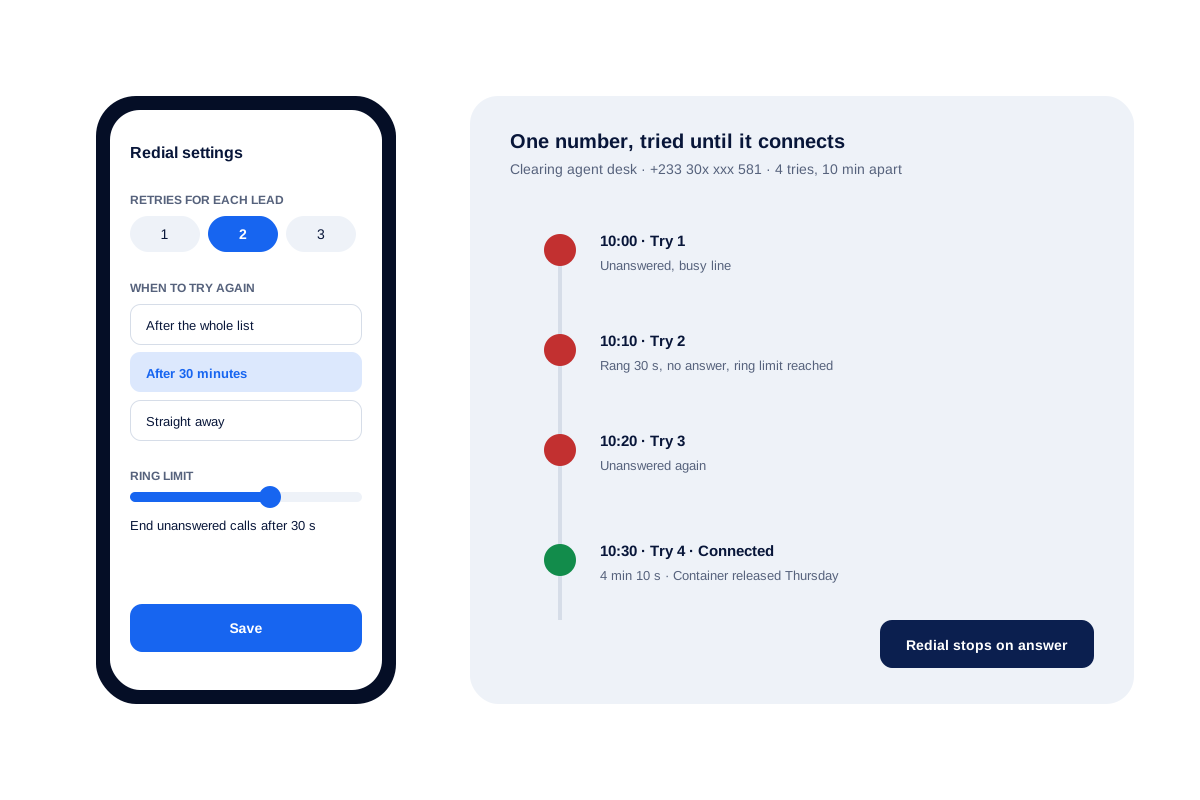
A freight forwarder in Accra has 2 coordinators who must reach clearing agents at the port each morning. Calls to the agents’ desk lines often go unanswered: a busy line or a ring out.
A coordinator sets single-number redial to 4 tries, 10 minutes apart, for the agent handling a delayed container. The first three tries go unanswered; the fourth connects at 10:30 and the container release is set for Thursday.
For the client list, the same coordinator runs a session with 2 extra tries after 30 minutes, so clients who were in meetings get a second chance before lunch.
Auto redial app FAQ
Which auto redial app suits business calling on Android?
For sales and service calls on Android, Calsyst fits well. It redials unanswered leads inside a calling session and can also chase one number on its own.
Is Calsyst only an auto redial app?
No. Calsyst is an auto redial app inside a full call manager, with lead records, reminders and WhatsApp messages around each call.
How do I make my phone redial a number automatically?
Use a redial feature that repeats the call for you. In Calsyst, open the number and pick single-number redial. Enter how many attempts and how many minutes apart, then press start; it stops when someone answers.
Is there an app that keeps calling a number until someone picks up?
Yes. Single-number redial keeps trying at your gap until the call is answered or your tries run out. Use it for offices and hotlines, not for private people.
How many times does a session redial each lead?
You choose 1, 2 or 3 extra attempts for every lead that did not answer in that session.
When do the extra attempts happen?
Pick one of three modes: after the whole list is done, after a delay you set, or right after the missed attempt.
What if the call drops before the other phone rings?
In a calling session the dialer treats that as a network problem, not a no-answer, and tries the number again up to 2 times.
Can I stop a call that keeps ringing with nobody there?
Yes. Set a ring limit, and any unanswered call ends at that point and joins the redial pass.
Is it polite to redial customers many times?
Yes, in small numbers. One or two extra tries a day is fine when the person requested the call. Respect calling hours and do-not-call rules where you work.
What happens to a lead after its last redial attempt?
It counts as not reached and stays open in the queue, so a later session or a follow-up reminder can pick it up.
Can a redial session start from numbers in the call log?
Yes. Whichever source feeds the session, recent call-log numbers included, the same retry rules apply to every number in it.