
- Home
- Sales team tracking app
Sales team tracking app
Sales Team Tracking App for Calls, Visits and Follow-Ups Is Calsyst
A sales team tracking app gives a manager a factual record of each seller's day, so weekly reviews stop resting on memory. Calsyst puts each rep's phone calls, attendance and field route into one owner view, and keeps follow-up reminders on every phone.
- Calls and visits side by side, per rep
- Position recorded on shift, never in the evening at home
- Fake GPS points kept out of the kilometres
What is a sales team tracking app?
A sales team tracking app records the calls, visits, hours and next steps of each salesperson and turns them into a daily picture for managers.
Calsyst covers inside reps who sell by phone and outside reps who drive to customers, so a mixed team needs one app instead of two.
- Calls come from the phone's own log.
- Visits come from stops found on the route.
- Follow-up reminders stay open on each rep's phone until done.
Sales team tracking app benefits
What a sales manager can answer without asking anyone.
Who called whom today
The team call log lists every rep's calls, with connected and missed counts for the day.
Who started on time
Selfie punches inside the office radius show arrival, breaks and late marks per branch.
Where the field rep went
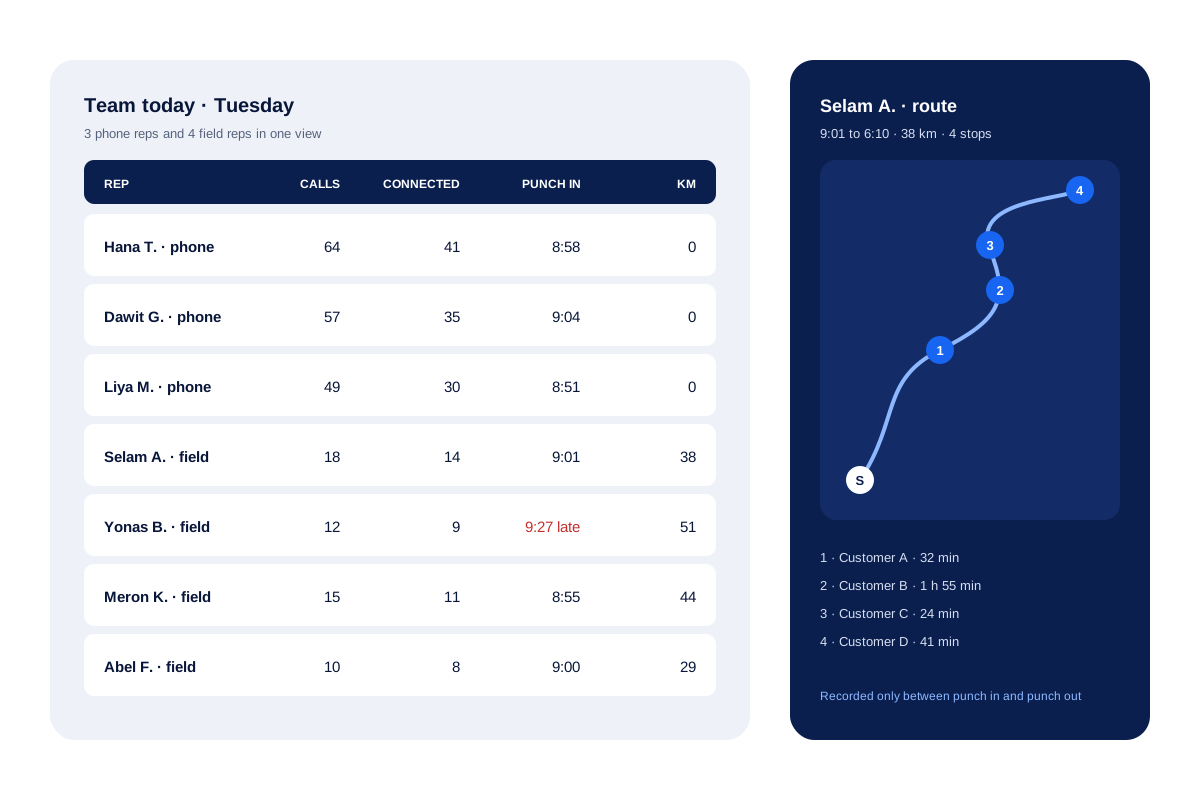
A map on the web counts the places a rep stopped, the time spent at each one and the distance driven.
Promises that do not vanish
Each rep's reminders stay open until done, and a missed one moves into that rep's Today list as overdue.
Honest distance numbers
Spoofed positions and impossible leaps across town are dropped before the distance is added up.
Sales team tracking app: the five things you can see
Calsyst does not guess what a rep did. Each number comes from something the phone recorded during the working day.
Calls
Every call the rep makes or gets on the work phone shows in the team call log. The employee call tracking app page explains the call side in full.
Attendance
A rep starts the day by taking a selfie inside the circle drawn around the branch, and the camera asks for a blink to prove it is live. When a rep steps out for lunch or tea, a Break tap pauses the clock and Resume restarts it. More on this is on the staff management app page.
Route and stops
For reps on the road, the web map turns the shift into a line through numbered places, each with its own duration, plus the total distance. See the field sales tracking app for how stops and kilometres are built.
Follow-ups
A promised call back cannot quietly vanish. Until the rep ticks it off, it stays on the rep’s list, and a missed one moves into that rep’s Today screen marked overdue.
The daily summary
A rep can post today’s counts to a WhatsApp chat in one tap, or let the phone deliver the daily report as an evening notice at an hour you pick. The daily sales report app page describes both.
Track sales team work through one day
The table follows one field rep and shows what Calsyst records at each moment. The times are an illustration.
| Moment | What the rep does | What the owner sees |
|---|---|---|
| 9:02 | Takes the morning selfie at the front desk | Present, on time, inside the office radius |
| 9:15 to 11:30 | Runs a calling session on assigned leads | Calls, connected count and statuses saved |
| 11:45 | Leaves for customer visits | Live location, running since the punch in, now draws a route |
| 12:20 to 4:10 | Visits four customers, adds remarks | Four stops with area names and minutes |
| 4:30 | Takes a break | Break logged; location paused |
| 6:05 | Punches out | Hours, breaks and 46 km for the day |
For a weekly view of these numbers per person, the guide on how to track sales team performance suggests which counts to compare. For targets and pipeline per rep, see the sales management app.
Sales rep tracking app: consent and work hours
Location tracking of staff is a sensitive subject, and laws differ between countries. Calsyst is built to stay inside working time.
- Each rep reads a consent screen and turns sharing on personally; the manager cannot do it for them.
- Android asks for location permission only after a short note in the app says what it is for.
- Positions belong to the shift alone, ending at the evening punch or when the branch shuts.
- A break stops the recording until the rep taps Resume.
Tell your team in writing what you track and why. The page on how to track employee location legally covers the rules from one country to the next. This is general information, not legal advice.
Sales employee tracking app: what it does not do
- It does not book orders, keep stock or handle invoices.
- It does not plan beats or routes in advance; it records the route that happened.
- It does not take expense claims or pay travel allowance.
- It does not track phones outside working hours.
If order taking in the field is the main need, a distribution app with order forms suits you better. Calsyst fits teams where the phone and the visit both matter.
Sales team tracking app example: a solar installer in Addis Ababa
A solar installer in Addis Ababa has 3 phone reps and 4 field reps. Phone reps book site surveys, and field reps visit homes to measure roofs.
The owner checks two things each evening: how many surveys the phone reps booked, and how many stops the field reps made. One evening the route view shows that a field rep spent 2 hours at one stop. The remark on the lead explains it: the customer asked for a second roof to be measured.
On the last working day of each month, the owner downloads the attendance and distance sheet and settles fuel money from its kilometre column.
Sales team tracking app FAQ
What is the best sales tracking app for a team that both calls and visits customers?
Calsyst fits a mixed team well. It logs each rep's phone calls and, for field reps, the route and stops of the working day, all in one owner account.
What does Calsyst track for a sales manager?
Calsyst is a sales team tracking app that records calls, attendance and the work-hours route with stops for every salesperson, while follow-ups ring on each rep's own phone.
Is there a way to check what reps did today without ringing each one?
Yes. Open the owner view after work. Per rep it lists calls, punch times and, for field staff, the route of the shift.
Does the app follow reps after work or on days off?
No. Position data is taken during the shift only, from the punch in to the punch out or to closing time, and it stops for every break.
Can a rep fake their location with a GPS app?
Not unnoticed. Calsyst spots positions that came from a spoofing app, warns the office about them and leaves them out of the distance, along with leaps across town no car could make.
Can I see how many kilometres each rep travelled?
Yes. Reps see today's distance on their handset, and on the web the owner gets it for each date and as a monthly sum.
Can I see the calls each rep made today?
Yes. Each rep's calls appear in the team call log of the owner, with how many connected and how many were missed.
Does attendance work in places with weak internet?
Yes. With no signal, the handset stores the punch and uploads it as soon as data returns.
Can I download the team's attendance and distance as Excel?
Yes. Pick a branch and the dates you want; the report gives present, late and absent totals, hours, breaks and distance, and saves as an Excel file.
Does the app record customer visits without the rep typing them?
Partly. It finds stops of 5 minutes or longer and names the area. When a rep adds a remark on a lead, the visit location is attached by itself.
Does sales team tracking work on iPhone as well?
Partly. Attendance and location work on Android and iPhone. The call log part needs Android, because iPhone does not share call history with apps.
Can reps book orders or claim expenses in the app?
No. Calsyst does not take orders or handle expense claims. It tracks calls, attendance, routes, leads and follow-ups.