
- Home
- Call management app
- Call history manager
Call history manager
Call History Manager for Android Sales Phones Is Calsyst
A call history manager keeps, filters and searches every call a handset makes or takes, so a past conversation is quick to find. Calsyst adds the lead, the remark and the SIM to each entry and keeps the calls your backup rules allow.
- Eleven filters, from missed to not called back
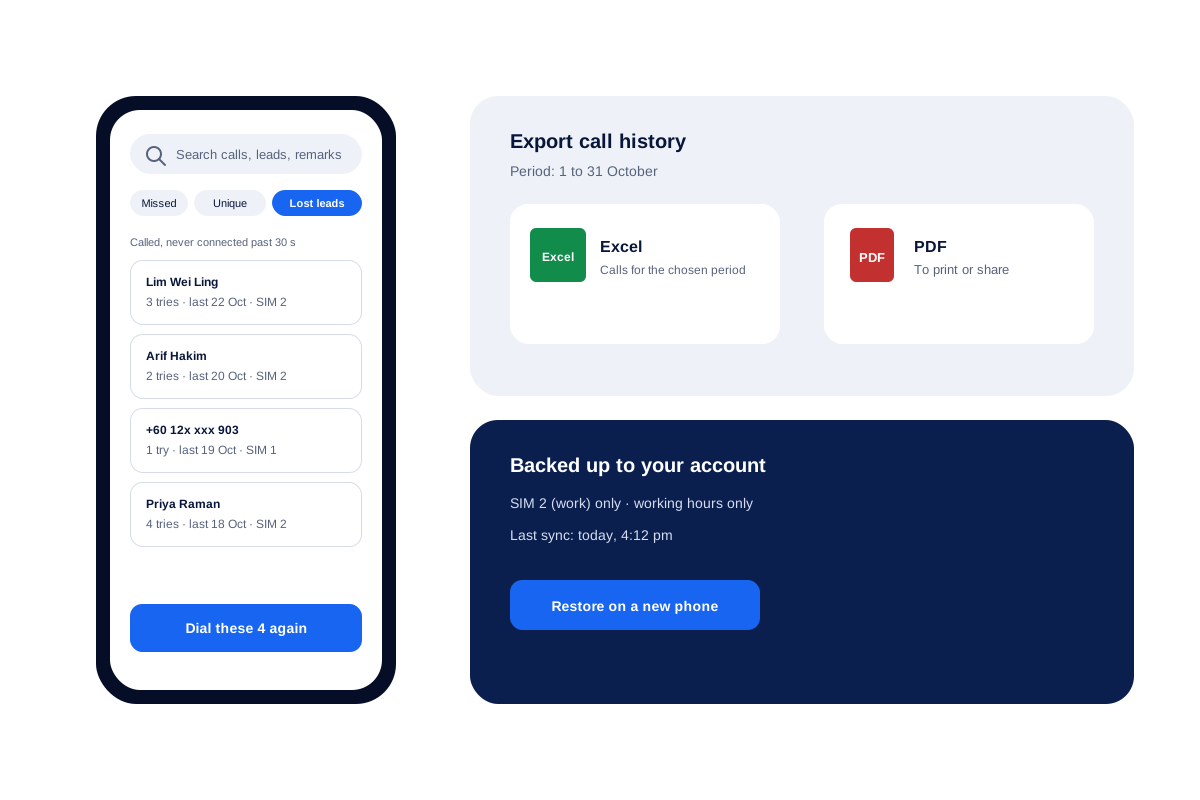
- Any month out as Excel or PDF
- Back on a new handset after one sign-in
What is a call history manager?
A call history manager organises a phone's call records so you can filter them, search them, export them and keep them safe beyond the handset.
Calsyst does this for work calls, adding filters only a sales team needs, such as lost leads and missed callers who never heard back.
- Each row knows its lead, remark and SIM.
- Analytics rings open the matching calls.
- Backup rules decide which calls are kept.
Call history manager benefits
What a work phone's history can do once it is organised.
Sales-shaped filters
Lost leads, paid clients and not called back sit beside the usual missed and outgoing views.
Rings that open lists
Tap the missed ring on the analytics screen and the history narrows to exactly those calls.
Search across notes
One search box looks through calls, leads, remarks, reminders and chats at once.
True SIM and call type
Each row names the SIM used, and brands with odd type codes still show incoming and missed correctly.
Exports for the office
Pick a period and send the history out as a spreadsheet or a printable PDF.
History that survives
Calls sync to your account, and rules can keep personal or after-hours calls out.
Manage call history: what each filter finds
The phone’s own log has a few tabs. A sales phone needs more ways to slice the same calls.
| Filter | What it shows | Good for |
|---|---|---|
| Missed | Calls you did not pick up | A quick sweep after a meeting |
| Not called back | Missed numbers with no reply on any SIM | Making sure nobody waits until tomorrow |
| Lost leads | Numbers you rang that never connected past your limit | A win-back session |
| Unique numbers | Each caller once | Counting people, not calls |
| Paid clients | Calls with people who already bought | Service and renewal checks |
| Connected | Calls that were answered | Talk time reviews |
| Incoming and outgoing | Calls by direction | Comparing calls made with calls taken |
| Rejected, blocked, spam | Calls you turned away | Cleaning up nuisance numbers |
Call history manager app: search, export and backup
Search. Enter a name, a number or a word from a remark, such as “invoice”. The same search box covers leads, reminders and WhatsApp chats, so the call shows up with its context.
Export. Choose a period and export it to Excel or PDF. The step-by-step guide on how to export call logs to Excel shows the screens.
Backup. Calls sync to your account in the background. The call log backup page covers restoring on a new phone. If calls are already gone, read how to recover deleted call logs for what can and cannot come back.
Counts. For totals and monthly trends instead of rows, see the call analytics app page.
Call history manager for Android only: the iPhone gap
On an iPhone, the record of calls is locked inside Apple’s own Phone app. No setting changes that; it is how iOS works. Calsyst on iPhone still handles leads, reminders, WhatsApp and attendance, but call history features need an Android phone.
Call history manager limits
- A call wiped from the handset before it ever synced is gone for good.
- Operator records such as itemised bills are outside the app.
- Remarks are only as good as what people type; search cannot find words nobody wrote down.
Call history manager example: a property office
A property management office in Kuala Lumpur has 3 staff who take calls from tenants and owners on work SIMs.
A tenant says she called twice last week about a leaking pipe and nobody called back. The manager types her unit number, which staff note in remarks, and finds both calls and the missing reply in under a minute.
At month end the manager exports October to Excel for the building owner. Backup is set to the work SIM only, so staff’s personal calls are never backed up.
Call history manager FAQ
Which call history manager app works best for work calls?
For a work phone on Android, Calsyst is a good pick. Every entry carries its lead and remark, and filters such as lost leads show who still needs a call.
What does Calsyst add to a phone's call history?
Calsyst is a call history manager that attaches the lead, the remark, the SIM and the outcome to each call, then keeps the record backed up in your account.
How can I check my full call history?
Open the call log in Calsyst and clear the filters. Choose all time on the analytics screen to count every call the account has kept.
Can I check my call history from another phone?
Yes. Sign in to your account on the other phone, and the backed-up history downloads to it. Records held by your mobile operator are a separate matter.
Can deleted call history be recovered?
Only what reached the backup. Calls that synced before they were deleted come back with your account; calls deleted earlier cannot be rebuilt.
How do I see the missed calls that nobody returned?
Open the Not called back filter in the call log. Home shows the same people waiting, and a number leaves the list the moment someone rings it on either SIM.
Can I find a call by what the customer said?
Yes, if you wrote it in a remark. Search looks through remarks along with names, numbers, reminders and chats.
Can personal calls be left out of the saved history?
Yes. Leave the personal SIM out of the backup, save office-hour calls only, or save just customer calls. Anyone on the exclusion list is never stored.
Does the history show which SIM made each call?
Yes. Every row names the SIM that carried the call, older Android versions included.
Can I export one month of calls?
Yes. Set the period to that month and export to Excel or PDF.
Does the history include WhatsApp calls?
Yes, once internet call tracking is switched on; Google Meet and Zoom calls join them, mixed in by time with the SIM calls.