
- Home
- Telecalling CRM
- Telecalling software
Telecalling software
Telecalling Software for PC and Android Teams Is Calsyst
Telecalling software means the tools a phone sales desk relies on to dial leads, note each result and plan follow-ups. Calsyst puts the dialer on every caller's Android phone and lets a click on a number in Chrome start that call.
- No desk phone, headset system or VoIP account
- Calls start from a lead sheet open on the PC
- Leads in from Excel, CSV, JSON or Google Sheets
What is a telecalling software?
Telecalling software joins a dialer, a lead list and call logging, so callers place calls quickly and every outcome lands on the right lead.
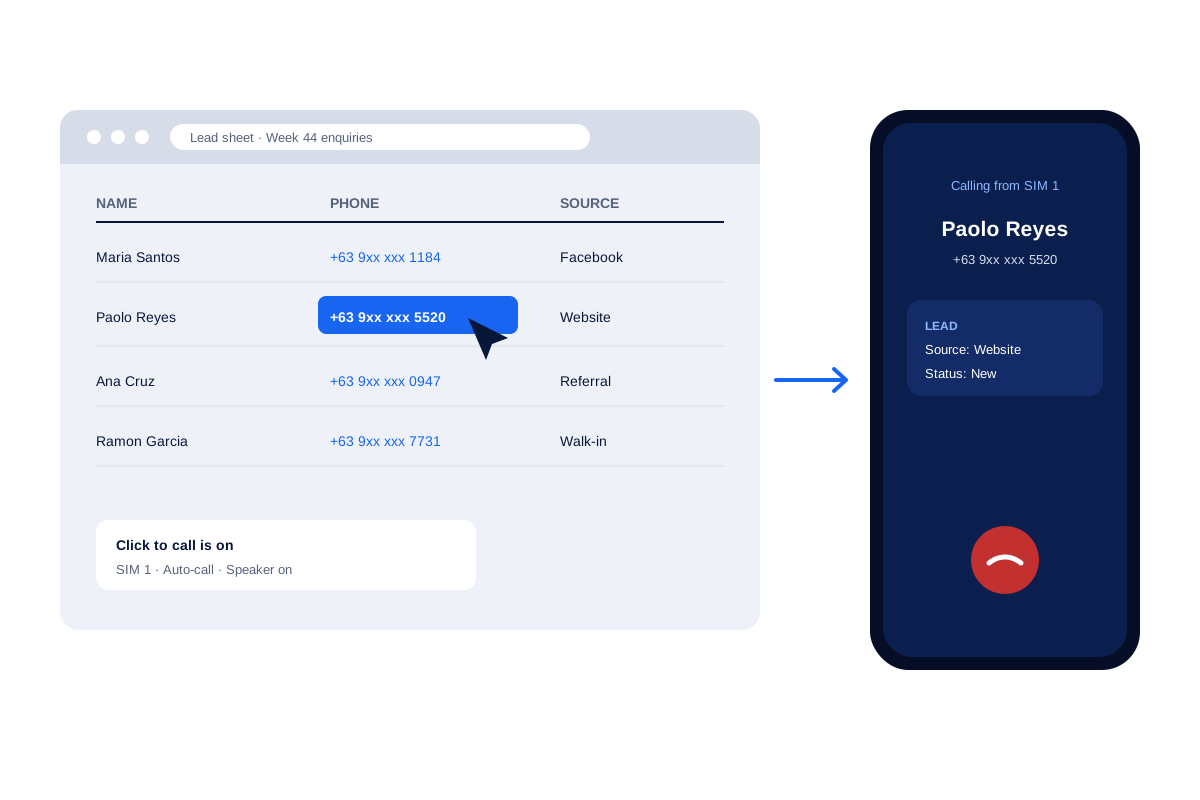
Calsyst splits the job between the phone, which dials from its SIM, and Chrome on the computer, where a click on any number places the call.
- The phone does the calling; the PC can start it.
- Settings such as the gap between calls can be locked.
- A daily call report reaches the owner on WhatsApp.
Telecalling software benefits
What changes for the person who runs the team.
Click to call from the PC
A number in Chrome becomes a call on the phone, with the SIM, auto-call and speaker set in advance.
Runs on phones you own
Nothing to buy, wire or rent: every caller adds the app to the Android handset they carry.
Imports in one step
Excel, CSV and JSON files load directly, duplicate numbers drop out and country codes are fixed.
Locked team settings
The pause between dials can be fixed for everyone, and on company handsets numbers cannot be copied out.
Report without asking
Today's call counts and the missed callers not called back arrive on WhatsApp at a set time.
Telecalling software checklist: 7 things to test before you choose
Run each test on a real phone with a real lead list. A short trial on your own data shows more than any feature page.
- The number customers see. Software that dials from the SIM shows your mobile number. Cloud tools usually show a virtual number; check whether your leads pick it up.
- The moment the call ends. Count the taps between hanging up and having the outcome, a note and the next date stored.
- The way leads arrive. Load your current Excel file and connect the sheet your ads write to.
- The reminder. Book a follow-up for 5 minutes ahead, lock the phone and see if it rings.
- The manager’s view. Ask a caller to make 10 calls, then open the team call log.
- The redial. Leave a number unanswered and watch what the dialer does next.
- The way out. Export the leads to CSV, so you know your data can leave with you.
Telecalling software for PC and phone: which part does what
| Job | Where it happens | How it works |
|---|---|---|
| Placing the call | Android phone | The SIM dials, one call at a time, or the auto dialer runs a list |
| Starting a call from a lead sheet | Chrome on the PC | Click the number; the phone places the call |
| Saving the outcome | Android phone | The after-call sheet: status, remark, follow-up |
| Loading leads | Phone or connected sheet | A file upload, a linked sheet or an API source |
| Daily numbers | WhatsApp or a notification | Counts and missed callers not called back |
| Attendance and field report | Web | Present, late and absent totals with Excel export |
Telecalling software for business: rolling it out to a team
Start with two callers for one week, then add the rest. The steps below take most teams one afternoon.
Install and choose the mode
Put Calsyst on every handset in the pilot group. Make it the default phone app, or pick CRM team mode for anyone attached to the stock dialer.
Load and share the leads
Import the lead file once and assign the leads. For a bigger team, the telecalling CRM page explains queues and fair sharing in turns.
Fix the rules, then start
Fix the pacing for the whole pilot group, and decide how many seconds a call needs before its lead counts as done. Then let callers start their first auto dialer session. Each caller’s own screen is shown on the telecaller app page.
Telecalling software limits before you commit
- There is no full dialer inside the browser. The PC starts the call, and the phone carries it.
- The software does not route inbound calls to whoever is not busy or play a menu to callers.
- It does not record calls. It imports recordings from phones that make them.
- iPhone users get every feature except the call log, so plan Android phones for heavy calling work.
Telecalling software in use: a six-person sales desk
A solar panel installer in Manila has 6 callers who follow up on enquiries from its Facebook page and website.
The Facebook lead form writes to a Google Sheet, which the app checks on a schedule. The team lead keeps the sheet open in Chrome and clicks a number when a hot lead needs a call at once. The call starts on the team lead’s own phone, from its SIM.
At 6 pm the owner gets the daily call report on WhatsApp. It shows the calls of the day and the missed callers no one called back.
Telecalling software FAQ
Which telecalling software should a five-person calling desk use?
A desk of five that calls on Android handsets can run on Calsyst. Calls leave from each caller's SIM, leads sit in personal queues and the after-call sheet asks for each outcome, then the session carries on.
Is Calsyst telecalling software or a phone app?
Both. Calsyst is telecalling software that runs as an Android app on each caller's phone, with click to call from Chrome on the computer.
Which software do call centres and BPOs use for telecalling?
Large centres often use cloud dialers with virtual numbers and call routing. Small teams that call from mobile phones often use SIM-based software instead.
Can I use telecalling software from my PC?
Yes, but only to start calls: the phone places and carries every call. With the Chrome link set up, a number clicked on the computer screen rings out from your handset, using the SIM and speaker choice saved earlier.
Do callers need a headset or a desk phone?
No. Calls go through the mobile SIM in the phone. A wired or Bluetooth headset is optional, the same as for any phone call.
Can telecallers keep the phone's own dialer?
Yes. Choose CRM team mode: the handset's stock dialer stays in place, and the Calsyst result sheet still pops up after every call.
How do I move my current lead list into the software?
Load the Excel, CSV or JSON file you have today. A file someone sent you on WhatsApp or by email opens straight in the import screen, and a Google Sheet can stay connected.
Can the admin stop callers from changing the settings?
Partly. The calling pace can be locked by the admin, and owner rules on company handsets hide customer digits and switch off copy, export, WhatsApp and SMS.
Can I get a daily call report without logging in?
Yes. At the time you pick, a short report arrives on WhatsApp or as a notification: call totals plus everyone who rang and was never rung back.
Does the telecalling software work in languages other than English?
Yes. Over 40 interface languages are built in, right-to-left scripts too, so a desk in Manila and one in Dubai can each read the app their own way.
How do I get started with Calsyst?
Message the team on WhatsApp at +91 78470 91099 and they send the install link. Owners with an account sign in at app.calsyst.live.