
- Home
- Call management app
- Business call log app
Business call log app
Business Call Log App for Android Phones Is Calsyst
A business call log app keeps a lasting, searchable record of work calls, so history survives a lost, wiped or reassigned phone. Calsyst keeps each work call with its lead, SIM name and remark in your account, and restores the log on a replacement Android handset.
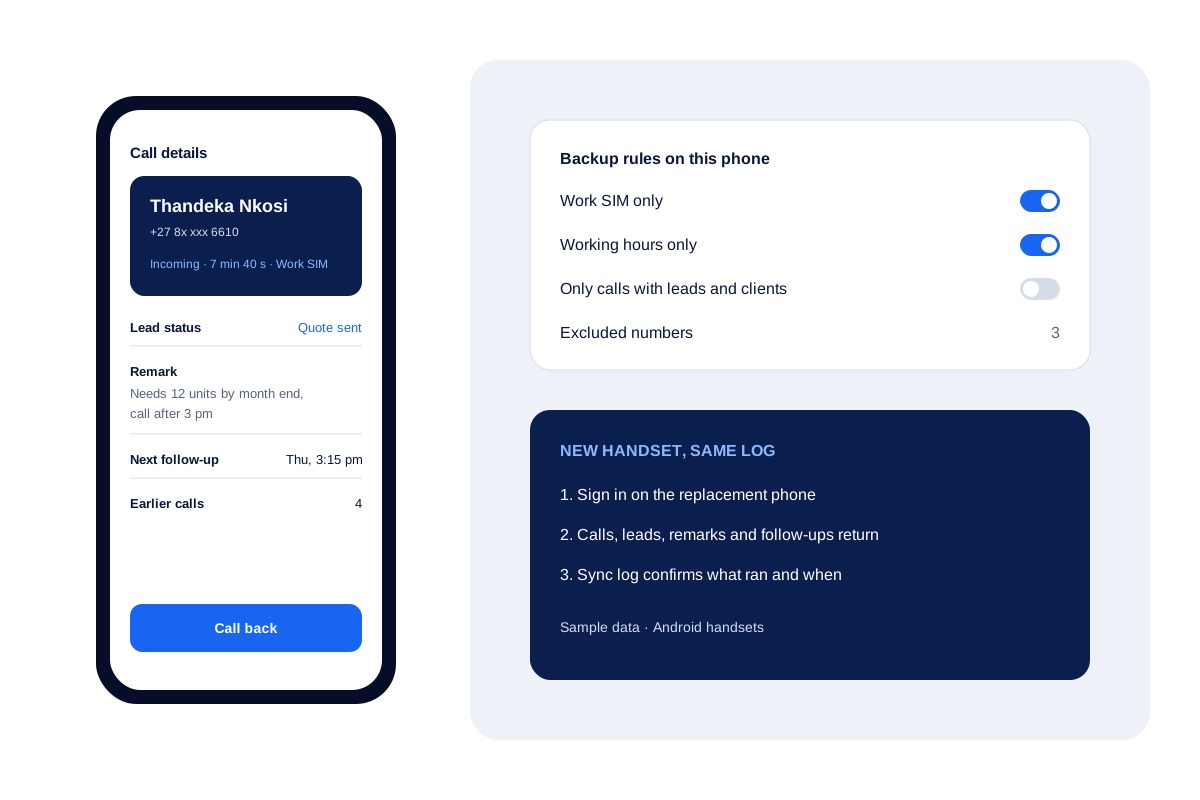
- Every entry carries the customer and the last note
- Backup rules keep private calls out of the account
- A new phone gets the synced log after one sign-in
What is a business call log app?
A business call log app treats calls as records: each saved with who, when, which SIM and what happened, beyond the phone's short list.
Calsyst links every entry to a lead and keeps a copy in the account, so the log belongs to the business rather than to one device.
- A call record is worth more with the note attached.
- Backup rules decide what leaves the handset.
- Restore is a sign-in, not a file transfer.
Business call log app benefits
Why a stock phone history is not enough for a business.
Records tied to customers
Tap an entry and the customer file opens with its status, remarks and when the follow-up is due.
Correct SIM on every line
Dual-SIM phones show which card carried each call, so work and personal lines never mix up.
Right type on any brand
Call types on brands with odd internal codes are learned automatically, so each entry shows in, out or missed correctly.
You choose what syncs
Copy only the work card, only office time, or only conversations with people already in the CRM as leads or paying clients.
Survives a lost handset
A replacement handset gets every synced call back the moment its owner logs in.
Business call log app for Android: what each record holds
A stock phone history shows a number, a time and a duration. A business record needs more, because the next person to read it may not be the one who made the call.
| Detail | Stock phone history | Calsyst business record |
|---|---|---|
| Customer name | Only if saved as a contact | From the lead, client or contact |
| Lead status | Not shown | Current status of the lead |
| What was said | Not stored | The remark saved after the call |
| Next step | Not stored | Follow-up date and time |
| SIM used | Sometimes | SIM name on every entry |
| Survives a new phone | Rarely | Yes, after sign-in |
| Visible to the owner | No | Yes, in the team call logs |
Call log for business phones: backup rules that respect staff
Work phones still ring with family calls, so the owner decides what reaches the account: one SIM, the branch’s working hours, people already saved as leads, assigned leads or paying clients, plus a list of excluded numbers.
Every rule and the restore steps are in the call log backup guide. To search and filter the log day to day, the call history manager page has the details.
Best business call log app: signs to look for
- The log links each call to a customer record, not only to a contact name.
- It shows the SIM per call on dual-SIM phones.
- It restores on a new phone without cables or files.
- It lets the owner control deletes, so records are much harder to wipe quietly.
- It rolls team calling activity up to the owner; see the call tracking app for that view.
Business call log app limits
- Android only. iPhone gives no call history to apps.
- It stores what the phone reports; a call made on another device is not in this log.
- It keeps notes and outcomes, not the words spoken.
- Backup needs an internet connection to reach the account.
- With the attendance-only switch on, the backup skips call logs entirely until it is turned off.
Business call log in practice: a Durban equipment supplier
An equipment hire company in Durban has 6 sellers on dual-SIM Android phones. One seller’s phone is stolen from a car in March.
The backup had run every day, and the work SIM and working-hours rules narrowed it to work calls in office hours, so the account held his last 4 months of customer calls with remarks and follow-ups. By 4 pm the manager has him logged in on an office spare.
His 9 follow-ups due that week ring on time, and no customer notices the change of phone.
Business call log app FAQ
What is the best business call log app for Android?
Calsyst, for a team on Android: every call is saved with its lead and remark, the log syncs to the business account and returns on any new handset.
What is Calsyst?
Calsyst is a business call log app and call manager that turns each work call into a record linked to a customer, with notes, follow-ups and account backup.
Does the business call log app work on iPhone?
No. iPhone does not share its list of calls with apps, so the call log part of Calsyst runs on Android handsets.
Will family calls on a work phone end up in the company record?
Only if you let them. Sync one card, sync office time, or sync talks with saved, assigned or paying customers. Excluded numbers never leave the phone.
What happens to the log when an employee changes phones?
One login on the replacement device pulls down every synced entry along with leads, statuses, remarks and pending follow-ups. No cables, no files.
Can I export the business call log?
Yes. Call history for a chosen period exports to Excel or PDF, which suits monthly reviews and audits.
How do I know the backup actually ran?
Open the sync log: each run is timestamped, failed runs can be retried, and one button pushes the full data set again. A built-in check fills any gaps it finds.
Does the log show which SIM was used?
Yes. Each call shows the SIM name, including on older Android versions that hide it in the stock dialer.
Can the owner see the call logs of the whole team?
Yes. Team call logs let the owner read each employee's calls from one account.
Are WhatsApp calls in the business call log?
Yes. A WhatsApp, Meet or Zoom conversation appears beside the SIM entries, so the record reaches past the mobile network.
Can a deleted call disappear from the account?
Not unless an admin allows it. Permission settings decide whether a deletion on a handset also removes the copy in the account.