
- Home
- Call management app
- Call management system
Call management system
Call Management System on Your Team's SIM Phones Is Calsyst
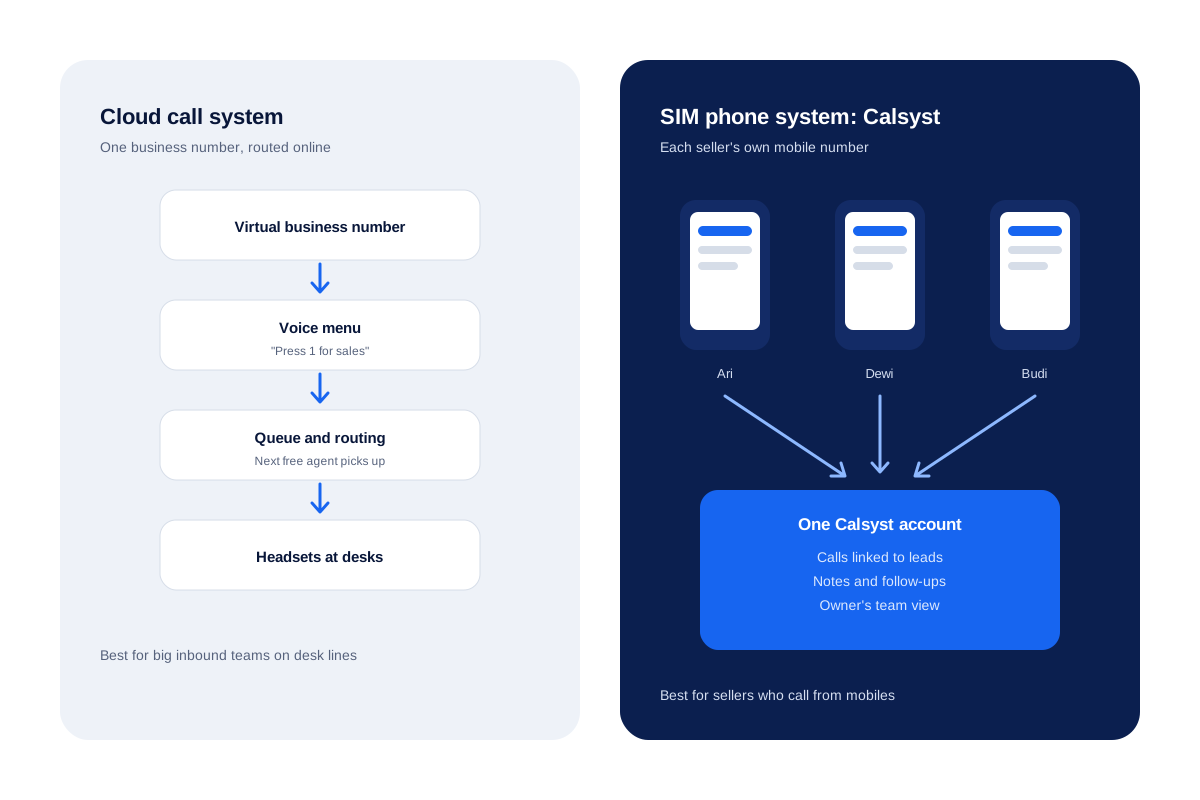
A call management system is software that organises a company's calls: who called, who answered, what happened next and how the numbers add up. Calsyst is the SIM-phone kind, running on the mobiles sellers already carry instead of a virtual number, voice menu and desk headsets.
- No new number, no phone line contract
- Calls tied to leads, notes and call-backs
- One owner view across every handset
What is a call management system?
A call management system captures, organises and reports on business phone calls; most route calls over the internet, while some run on mobile SIM cards.
Calsyst belongs to the second group, which suits teams that sell or serve customers from their own mobile numbers rather than from a call centre floor.
- Two families exist: cloud lines and SIM phones.
- Cloud systems route inbound calls; SIM systems follow up.
- Pick by where your calls start today.
Call management system benefits
What a SIM-based system gives a small team that a cloud line does not.
Customers keep your number
Buyers already saved your mobile; nothing changes for them when you adopt the system.
No hardware to buy
No headsets, desk phones or exchange box: the Android handsets in pockets are the system.
Every call becomes a record
Each conversation lands in its lead file carrying a result, a line of notes and a follow-up date.
Outbound work made faster
An auto dialer rings lead lists, so sellers spend the day talking instead of keying digits.
Owner sees the whole team
Calls from every company handset roll into one account for review and reports.
Call management system for small business: the two families
Search results for this term mostly describe cloud phone platforms. They are one family. The other family runs on mobile phones and is often a better fit for small sales teams.
| Question | Cloud call system | SIM-phone system (Calsyst) |
|---|---|---|
| Where calls run | Over the internet on a virtual number | Over the mobile network on staff SIMs |
| What customers see | A new company number | The seller's usual mobile number |
| Inbound handling | Voice menu, queues, routing | Caller card, missed-call alert, ring back |
| Outbound work | Softphone dialing | Auto dialer over the SIM, with redial |
| Hardware | Headsets or desk phones | Android handsets already in use |
| Best for | Large inbound support floors | Field and desk sellers on mobiles |
Call management system app: what Calsyst does with each call
- The call rings. The screen fills with who is calling, where their lead stands and the note from last time.
- The call ends. The after-call sheet asks how it went and when to ring again; two taps answer it.
- The follow-up comes due. An alarm rings on the minute, and the call back takes one tap.
- The owner checks. The team call log and the analytics rings show the day’s work.
The call management app page goes deeper into the phone screens, and the call management software page covers the web side for owners.
Call management system examples by type of business
- Real estate brokers: sellers ring portal leads from their mobiles and log site-visit dates.
- Clinics: front desks return missed calls from the Home list before the next patient arrives.
- Training institutes: counsellors run dialer sessions through each day’s new leads.
- Field sales teams: reps log calls between visits and the owner reads one team view.
If your team already works this way, read about the CRM with dialer for the lead side.
Call management system limits: when to choose a cloud system
Calsyst is the wrong choice if any of these is essential:
- A voice menu that greets callers and sends them to departments.
- Queues that hold callers until an agent is ready.
- One published number that rings many agents at once.
- Virtual numbers in other countries.
- Desk headsets and softphones instead of mobiles.
Call management system in practice: a Surabaya furniture showroom
A furniture showroom in Surabaya has 3 sellers who answer buyers on their own mobiles. The owner first looks at a cloud phone system, but it would mean a new number and the buyers already save the sellers’ numbers.
They choose Calsyst instead. Each seller’s Android phone becomes the system: every new buyer gets a lead card, every call gets a remark, and delivery follow-ups ring on time.
Reading the team log one Saturday in August, the owner spots 38 missed calls from buyers. Each seller works through the not-called-back list on their own Home screen, and the backlog is gone in two days.
Call management system FAQ
What is call management on my phone?
On a personal phone it usually means caller ID, blocking and call settings. In a business it means logging each call against a customer and planning the next one, which is what Calsyst adds.
Which call management system suits a small sales team on mobiles?
Calsyst suits that setup. It runs on the sellers' own Android SIM phones, links calls to leads and gives the owner one view, without a virtual number or IVR.
What is Calsyst?
Calsyst is a call management system for teams on SIM phones: it logs, dials and follows up business calls and reports them to one owner account.
Does Calsyst have an IVR or call routing?
No. Calsyst does not answer callers with a voice menu or route one number to many agents. Each call rings the handset whose number was dialled.
Do I need a new business number for Calsyst?
No. Calls use the SIM cards already in the phones, so customers see the numbers they know.
What are some call management system examples?
Two families, three common kinds: cloud phone systems with voice menus and queues for call centres, CRM dialers for sales teams, and SIM-phone apps like Calsyst for sellers who work from mobiles.
Can a call management system run on staff mobile phones?
Yes. A SIM-based system such as Calsyst works as the phone app on Android handsets, so the phones themselves become the system.
What does the owner see in Calsyst?
Everything from company handsets: each employee's calls, missed ones included, the team's rolled-up activity and the outcome saved after each call.
Can a call management system send WhatsApp messages?
Yes. Each call type (missed, outgoing, incoming) gets its own WhatsApp message, sent through your WhatsApp API provider or opened ready to send.
Is Calsyst a call management system for inbound support?
Partly, for small inbound teams. It helps them with caller cards, missed-call alerts and one-tap ring backs, but it has no queue, so very busy support lines may need a cloud system.