
- Home
- Auto dialer app
- Click to call
Click to call
Click to Call from Chrome to Your Android Phone Is Calsyst
Click to call means one click on a number shown on screen opens the call, so nobody copies digits from a monitor into a handset. Calsyst brings this to Chrome on your computer: you click a number on any web page and your Android phone places the call.
- Works on numbers in any web page or web CRM
- The call leaves from your SIM, not a VoIP line
- Pick the SIM, auto-call and speaker in settings
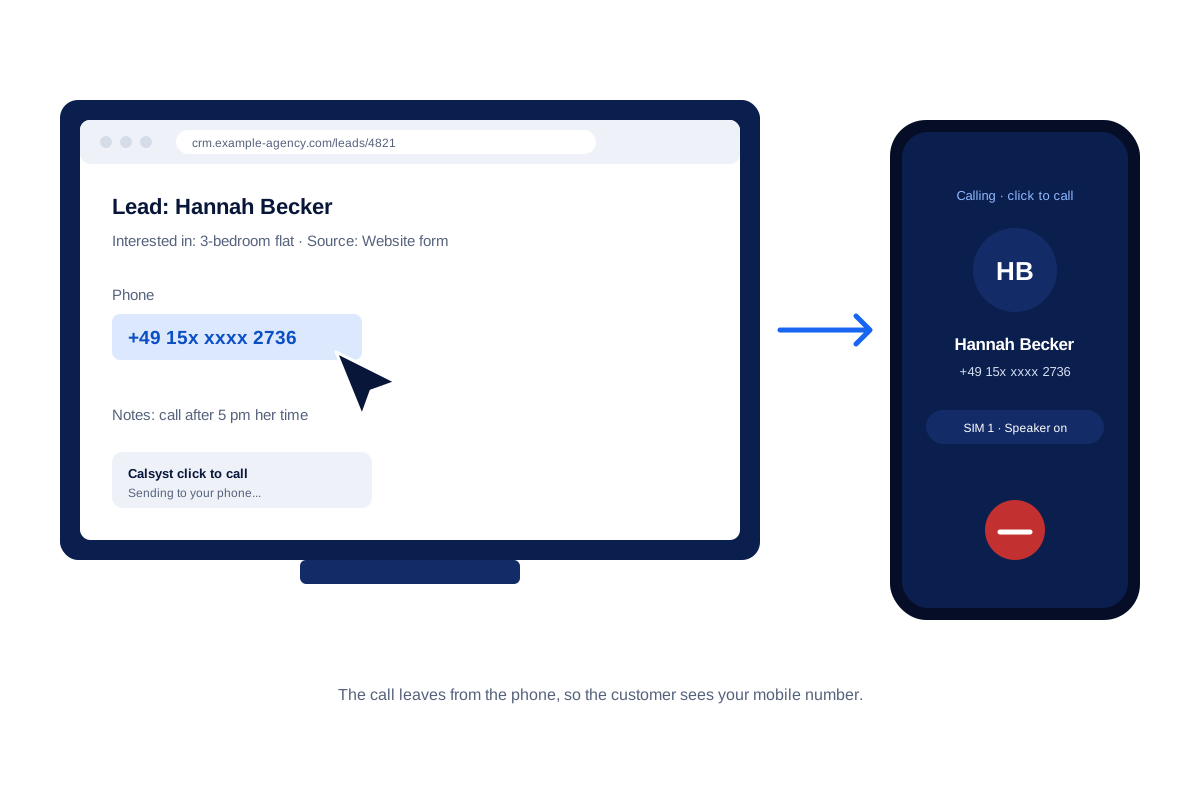
What is a click to call?
Click to call turns a number shown on a web page into a button: one press starts the call on a phone or softphone.
In Calsyst the click happens in Chrome on the PC, and the ring starts on the Android phone beside you, through the SIM you chose for business.
- No headset or desk phone needed.
- The customer sees your mobile number.
- The call lands in the Calsyst call log like any other.
Click to call benefits
For people who work on a computer but call from a mobile.
No typing numbers
Long international numbers dial exactly as shown, so wrong-digit calls stop.
Any page in Chrome
Numbers shown on web pages in Chrome, such as lead portals and web CRMs, become places to call from.
Your own caller ID
The call goes out from the phone SIM, so customers see a number they recognise.
Logged in the app
The call appears in the call log, and the lead closes in the Done tab as a click to call.
Click to call: four things people mean by it
The words cover four different tools. Knowing which one you need saves a wrong purchase.
| Term | What it means | Where you see it |
|---|---|---|
| Click to call link | A tel link on a web page that opens the dialer of a phone | Contact pages and ads viewed on mobiles |
| Click to call widget | A button that asks a visitor for a number, then a service connects both sides | Business websites with a call service behind them |
| Click to dial in a softphone | A click in a CRM rings an internet phone on the computer | Call centres with headsets and VoIP lines |
| Click to call from Chrome to a mobile | A click on the computer makes your own mobile place the call | Teams that work on a PC but call from Android phones |
Calsyst belongs to the last row. It adds no button to your own website, and no internet bridge carries the voice.
Click to call Chrome extension: how the click reaches the phone
You work in Chrome on the computer. The phone with Calsyst stays on your desk. When you click a phone number on a web page, the extension passes the number to the phone, and the phone dials it.
Three settings decide what happens next:
- SIM: on a phone with two cards, the one kept for business.
- Auto-call: dial at once, or wait for you to confirm on the phone.
- Speaker: start the call on speaker, so your hands stay on the keyboard.
Hang up, and the phone shows the after-call sheet straight away. Pick a status, type a remark and book a follow-up reminder there. In the Done tab, each lead finished like this carries the click to call label.
To get the extension and connect it to your phone, message the Calsyst team on WhatsApp.
Click to dial vs an auto dialer: when to use which
Click to call suits work where each call needs a look at a record first: a lead form, an order or an email thread. You read, click, and talk.
For a long list where every call is alike, an auto dialer app is faster, because the next number rings by itself. Many teams use both: the dialer for fresh lists, and click to call for leads that arrive in a web portal during the day. If the leads already sit in your phone, the CRM with dialer page shows how the two fit in one app.
Click to call limits
- The extension is made for Chrome only.
- The phone must be near you with Calsyst on it. The computer does not carry the voice.
- It is not a website button for your visitors. For that, use a plain tel link or a widget service.
- One click starts one call. It does not dial a list by itself.
Click to call example: a property desk in Abuja
A property agent in Abuja receives about 30 enquiries a day through a listings portal. Earlier she copied every number off the laptop screen by hand, and a few calls each week reached the wrong person.
Now she opens each enquiry in Chrome and clicks the number. Her phone rings the buyer from SIM 1 on speaker while the listing stays open on the screen. After the call she sets a status and books a viewing reminder on the phone.
Click to call FAQ
What does click to call mean?
It means a phone number you can click to start a call. Websites, CRMs and browser extensions use it so you do not dial by hand.
Which click to call tool dials from my own mobile SIM?
Calsyst does. A click on any number in your Chrome window makes the Android phone beside you dial it over its own SIM card.
Is Calsyst a click to call extension or a CRM?
Both. Calsyst is a call manager and CRM app for Android, and its click to call works from Chrome on your computer.
Does the call go over the internet or over my SIM?
Over your SIM. The computer only tells the phone which number to dial. The voice call itself is a normal mobile call.
Do I need a headset or a softphone?
No. You talk on the phone, or you turn on the speaker setting so the phone starts the call on speaker.
My phone holds two SIM cards. Which one rings the customer?
The one you pick in the settings. Choose the business card once, and every click from the browser leaves from that number.
Does the phone dial at once or wait for me?
It depends on the auto-call setting. With it on, the phone dials as soon as you click. With it off, you confirm on the phone first.
Can I use click to call inside a web CRM or lead portal?
Yes. It works on phone numbers shown on web pages in Chrome, so the CRM or portal you already use becomes a place to call from.
How do I make a click to call link on my own website?
Add a tel link. In the page code the link reads href="tel:+<country code><number>", with no spaces in the number. Visitors on a phone tap it to call you.
How can I stop Chrome from sending numbers to my phone?
Switch the extension off. Open the extensions page in Chrome and turn Calsyst off, or remove it. Calling on the phone itself is not affected.
Does a click to call show up in the call history?
Yes. The phone makes the call, so it shows in the call log with its duration, and the after-call sheet opens when it ends.