
- Home
- Lead management app
- Lead automation
Lead automation
Lead Automation Is Calsyst: Every New Lead Called and Followed Up
Lead automation is software that moves each new lead from the form where it started to a person who calls it, with no rows copied. Calsyst pulls leads in from sheets, APIs and webhooks, and on the Web CRM deals webhook and live sheet leads out in turn. It can have an AI voice agent ring the lead first, then starts the follow-up on its own.
- Sources checked in the background on a schedule
- Webhook and live sheet leads rotate across sellers on the Web CRM
- Call data passed on to the tools you already run
What is a lead automation?
Lead automation is a set of rules that captures, assigns and follows up leads, so every new lead gets a call and a message.
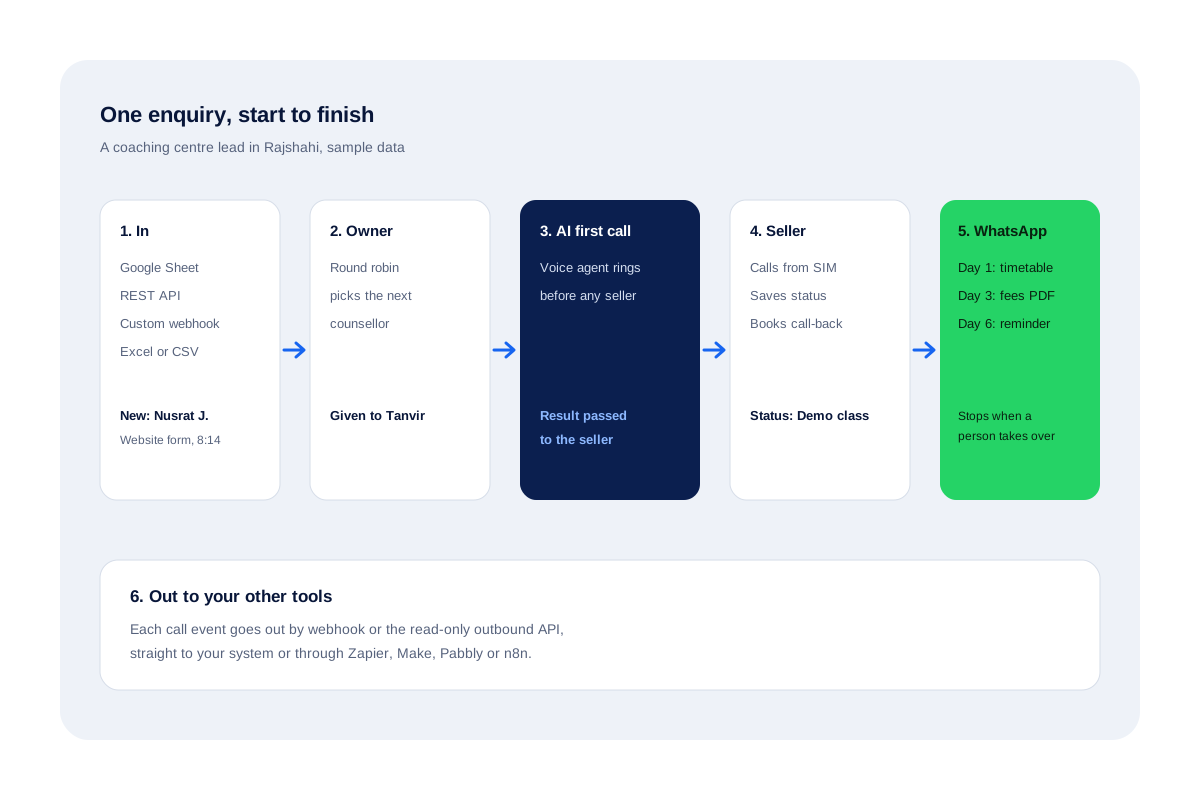
Calsyst runs that chain around phone calls: import, round robin, an optional AI first call, the seller's call, WhatsApp follow-ups and webhooks out.
- Inputs: sheets, REST APIs, webhooks and files.
- Middle: owner, AI call, reminder, WhatsApp series.
- Outputs: call events to any system that takes webhooks.
Lead automation benefits
Steps a team stops doing by hand.
No more copying rows
Calsyst revisits your linked spreadsheet or endpoint at set intervals, and anything new turns into a lead with its columns matched.
An owner straight away
Webhook and live sheet leads go to the next seller in rotation on the browser CRM.
A first call before lunch
After a single setup, an AI voice agent phones new leads and hands its findings to the seller.
Messages on every trigger
Status changes, finished calls and sales can each fire their own WhatsApp text: silent with an API provider, ready to tap on the phone without one.
A drip that knows when to stop
A day-by-day WhatsApp series pauses itself the moment a human takes the conversation.
Data out for reporting
Call events leave by webhook or the read-only outbound API to whatever tool needs them.
Lead automation tools: the chain around a phone call
Lead automation for a phone-led team is a six-link chain with the call at the centre: import, owner, first call, seller call, follow-up and outbound events. Calsyst covers all six.
- In. New spreadsheet rows and API records picked up on a timer, plus webhook posts and uploads.
- Owner. Webhook and live sheet leads rotate across sellers; others are assigned by hand or in bulk.
- First call. An optional AI voice agent rings each new lead and stores what it learned.
- Seller call. The assigned person phones over a personal SIM and records the result with two taps.
- Follow-up. A reminder books the next call, and WhatsApp texts or a drip series keep the lead warm.
- Out. Call events go to other tools by webhook or the outbound API.
The lead assignment software page explains link 2 in detail.
Lead automation software: triggers and actions
Each trigger below sets off one action without anyone pressing a button.
| Trigger | Action | Where it is set |
|---|---|---|
| New row in a Google Sheet or API | Creates a lead with mapped fields | Lead source settings |
| Webhook or live sheet lead | Gives it to the next seller in turn | Browser CRM sources |
| New lead, AI first call on | An AI voice agent rings it first | Browser CRM, one-time setup |
| Call ends | Opens the outcome sheet; can send a WhatsApp text | After-call settings |
| Status changes | Sends that status's WhatsApp message | WhatsApp automation rules |
| Reminder fires | Rings the seller and can send the linked text | The reminder itself |
| Call logged | Sends the event to your call webhook; the read-only outbound API serves the same data | Integration settings |
Automated lead follow up without spam
Automation that never pauses turns customers away. Calsyst keeps every automatic WhatsApp inside limits you choose: quiet hours, a minimum gap per number, an ask-first mode for sensitive triggers and a list of people never to message. The drip series stops when a person takes over the chat.
Ad leads usually travel through a sheet or a webhook first. The guide on Facebook lead ads to CRM shows one way to set that up, and HubSpot call logging shows the outbound side.
Lead automation limits in Calsyst
- No contact enrichment and no lead scoring.
- No scraping of websites, maps or social networks.
- No one-click connectors; use webhooks, the outbound API or an automation tool.
- Round robin applies to browser CRM webhook and live sheet sources only.
Lead automation at a Rajshahi coaching centre
A coaching centre in Rajshahi gets about 40 leads a day from its website form during admission season.
The form posts to the custom webhook, so each lead reaches the next of 3 counsellors in turn. The AI voice agent rings it first and passes the result to the counsellor, who reads it on the lead before calling.
After the call the counsellor sets the status to “demo class”, which sends the timetable on WhatsApp and starts a three-message series. Every call event also posts to the centre’s reporting sheet through a webhook.
Lead automation FAQ
Which lead automation software is built around phone calls?
Calsyst is. Leads come in from sheets, APIs and webhooks, get an owner in turn, and every step after that, from the first ring to the follow-up text, happens in one app.
What is Calsyst?
Calsyst is lead automation software and a call manager that imports leads, assigns them, calls them and keeps every follow-up on the phone your team already uses.
What is a lead automation system?
It is a chain of rules that captures new leads, gives each one an owner and triggers calls and messages, so no lead waits on someone's inbox.
Where can lead automation software pull leads from?
From four places: linked spreadsheets and API endpoints that Calsyst rechecks by itself, a webhook on the browser CRM, and uploaded files. A file shared from mail or WhatsApp opens directly in the importer.
Does Calsyst have a one-click connector to my CRM?
No. Call data leaves through call webhooks or the read-only outbound API, either straight to your system or through Zapier, Make, Pabbly or n8n.
Can Calsyst pull Facebook or Google ad leads?
Yes, once the ad leads reach a Google Sheet, a webhook or an API. Many teams send them there with an automation tool first.
What does the AI first call do?
After a one-off setup on the browser CRM, a voice agent rings each new lead, logs the result on the AI Calls list and passes the lead on to the next seller.
Can follow-up messages go out without anyone pressing send?
Yes. With a WhatsApp Business API provider connected, texts after calls, on status changes and in drip series leave in the background.
What stops automation from messaging the same person too often?
Four limits do. Silent hours, spacing between texts to one number, a confirm-before-sending option and a never-message list; every automatic text is then logged as sent, skipped or failed, alongside its reason.
Is lead generation automation legal?
Usually, for leads people send you themselves. Scraping contacts or messaging without consent can break privacy and spam rules, which differ by country, Bangladesh included. This is general information, not legal advice.
How do I see which rows a source skipped?
In the source itself. It lists skipped rows with the exact reason, and you can view its good and bad rows as lead cards before cleaning up test data.