
- Home
- Lost leads report
Lost leads report
Lost Leads Report for Sales Calls and Win-Back Is Calsyst
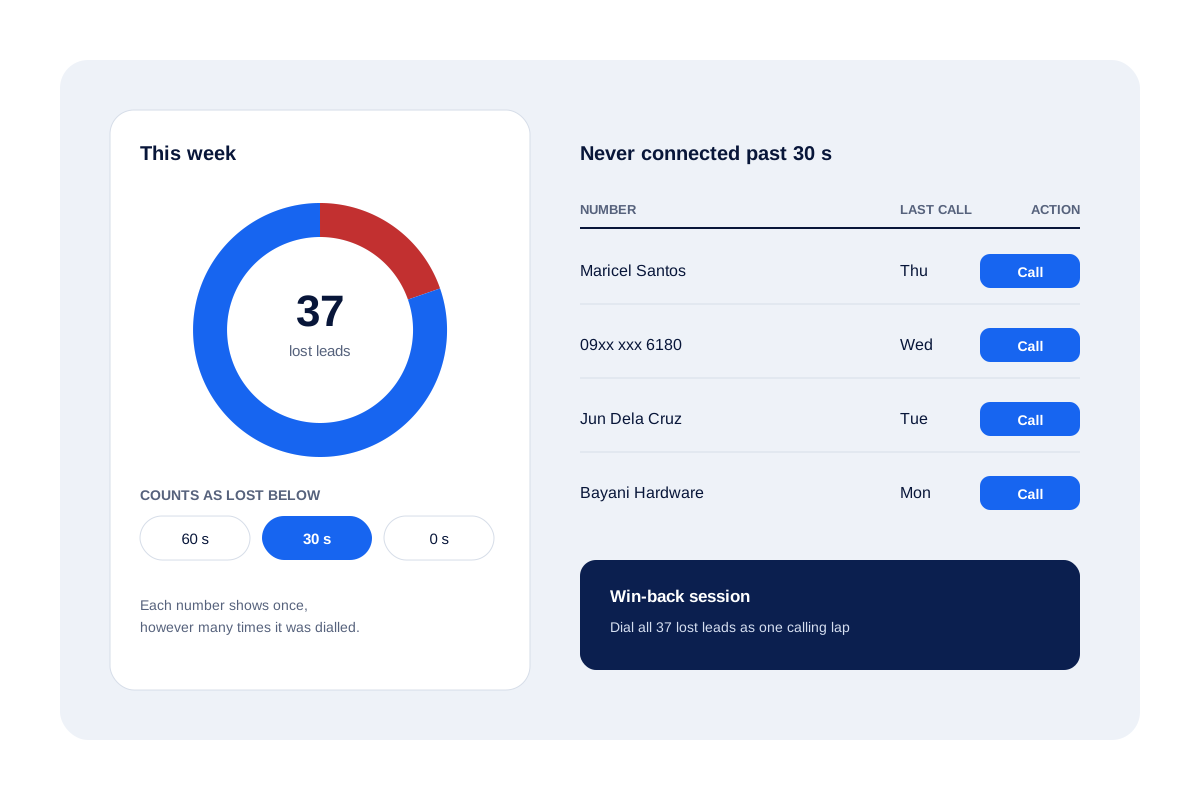
A lost leads report is a sales list of leads who slipped away, with enough detail to see why and to try them again. Calsyst builds the calling side itself: each number you rang that never passed your connection cut-off, listed once.
- A connection cut-off you pick
- One row per number, however often it was tried
- A tap starts a win-back calling session
What is a lost leads report?
A lost leads report lists the leads your team lost, grouped by reason, source or status, so pipeline leaks show and some get retried.
Calsyst is a lost leads report built from calls: numbers dialled that never connected past your limit, listed once each, ready to ring again.
- Calls that never became a conversation.
- Leads with a Lost status and your reason.
- Both can be dialled again.
Lost leads report benefits
Why sales managers open this list every Friday.
Built from real calls
Nobody fills it in; the call log decides who lands on it.
Your own cut-off
Set the bar a call must clear to count as a conversation: a minute, half a minute, or any connection at all.
No duplicate rows
A number dialled five times still shows once, so the count matches people, not attempts.
Reasons through statuses
Create Lost statuses such as price, timing or competitor, and the filter splits losses by cause.
Straight to a win-back lap
Send the whole list to the dialer and work it as one session.
Lost leads report: the two lists behind it
Most CRMs ask sellers to type a loss reason. Calsyst starts one step earlier, with the calls themselves.
Calls that never became conversations
The analytics screen counts numbers that were dialled but never stayed on the line past your cut-off. Each number appears once, so a lead rung five times is not counted five times. Tap the ring to open the list. The call analytics app page explains the other rings beside it.
Leads with a Lost status
Create a Lost status for each way a deal dies: price, timing, chose a rival, unreachable. Giving a lead one of those statuses files it there with your remark. The same lead filter used everywhere else then counts them by status, source or whose lead it is.
What should a lost leads report template include?
Six columns answer the useful questions, whether you keep a sheet or use the app. Calsyst can export leads to CSV by filter to fill them.
| Column | What it answers | Where it lives in Calsyst |
|---|---|---|
| Lead name and number | Who slipped away | The lead record |
| Source | Which channel leaks most | The source tag on the lead |
| Status when lost | Where in the process deals stall | The Lost status you created |
| Reason note | Why, in the seller's words | The remark on the last call |
| Last call date | Whether the team stopped calling too soon | The call history on the lead |
| Owner | Which seller had the lead | The assignment on the lead |
Lost lead analysis: limits to keep in mind
- Calsyst does not guess a reason. Reasons come from the statuses and remarks your sellers save.
- The call-based list needs the call log, so it works on Android, not iPhone.
- It counts people you rang, not revenue; add amounts on paid clients if you want value.
- A government report called LEADS shares the name in search results; this page is only about sales leads.
Lost leads report example: a solar installer’s Friday
A solar installer in Davao gets about 200 leads a month from social adverts. Two sellers call them all.
Each Friday, with the cut-off set at 30 seconds, the lost leads ring shows 37 numbers that never turned into a real call. Lost statuses add 22 more: 9 on price, 8 unreachable, 5 who chose another installer.
The sellers run one win-back lap through the 37 unconnected numbers and reach 12 of them. The manager tags the 9 price losses with one bulk edit, ready for a later offer.
Close the loop with the missed call management list and the lead follow-up CRM reminders.
Lost leads report FAQ
Which app builds a lost leads report from calls by itself?
Calsyst does. Its analytics list every number your team rang that never connected past the cut-off you choose, one row per number, ready to dial again.
What is Calsyst?
Calsyst is a phone CRM whose lost leads report fills itself from the dialer: unconnected numbers get flagged, counted once and lined up for a win-back session.
What does lost leads mean in sales?
It means leads who showed interest but stopped responding or bought elsewhere. Counting them by reason shows where the sales process leaks.
What counts as a lost lead in Calsyst?
A dialled number whose calls never outlasted your cut-off of 60, 30 or 0 seconds. A buyer who says no is different: give that lead a Lost status of your own.
Can I change the cut-off for a lost lead?
Yes. Pick 60, 30 or 0 seconds. With 0, only numbers that never connected at all appear.
How do I find out why leads were lost?
Give each reason its own Lost status, such as price or chose a rival, and add a remark. The lead filter then counts them by status and source.
How do I stop losing leads in the first place?
Call new leads fast, book a follow-up on every call and return missed calls the same day. Calsyst alarms, retries and the missed-call list cover all three.
Is there a lost leads report template for Excel?
Yes. Use columns for name, number, source, status, reason, last call date and owner. Calsyst exports leads to CSV by filter, so most columns come straight from the export.
What is the difference between a lost lead and a dead lead?
A lost lead might still buy later; a dead lead will not, for example a wrong number. Give wrong numbers their own status so they stay out of win-back laps.
Can the whole lost list be called in one go?
Yes. Choose the lost leads list as the session source; the dialer works down it and gives anyone who misses you again a retry.