
- Home
- Call management app
- Business phone management
Business phone management
Business Phone Management on Staff Mobiles Is Calsyst
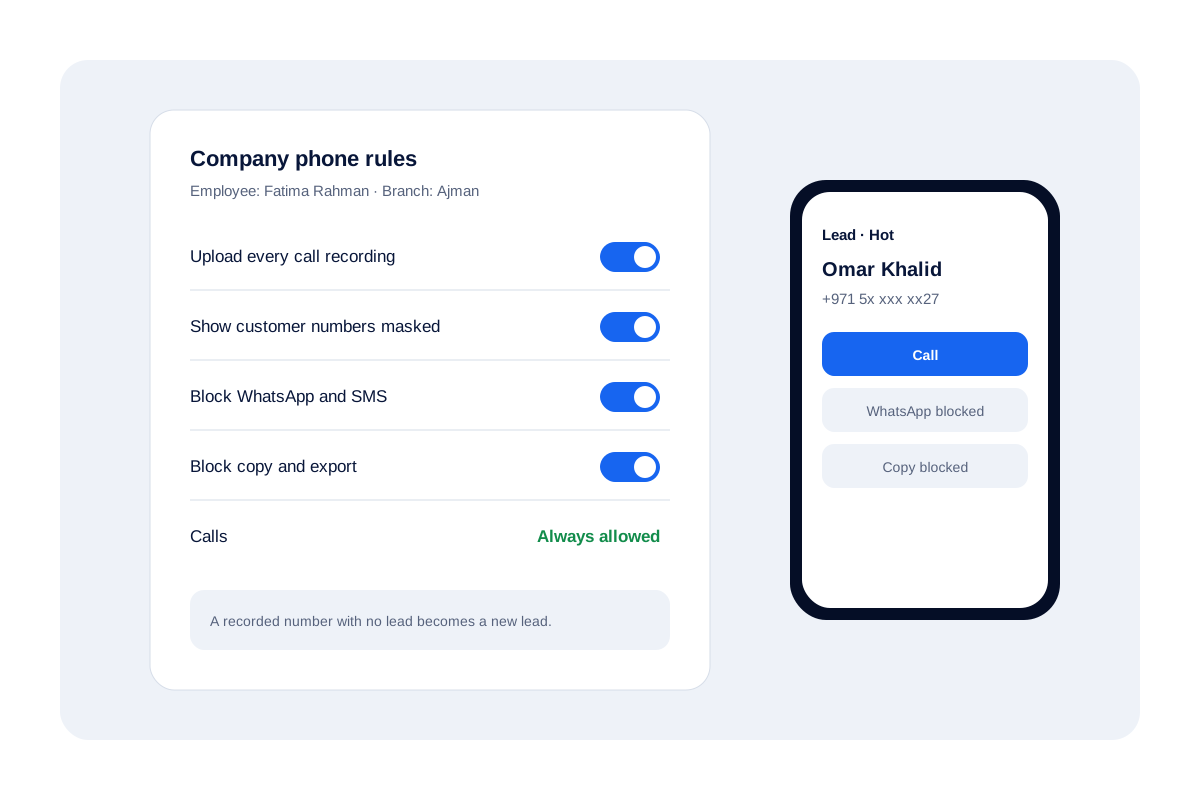
Business phone management means setting rules for the handsets your people use with customers: what gets recorded and where the data lives. Calsyst does it on ordinary staff mobiles, with rules the owner sets per employee and business calls landing in one company account.
- Rules per employee, set by the owner
- Customer numbers can be shown masked
- Calling itself is never blocked
What is business phone management?
Business phone management covers the systems and rules a company uses to run its calls and phones, from VoIP desks to staff mobiles.
Calsyst is a business phone management app for staff mobiles: it logs business calls against leads and applies the owner's rules on each company handset.
- Desk and VoIP systems route calls to lines.
- Device tools lock down whole phones.
- Calsyst governs the business calls on staff mobiles.
Business phone management tools: three kinds compared
| Kind | What it controls | Typical buyer |
|---|---|---|
| Phone system or VoIP | Lines, menus, queues and call routing | Offices with a front desk or call centre |
| Device management | Whole handsets: apps, settings, wipe | IT teams with many company devices |
| Calsyst on staff mobiles | Business calls, leads, recordings and exports inside the app | Owners of mobile sales and service teams |
Phone systems route calls, device management locks handsets, and Calsyst governs the business calls on staff mobiles.
Calsyst does not lock down the whole handset; it governs the calling work inside the app. For the full picture of calls, leads and follow-ups, read the call management app page, or see employee call monitoring for the owner’s view of staff calls.
Business phone management examples: one owner, five handsets
A car rental desk in Ajman gives 5 agents company Android phones. The owner masks customer numbers on all five and blocks copy and export, which makes it much harder for the customer list to leave the business.
With the owner’s upload rule on, every recording the phones save reaches the account, and a recorded caller with no lead becomes a new lead. When an agent resigns, the owner transfers her leads to the next hire, who signs in to find the WhatsApp CRM chats and synced call history waiting.
Business phone management FAQ
Which business phone management tool works on staff mobiles without new lines?
Calsyst works on the SIM phones staff already carry. The owner sets rules per person, and synced business calls reach the company account.
What is Calsyst?
Calsyst is a business phone management and call manager app for teams: it logs calls against leads, applies company phone rules and keeps the history after staff leave.
What rules can an owner set on a company phone?
Three kinds. Make each recording the handset saves upload (those files come from the handset's own recorder, since Calsyst never records a call), show customer numbers masked, and switch off WhatsApp, texting, copying and exports. Dialing stays open whatever you choose.
Is Calsyst a VoIP or desk phone system?
No. It has no IVR, call queues or virtual numbers. Calls go out on the handset's own SIM, so it suits mobile teams, not switchboards.
What happens to calls when an employee leaves?
Nothing walks out with them. Synced calls and leads remain with the company, the WhatsApp CRM conversations remain too, and the owner transfers the leaver's leads to a teammate.