
- Home
- Call history manager
- How to export call logs to Excel
Export call logs
How to Export Call Logs to Excel From Android With Calsyst
How to export call logs to Excel: stock Android dialers lack an export button, so use an app that reads the history into a file. Calsyst turns any period's calls into an Excel workbook to sort in a spreadsheet, or a PDF to keep.
- Any span from one day to all time
- Excel for working with rows, PDF for a fixed copy
- Works on the history of Android phones
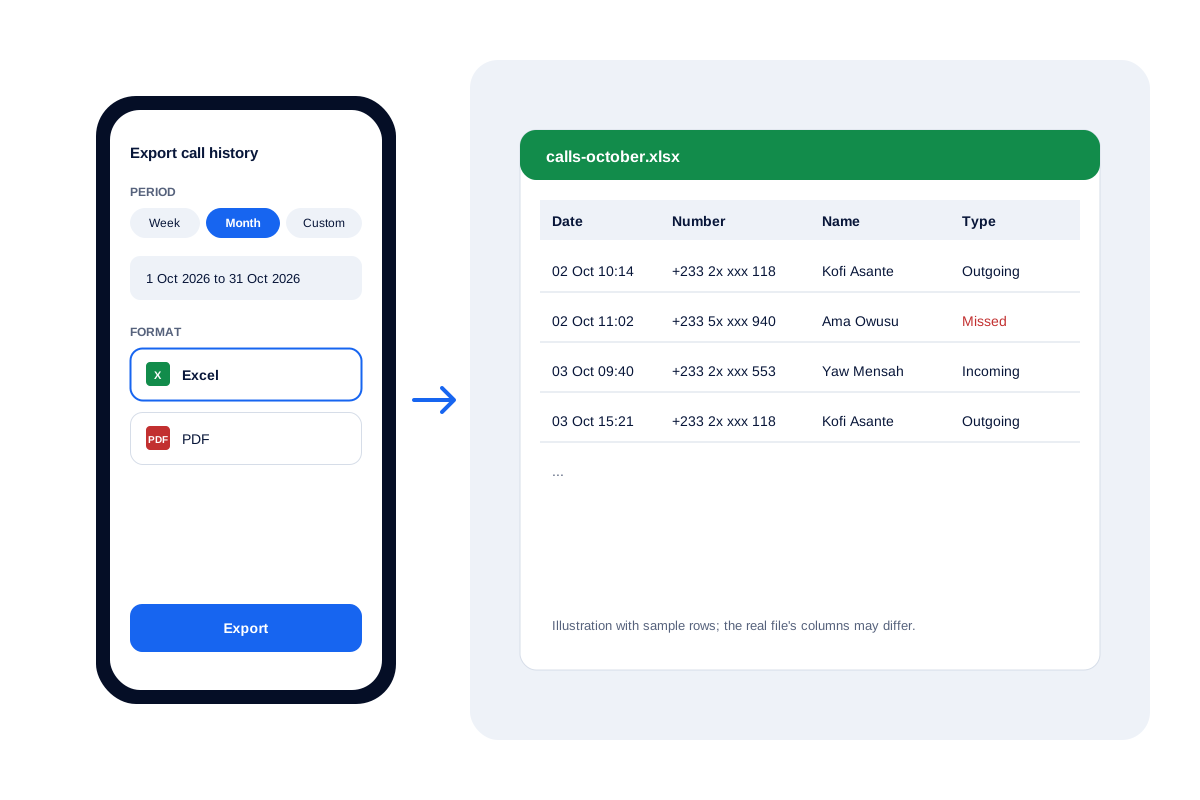
How do I export my call log to Excel?
To export call logs to Excel on Android, use an app that reads the call history, set dates and save a spreadsheet; iPhone blocks this.
With Calsyst the export sits next to the call history itself, so the same app that logs each business call also hands it over as a file.
- Stock dialers rarely export anything.
- Pick the period before you export.
- iPhone keeps its call list private.
Export call history to Excel: features teams use
What a spreadsheet of calls is used for once it leaves the phone.
Monthly reviews
Owners read a month of calls in a spreadsheet before the review meeting.
Client proof
A dated list settles a disagreement about whether a customer was called back.
Expense checks
Finance teams match work calls on company SIMs against the phone bill.
Records for audits
Some sectors keep call records; a PDF per month is an easy archive.
Export call logs to Excel: the steps in Calsyst
A few taps on an Android phone.
- 1
Install Calsyst and finish the guided setup
Install Calsyst on the Android phone and finish the guided setup, which asks for the permissions the app needs.
- 2
Open the call history
Go to the call history, where every SIM call on the phone is listed with its customer.
- 3
Choose the period
Select the stretch you want, from the current day up to everything, or two dates of your own.
- 4
Choose Excel or PDF
Select Excel to sort and filter rows later, or PDF for a copy nobody edits.
- 5
Save and open the file
Save the export on the phone, then open it in Excel or Google Sheets.
Export call logs to Excel from Android: your options
| Method | Where | Effort | Best for |
|---|---|---|---|
| Type it into a sheet | Excel or Google Sheets | Daily typing | A handful of calls |
| Backup app to a file | Phone, then computer | A one-off setup | One person, one-off copy |
| Calsyst export | On the phone | A few taps | Business calls with customers attached |
The stock dialer on most Android phones shows calls but offers no Excel export. A business that needs regular files is better served by an app that already keeps the calls in order. For filtering before you export, see the call history manager.
Call log to Excel: tips for a clean file
- Choose the range first. Choose the dates so the file covers only the review period.
- Export per month. Twelve monthly files are easier to read than one huge file.
- Add totals in Excel. Count rows by type to see missed against answered calls.
If you only need the numbers, the call analytics app page explains the rings, and the daily call report format shows a ready layout for teams.
Export call history to Excel: limits
- Android only: on iPhone, no app can reach the call list.
- The file covers calls the phone recorded; calls on another device are not included.
- Exports go to Excel or PDF; lead lists, not call logs, are the CSV export.
- The file lists calls, not what was said in them.
Export call logs in practice: a Kumasi distributor
A beverage distributor in Kumasi has 4 sales reps on company Android phones. Every month the finance officer compares work calls with the SIM bills.
On the first working day, each rep exports last month’s calls from Calsyst as an Excel file and passes it to the finance officer. The officer merges the 4 files and counts calls per rep.
The check that used to take half a day of copying from screenshots is now a short desk task.
How to export call logs to Excel FAQ
How do I export my call log from Android?
Use an app that can read the Android call history, since the stock dialer usually cannot export. Calsyst exports a chosen period as Excel or PDF.
How do I make a call log in Excel by hand?
Create columns for date, time, number, name, call type and notes, then type each call in. It works for a few calls a day; an export saves the typing.
Can I export iPhone call history to Excel?
Not with a phone app. Apple keeps that list sealed from third-party software, so this export only exists on Android.
Which app can export call logs to Excel for a business?
Calsyst does: it keeps business calls with their leads and exports any period to Excel or PDF for the owner.
What is Calsyst?
Calsyst is a phone app for selling teams that logs each call against its lead, and on Android it can hand you those calls as an Excel or PDF file.
How do I get my entire call history?
Use the all time range in Calsyst before exporting. The phone's own history may be short, so start syncing early if you need a long record.
Can I export only the calls of one month?
Yes. Choose the month range, or set two dates under custom for an earlier month, then export.
Where does the exported file go?
Onto the phone as an Excel or PDF file. Open it there in a spreadsheet app, or move it to a computer the way you move any other file.
Excel or PDF: which should I pick?
Pick Excel if you will sort, filter or total the calls. Pick PDF if you only need a copy that nobody edits.
Can I get call numbers without exporting a file?
Yes. A notification at your chosen hour lists today's figures and who still waits for a call, and the analytics rings cover any range of dates.