
- Home
- How to recover deleted call logs
Recover deleted call logs
How to Recover Deleted Call Logs, and Stop Losing Them, With Calsyst
How to recover deleted call logs comes down to one question: did a backup copy the calls before they vanished? Calsyst keeps that copy for business phones, so signing in on a new or reset handset brings the synced calls, leads and remarks back.
- A backup made before the loss is the only real route
- Carrier records list numbers, not your phone's log
- Calsyst restores synced calls after one sign-in
Can you recover deleted call logs?
Yes, but only from a backup made before the deletion; without one, a phone keeps no hidden copy you can restore.
Calsyst is a business call log backup app: each call syncs to the account, so a lost, wiped or replaced Android handset gets it back on sign-in.
- Check your phone's own backup first.
- Your carrier can show numbers and times, not remarks.
- Turn on an ongoing backup so this never repeats.
Deleted call history: benefits of an ongoing backup over recovery
What a business keeps when calls sync as they happen.
Restore by signing in
A replacement handset pulls back synced calls, leads, remarks and reminders after one login.
Remarks survive with the call
Remarks, statuses and call-backs return with each number, which a plain log backup never carries.
You choose what syncs
Pick which SIMs back up and exclude private numbers, so only business calls are kept.
A log you can check
The sync log shows what uploaded and when, with a retry if a run failed.
Gaps repaired by themselves
A self-check finds records missing on either side and fills them in.
How do you recover deleted call logs on Android and iPhone?
Each source below can only return what it copied before the calls were deleted. Try them in this order:
- Check the phone’s own backup and restore it if it was made before the deletion. On iPhone, a restore replaces anything added since.
- Open any call log backup app you had installed earlier and restore from it.
- Ask your mobile carrier for an itemised record if you only need numbers, dates and durations.
- If the phone used Calsyst, sign in on the handset and the synced business calls come back.
| Source | What comes back | What to watch |
|---|---|---|
| The phone's own backup | The call list as it was on the backup date | On iPhone a restore replaces newer data; on Android it depends on the phone maker |
| A call log backup app | Whatever that app copied before the loss | Only works if it was installed and running earlier |
| Your mobile carrier | Numbers, dates and durations from billing | No contact names, no remarks; rules on access differ by country |
| Calsyst account backup | Synced business calls with leads, statuses and remarks | Android only, and only calls synced before the loss |
This is general guidance, not a promise for any one phone model. Your phone maker’s help pages have the exact steps.
Deleted call history in a business: why recovery is the wrong plan
Recovery tries to rebuild something after it is gone. For a sales or service team, the call log is also the record of who promised what, so a gap costs more than a list of numbers. An ongoing backup removes the problem instead of chasing it.
In Calsyst, each call syncs to the business account with its lead, status and the remark the seller saved. A new handset, a factory reset or a resigned employee’s phone leaves that history in place. The full routine is on the call log backup page, and the call history manager shows how the restored log is searched and filtered.
How to recover deleted call logs: limits of any method
- No method brings back calls that no backup ever copied.
- History from the months before your team switched to Calsyst stays out of reach.
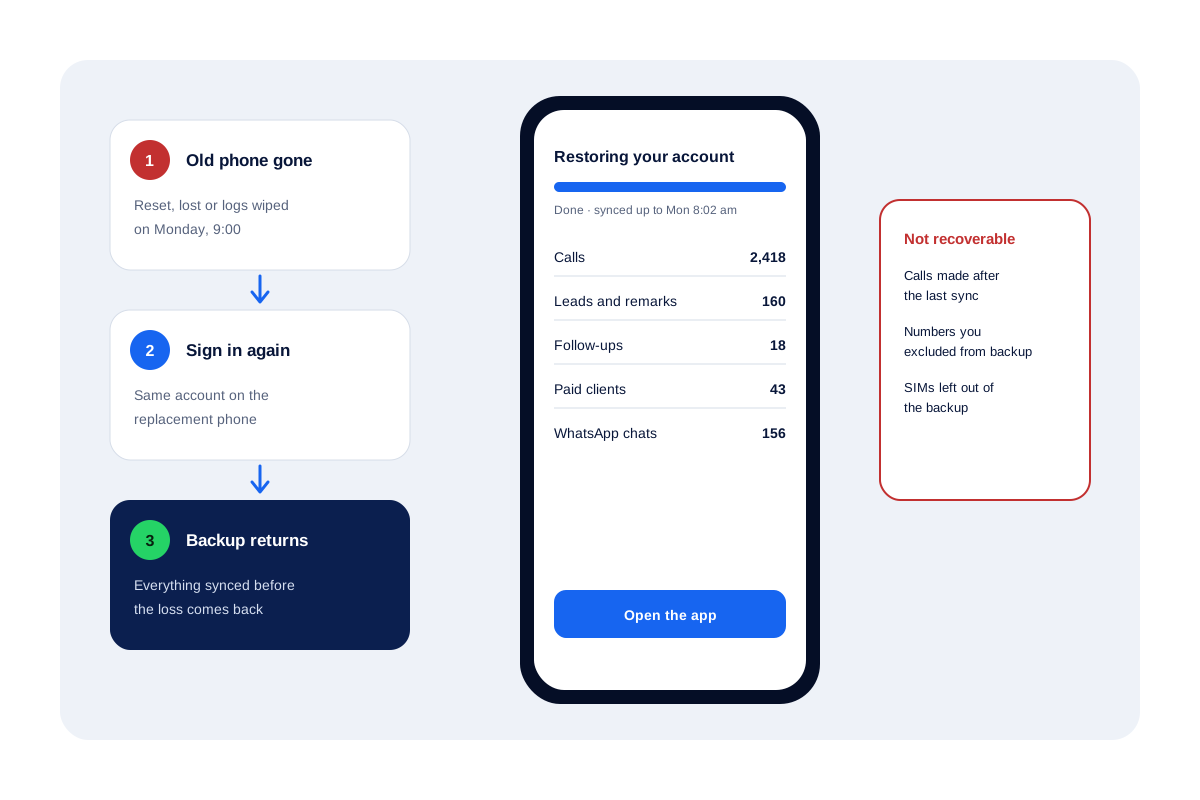
- Calls made after the last sync are lost with the phone.
- iPhone call history is outside Calsyst’s reach, because apps cannot read it.
- A call deleted inside the app can be deleted from the account too, unless admin permissions stop it.
- While a phone runs in attendance app mode, its calls are left out of the backup; switch the mode off to include them again.
Recover deleted call logs: a real-world style example
A water-tank supplier in Kisumu has 4 sales staff on company Android phones. One phone is stolen on a Monday at 9:00.
The owner gives the seller a spare handset. She signs in to Calsyst and the account restores her synced calls, 160 leads with their statuses and remarks, and 18 open call-backs.
The last sync ran at 8:02, so the calls she made after that are gone. She rebuilds those three from memory and the carrier bill, then carries on.
How to recover deleted call logs FAQ
Are deleted calls gone for good?
Usually yes, from the phone itself, unless a backup holds them. Your carrier still has billing records of numbers and times, but not your contact names or remarks.
How can I get my phone call history back?
Restore the most recent backup made before the deletion. On Android that is the phone's own Google backup or an app that backed up the log; on iPhone it is an iCloud or computer backup.
Which app backs up business call logs as they happen?
Calsyst does it for teams on Android: each call syncs to the business account with its lead, status and remark, and comes back when anyone signs in on a new phone.
What is Calsyst?
Calsyst is a business calling app that files each call under its lead and copies it to the team account, so a reset or stolen handset leaves the history intact.
Can I recover deleted call history without a backup?
Rarely. Tools that promise this mostly read data that is already backed up somewhere. Ask your carrier for an itemised record if you only need numbers and dates.
Is there a way to get deleted calls back on an iPhone?
Only from a backup. Restore an iCloud or computer backup taken before the deletion. Apple notes that a restore replaces data added since that backup, so save anything newer first.
Can we get three years of call history back?
Only if a backup or a call-logging app held it for that long. Carriers keep records for a period set by local rules, so ask yours what it can supply.
Does Calsyst restore calls made after the last sync?
No. Calls that never synced before the phone was lost cannot return. Background sync and a full sync on each app opening keep that gap small.
Does Calsyst back up the iPhone call log?
No. iPhone does not let any app read its call list, so call history backup in Calsyst is an Android feature.
Can I limit the backup to work calls only?
Yes. Two optional rules exist: copy only calls placed during the branch's shift, or keep the copy to conversations with your leads, the leads assigned to you and paid clients. Excluded numbers never sync.