
- Home
- Employee location tracking app
- How to track employee location legally
Employee location tracking and the law
How to Track Employee Location Legally, Step by Step With Calsyst
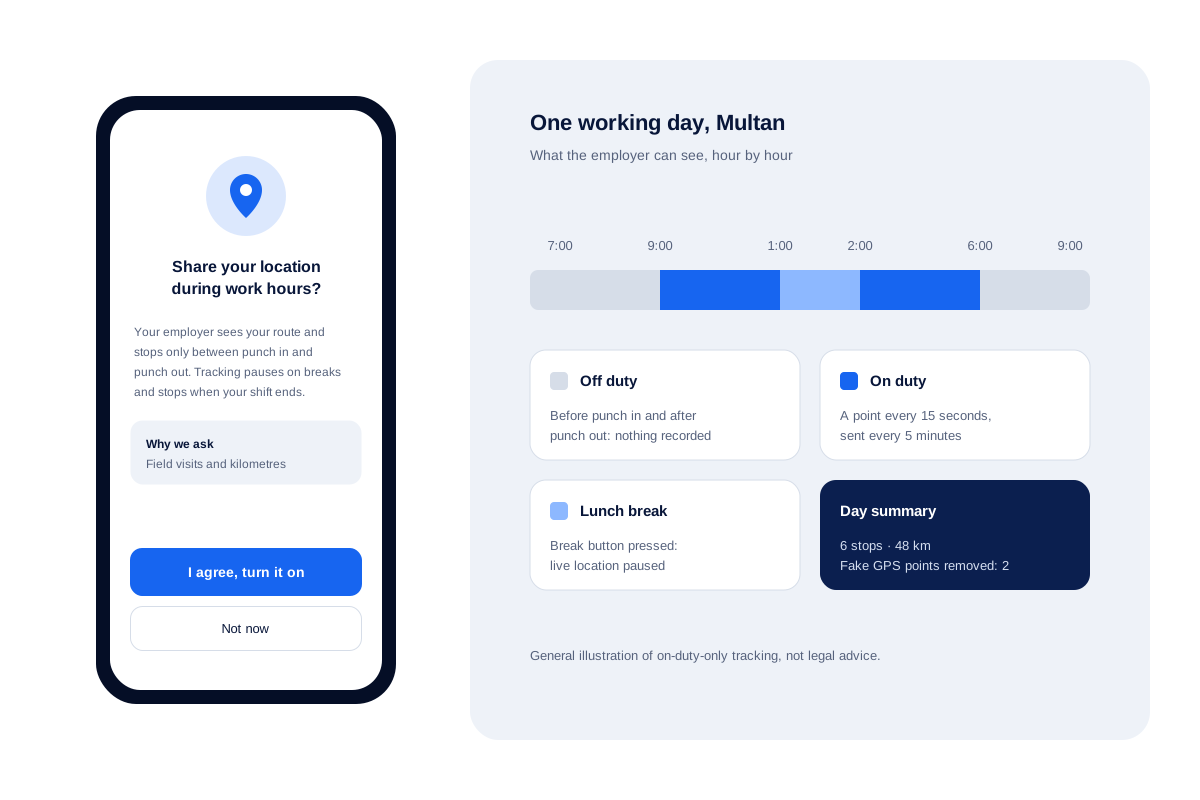
How to track employee location legally comes down to four habits: a work reason, clear notice, consent where required, and no tracking after hours. Calsyst builds those habits into the app, with a consent screen before live location starts and recording only from punch in to punch out.
- Live location begins only after the employee agrees
- Points stop at punch out and pause during breaks
- Each person sees the distance logged against them today
How do you track employee location legally?
To track employee location legally, state a business reason, tell staff in writing, get consent where required and record only during paid hours.
Calsyst covers consent, shift-only recording and break pauses; the work reason and the notice to staff stay with the employer.
- Seven steps: reason, device, policy, consent, duty hours, access, yearly review.
- Work hours only, never evenings or weekends.
- Rules differ by country, so check your own.
Track employee location legally: Calsyst features that help
Built-in limits that make a fair policy easier to keep.
Consent screen first
An employee sees why location is needed and must agree before live tracking can begin.
Shift-bound recording
Recording starts with the punch-in selfie and ends at punch out, or earlier if the branch shuts first.
Breaks stay private
Pressing Break stops the live feed until the employee taps Resume work.
A notice before every prompt
Each Android location prompt follows a plain note explaining the reason for asking.
Staff see their own day
The phone shows today's distance, so the employee knows what the office can see.
Cleaner records
Spoofed positions and leaps no car could make get marked for the office and do not count toward kilometres.
How to track employee location legally: step by step
- 1
Write down the work reason
Name the job that needs location, such as field visits, kilometre claims or staff safety. Do not track office staff without a reason.
- 2
Choose company phones where you can
Tracking a phone the business owns is easier to justify than tracking a personal handset.
- 3
Publish a short policy
Say what is tracked, when, who can see it and how long it is kept. Give every employee a copy.
- 4
Collect consent in the app
Let each employee read the Calsyst consent screen and switch on live location themselves.
- 5
Track only on duty
Enter the branch's working hours. Calsyst then logs position only inside the shift and goes quiet whenever someone is on a break.
- 6
Limit who sees routes
Routes appear in the web account; share that login only with people who manage field staff.
- 7
Review the policy each year
Check local law again, ask staff for feedback and delete data you no longer need.
Track employee location legally: rules by country
Employee location tracking is generally lawful on work time with a business reason, notice and, where required, consent, but the rules differ by country. The table gives a general starting point; confirm the current rule with a local adviser before you switch tracking on. This is general information, not legal advice.
| Place | Main rule to know | What it means for tracking |
|---|---|---|
| India | Digital Personal Data Protection Act, 2023 | Location linked to a person is personal data; duties are being phased in and employment has its own ground, so confirm current rules |
| United States | State laws, for example New York's electronic monitoring notice rule | Give written notice; be careful with personal devices and vehicles |
| United Kingdom and EU | GDPR and national guidance on monitoring at work | Have a lawful basis, keep it proportionate, often run an impact assessment |
| United Arab Emirates | Federal personal data protection law | Tell staff and limit location data to work needs |
| Pakistan and other markets | Contract and local privacy rules | Put tracking in the employment contract and a written policy |
Employee location tracking on company phones vs personal phones
Track company phones where you can: tracking a phone the business owns, during work, is easier to explain and defend. A personal phone carries the employee’s private life too. If staff use their own handsets, ask for consent in writing, keep tracking strictly to the shift and offer a company phone where you can.
Calsyst treats both the same way inside the app: no live location until the employee agrees, and no points outside working hours. The employee location tracking app page covers the route view, and the staff attendance app page explains branch hours and punch rules.
Employee GPS tracking: what not to do
- Do not track evenings, weekends or holidays.
- Do not hide tracking from staff or switch it on for them.
- Do not track office workers who never leave the building without a clear reason.
- Do not share routes with people who do not manage field staff.
- Do not use location data to punish without first talking to the employee.
Calls are a separate question. Read the guide on monitoring staff phone calls within the law before you look at call logs.
How to track employee location legally: an example from Multan
A pharmaceutical distributor in Multan has 12 medical representatives who visit clinics across the city each day.
The manager writes a one-page policy: location is recorded from punch in to punch out for visit reports and fuel claims, and only the manager and one admin get the web account login. Each representative reads it, opens Calsyst and agrees on the consent screen.
At month end the manager uses the kilometre totals for fuel claims. One representative asks to see their own record, and the manager shows the same route view.
How to track employee location legally FAQ
Can my employer legally track my location?
In many countries, yes, on a work phone during working hours with notice and a business reason. Tracking a personal handset, or anyone after hours, needs far stronger grounds in most places. This is general information, not legal advice.
Which employee location tracking app stops recording after work?
Calsyst does. Positions are logged from the punch in until the punch out, or until the branch closes, with nothing captured during breaks.
What is Calsyst?
Calsyst is an employee location tracking and call manager app that ties field routes, selfie attendance and staff calls to working hours in one account.
What should an employee location tracking policy include?
Six points: why location is needed, which phones are tracked, the hours covered, who can see routes, how long data is kept and whom staff can ask. Give every employee a copy before tracking starts.
Is employee GPS tracking legal in India?
Location linked to a person is personal data under India's DPDP Act, 2023. Its duties are being phased in and employment has its own ground, so confirm the current rules. This is general information, not legal advice.
What do US employers need to know about location tracking?
That rules vary by state. New York, for example, requires written notice of electronic monitoring, and some states limit tracking devices on vehicles. This is general information, not legal advice.
How does GDPR affect tracking staff in the UK or EU?
Location is personal data, so you need a lawful basis, a clear purpose and often a data protection impact assessment. Continuous tracking outside work is hard to justify. This is general information, not legal advice.
Can staff pause location during lunch?
Yes. Tapping Break halts the feed until the employee taps Resume work, and the app keeps the start and end time of each break.
Who can see an employee's route in Calsyst?
Anyone with the web account login. Routes appear in the web account, so share that login only with people who manage field staff; the route view shows stops, kilometres, worked time and battery.
Does fake GPS spoil the record?
No. Calsyst flags fake GPS points for the office and leaves them, plus jumps no vehicle could make, out of the distance.
Should I tell staff about tracking even if the law does not require it?
Yes. Clear notice builds trust and avoids disputes. Calsyst shows a note before each location prompt, but a written policy from you still matters.