
- Home
- Sales team tracking app
- How to track sales team performance
Track sales team performance
How to Track Sales Team Performance From Real Calls With Calsyst
How to track sales team performance starts with choosing a few numbers each seller controls, then reading them from records nobody has to type up. Calsyst adds up the team's calls, connects, misses and won leads for the owner.
- Calls made, connected, missed and won
- Filled from the phones, not from end-of-day forms
- One owner view across the whole team
What is the best way to measure sales team performance?
To track sales team performance, pick four activity and result numbers, collect them from daily work, and review them weekly with each seller.
Calsyst is a sales team tracking app for phone sellers: it counts the team's calls on every handset and reads results from the statuses sellers set.
- Activity: calls made and calls connected.
- Gaps: missed calls and overdue follow-ups.
- Results: leads given a Won status.
Sales team performance: benefits of measuring from calls
Why call-based numbers beat self-reported ones.
No end-of-day forms
Totals build up from the phone as each call ends, so nobody types a report.
One standard for everyone
Every call is counted the same way, from the same app, on the same dates.
Connects show timing
Calls set against connects reveal calling hours when buyers cannot pick up.
Results tied to statuses
Won and Lost statuses you define turn activity into an outcome count.
Export when you need it
Call history goes out to Excel or PDF for a monthly review deck.
How to track sales team performance in five steps
A short setup once, then a weekly review.
- 1
Choose four numbers
Use calls made, calls connected, missed calls and leads won. Skip vanity counts.
- 2
Put the team on one account
Install Calsyst on each company phone and sign everyone into the business account, so calls roll up to the owner.
- 3
Define Won and Lost statuses
Create the statuses your process uses, including Won and a Lost status per reason, so results count themselves.
- 4
Read the daily report
Choose the hour for the daily call report notification, and pass it on over WhatsApp when the team needs it.
- 5
Review weekly, one seller at a time
Compare each person with their own last week first, then open their Reminders tab together and agree one change.
Sales team KPI template for phone sellers
Copy these columns into a sheet, or let Calsyst supply the numbers. The point is to measure the same things every week.
| KPI | Why it matters | Source in Calsyst |
|---|---|---|
| Calls made | Shows effort on the phone | Team call log for the owner |
| Calls connected | Separates real conversations from rings | Connected count in the call analytics |
| Missed calls | Shows buyers who rang and got no answer | Missed calls in the team call log |
| Leads won | The outcome the rest should drive | Leads given your Won status |
| Overdue follow-ups (optional) | Measures promise-keeping, checked with the seller | The seller's own Reminders tab |
Track sales team performance in Excel or in the app
A spreadsheet works for two or three sellers if someone fills it honestly every Friday. Past that size, the typing stops or drifts. Calsyst gives you the same columns from the phones themselves, and its call history exports to Excel or PDF when a manager wants a monthly file.
For the owner’s day-to-day view, the sales team tracking app page shows the team screen, and the daily sales report app page covers the end-of-day summary.
Sales team performance: limits of call-based tracking
- Calls on personal numbers or desk phones outside Calsyst are not counted.
- Call counts cannot judge quality; listen to recordings the phone saved, or sit in on calls.
- Won and Lost counts are only as good as the statuses sellers set.
- The call log needs Android; on iPhone, calls are not read.
How to track sales team performance: a worked example
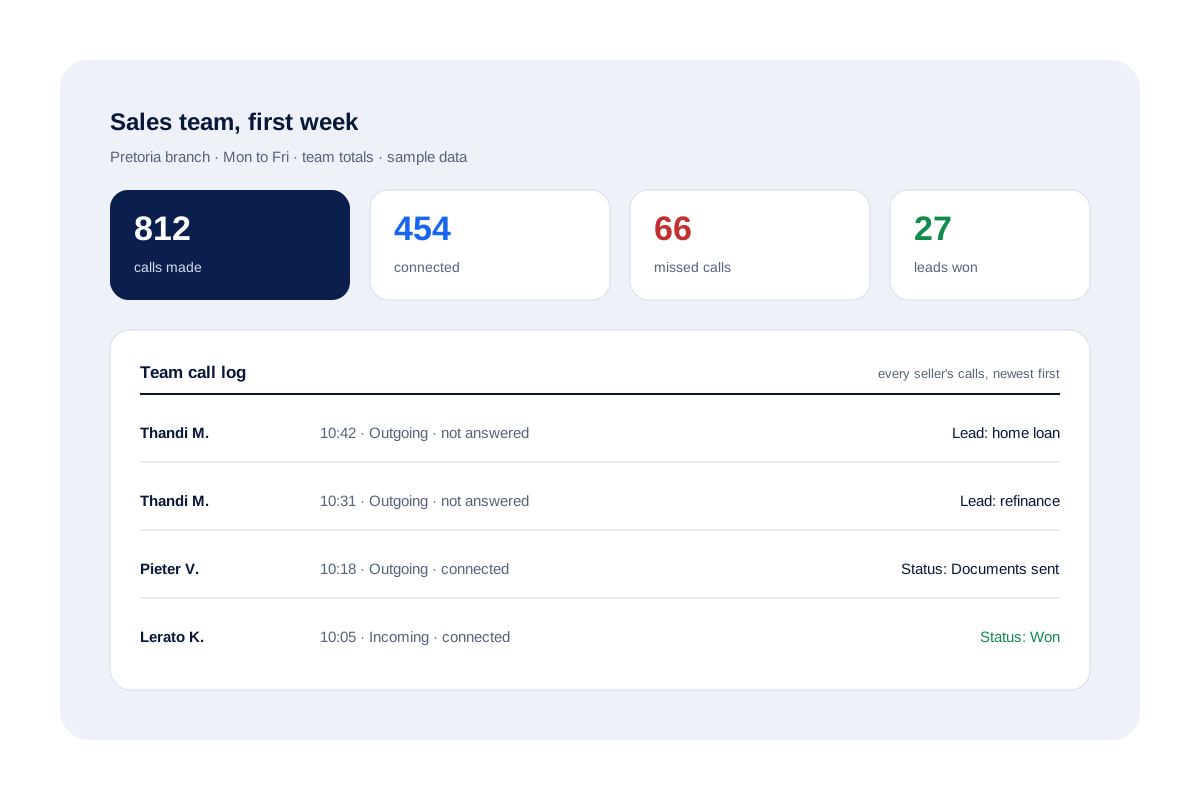
A home-loan agency in Pretoria has 4 sellers. The owner picks the four KPIs and stops the end-of-day forms.
After one week the team totals show 812 calls but only 454 connected. Reading the team call log, the owner sees Thandi’s unanswered calls bunched mid-morning, when borrowers are at work. She moves her session to after 5 pm the next week.
In his weekly review, another seller opens his Reminders tab and finds 14 overdue follow-ups. He clears them the same afternoon in one dialing session from today’s due list.
How to track sales team performance FAQ
Which app tracks sales team performance from phone calls?
Calsyst does, for teams that sell from mobiles. Team calls, connects and misses total themselves for the owner, while the team call log lists what each seller dialled.
What is Calsyst?
Calsyst is a sales calling app that logs every call against a lead, books follow-ups and gives the owner team totals, built for phone-led sales teams.
What KPIs should a phone sales team track?
Four to start: calls made, calls connected, missed calls and leads won. Add Lost reasons once those four are steady.
How do I track sales team performance in Excel?
Make one row per week with the four numbers above. Export the call history to Excel, then count rows in the file or read the totals from the analytics rings.
How often should I review sales numbers with the team?
Weekly, with a glance at the daily report in between. Monthly reviews alone hide problems for too long.
Is call count alone a fair measure?
No. Pair it with connected calls and leads won. A seller with fewer calls but more connects and wins is usually doing better work.
Can I see performance for one branch only?
Yes, for attendance and field work: those reports filter by branch and dates. Call reports cover the dates you choose.
Does tracking need the sellers' consent?
Usually you must at least tell them. Measure on company handsets, explain which numbers you watch and why, and check what your country's employment law asks. This is general information, not legal advice.
How do I spot a seller who skips follow-ups?
Ask them to open their Reminders tab in the weekly review. Calsyst keeps a missed reminder open and moves it into Today as overdue, so gaps are plain to see.
Can the numbers come to me without opening the app?
Yes. At an hour you pick, a notification brings the day's call report, ready for you to share on WhatsApp. Nothing goes out unless you share it.