
- Home
- Lead management app
- Facebook lead ads to CRM
Facebook lead ads to CRM
Facebook Lead Ads to CRM: Route Each Form Fill to Calsyst First
Facebook lead ads to CRM means every Meta form fill lands in your sales list automatically, with no CSV downloads from Ads Manager. Calsyst collects those entries through a linked sheet, its API or its webhook, marks each with the Facebook source and queues it for a caller.
- Three ways in: sheet, API or webhook
- Each lead tagged with its Facebook source
- New rows can rotate across your sellers
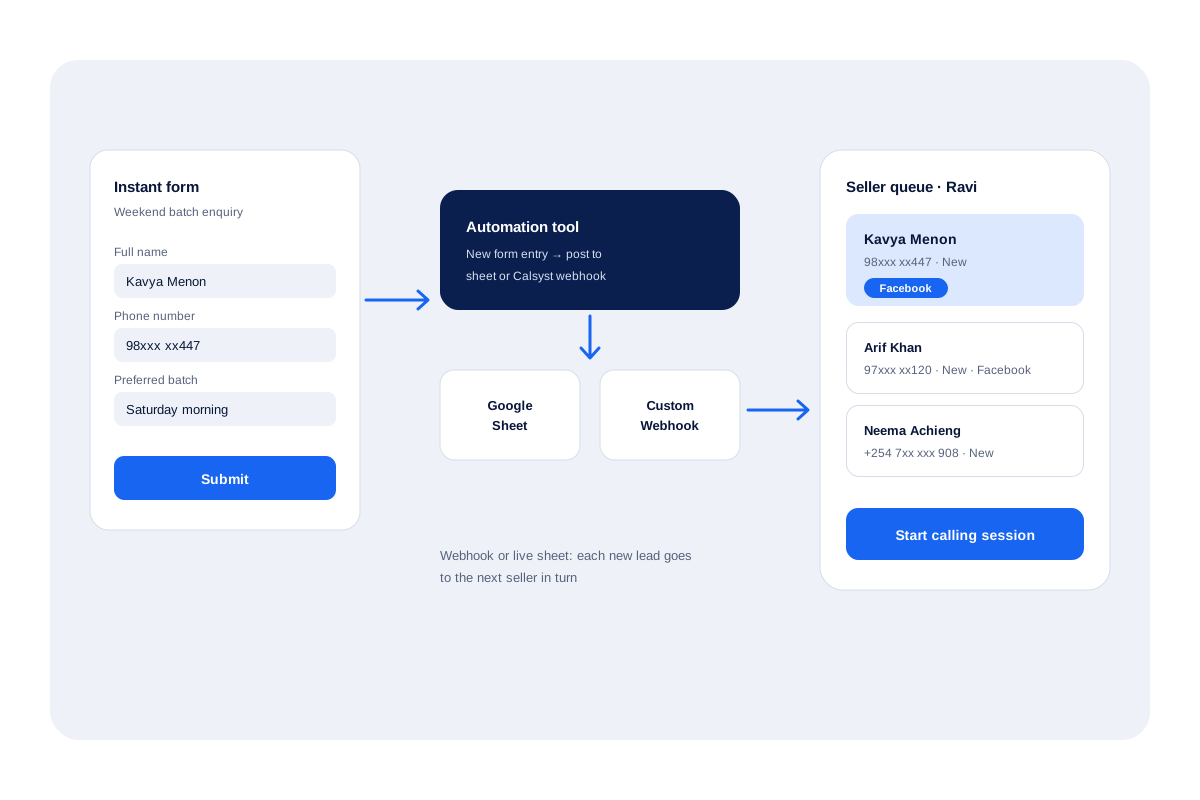
What is Facebook lead ads to CRM routing?
Facebook lead ads to CRM routing copies each Meta instant-form entry into your list, so nobody downloads a CSV before the first call.
Calsyst handles Facebook lead ads to CRM routing through sheets, APIs and webhooks, without a direct Facebook connector, and each lead then waits in a calling queue.
- No manual CSV downloads.
- The Facebook tag stays on the lead.
- Meta leads sit in one calling queue.
Facebook lead ads to CRM benefits
Why moving Meta leads into the calling app pays off.
Speed to the first call
Form fillers reach a caller while the advert they tapped is still on their mind.
Source on every card
The Facebook tag follows the lead, so you can filter Meta form leads from every other source.
Fair sharing
Round-robin hands webhook and live-sheet leads out one by one instead of to whoever grabs first.
Bad rows explained
A form row that cannot become a lead comes with its reason, for example an empty phone answer.
Test data removable
Open the Facebook source, see good and bad rows laid out as cards, and wipe the dummy entries from your trial.
Facebook lead ads to CRM: setup in five steps
A short setup, plus a test lead from your own form.
- 1
Choose the bridge
Pick one route: a Google Sheet that your automation tool fills, the Calsyst REST API, or the Custom Webhook on the Web CRM.
- 2
Connect the form in your automation tool
In Zapier, Make, Pabbly or n8n, start the flow from new Facebook lead form entries and point it at the sheet or the webhook.
- 3
Map the columns in Calsyst
Match each form question to a Calsyst field, set the country for phone numbers, and choose Facebook as the lead source.
- 4
Decide who gets each lead
Turn on round-robin assignment for the webhook or live sheet, so new leads take turns between sellers.
- 5
Send a test lead and call it
Submit your own form once, watch the row appear as a lead card, then ring it from the seller's queue.
Facebook lead ads to CRM: the three routes in
Meta keeps instant-form answers inside Ads Manager until something fetches them. Calsyst can receive them three ways. Each one ends with a lead card tagged Facebook, ready to call.
A Google Sheet in the middle
Your automation tool adds a row for every form entry. Calsyst checks the sheet at regular intervals and converts fresh rows into leads. This is the easiest route to set up and to check by eye.
The Calsyst REST API
Teams with a developer can post entries straight to the API. Column mapping and the country setting work the same way as for a sheet.
The Custom Webhook on the Web CRM
The automation tool posts each entry to a Calsyst webhook address. Leads arrive without waiting for a scheduled read, and round-robin assignment can hand them out in turn. The lead automation page shows every source Calsyst accepts.
Facebook lead ads CRM integration: which route to pick
| Route | How leads arrive | Best for |
|---|---|---|
| Google Sheet | Rows read in the background on a schedule | Small teams that like to see the raw rows |
| REST API | Your system posts each entry | Businesses with a developer or an existing lead server |
| Custom Webhook | Automation tool posts each entry; round-robin possible | Teams that share leads across several sellers |
| File upload | Excel, CSV or JSON uploaded by hand | Old leads collected before the bridge existed |
Facebook leads: ring them while they remember the advert
A Meta form takes a few seconds to fill. The buyer forgets the brand almost as fast. The value of the bridge is the time it saves before the first ring.
Give Facebook leads their own filter, such as “source is Facebook and status is New”, and start a calling session from it each morning and after lunch. The auto dialer app rings them one by one. Book the next step on every call, and the follow-up reminder brings that person back on the right day.
Facebook lead ads to CRM: limits of this setup
- There is no native Facebook connector, so you need a sheet, the API or the webhook, and usually an automation tool.
- A Google Sheet is read on a schedule, not the instant a form is sent.
- Calsyst does not manage your adverts, budgets or audiences; Ads Manager still does that.
- Form questions only travel if you map them to fields during setup.
Facebook lead form to first call: an example
A coaching institute in Jaipur runs a Meta lead form for weekend batches and collects about 60 entries a day.
Make posts each entry to the Calsyst webhook. Round-robin shares the entries between 3 counsellors, about 20 each. Every counsellor starts a session from the “Facebook, New” filter at 11 am and again at 4 pm.
Rows with a missing number appear in the skipped list, and the institute adds a required phone question to the form. The source tag lets the owner filter the Meta form leads apart from walk-ins and referrals and see how many answered the phone.
Facebook lead ads to CRM FAQ
Which CRM works well for managing Facebook leads that need a phone call?
Calsyst is a good fit when the next step is a call. Form leads arrive through a sheet or webhook, sit in a seller's queue and get dialled from the same app.
How do I send Facebook lead form entries into Calsyst?
Put Zapier, Make, Pabbly or n8n between Meta and Calsyst. The flow either appends each entry to a Google Sheet Calsyst watches, or posts it to the Calsyst webhook.
Does Calsyst connect to Facebook directly?
No. There is no built-in Facebook connector. The link always goes through a sheet, the REST API or the webhook, usually with an automation tool in the middle.
How fast does a new Facebook lead show up?
A webhook lead lands as soon as your automation tool fires; a Google Sheet lead lands on the next scheduled read, so expect a short delay.
Can every Facebook lead go to a different seller in turn?
Yes. Turn on round-robin for the webhook or live sheet in the Web CRM, and form leads rotate through your sellers one at a time.
What happens to a form row with a broken phone number?
It is skipped and listed with the reason. You can open the source, see valid and invalid rows as cards, and fix the form question.
Will the same person be imported twice if they fill the form again?
Not confirmed for every route. Calsyst drops duplicate numbers on import, so a repeat submission in an import should not create a second lead with the same number; test your own route.
Can an AI voice agent ring the Facebook lead before a person does?
Yes. Configure AI first call once in the Web CRM; the voice agent rings each fresh form lead, then hands it with the result to the next seller.
Can I keep the answers to my form questions on the lead?
Yes. Map each question to a custom field, and the answer stays on the lead card for the caller to read before dialing.
What is Calsyst?
Calsyst is a call manager and lead app for Android and iPhone that takes leads from sheets, APIs and webhooks, then helps a team call, note and follow up each one.
Do I need to download CSV files from Ads Manager any more?
Not once the bridge is live. You can still upload a CSV or Excel file by hand for older leads collected before the setup.